TABLE OF CONTENTS
Summary
Exchange Online no longer supports use of TLS1.0 and TLS1.1 due to this when trying to send an email from the Synergetic Windows Application, you may get an error message "TLS 1.0 and 1.1 are not supported. Please upgrade/update your client to support TLS 1.2"
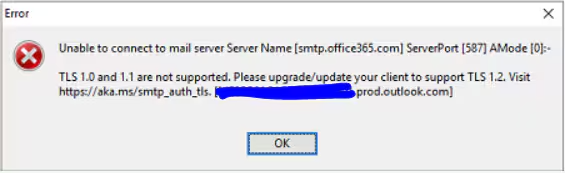
Synergetic does support TLS 1.2 but it appears the TLS 1.2 version is not being used and instead an older/unknown version when trying to send out an email.
End Result
Allow emails to be sent using TLS 1.2 via the Synergetic application
Method
- Check if TLS 1.2 is enabled and TLS 1.0 and 1.1 are disabled, on the Synergetic servers and the client machines. Exchange Server TLS guidance Part 2: Enabling TLS 1.2 and Identifying Clients Not Using It - Microsoft Tech Community
- Follow our guide on how to setup email settings and check if your settings are matching. Configure Synergetic with a third-party email Provider
- Go to the Synergetic server and find the Synergetic folder. In the Synergetic Folder there are .DLL files 'libeay32.dll' and 'ssleay32.dll' that may have not yet been updated. Replace them with the .ZIP folder attached.
- Go to the Synergetic folder and rename 'libeay32.dll' and 'ssleay32.dll' to 'libeay32OLD.dll' and 'ssleay32OLD.dll'
- Extract the folder 'openssl-1.0.2u-i386-win32.zip' and copy 'libeay32.dll' and 'ssleay32.dll' and paste them onto the Synergetic folder.
Considerations
If the issue is still occurring, there are two work arounds, as we currently investigate.
- Setup an SMTP relay: Email Service Configuration
- If you are having issues setting this up or need assistance feel free to contact Synergetic support.
- If you are having issues setting this up or need assistance feel free to contact Synergetic support.
- Microsoft legacy option: Opt in to the Exchange Online endpoint for legacy TLS clients using SMTP AUTH | Microsoft Docs
- Consider this as a last option. Synergetic does support TLS 1.2, however if you do need to use the legacy protocols to get the emails working again, please raise a ticket with us letting us know and we will investigate all possibilities.
Was this article helpful?
That’s Great!
Thank you for your feedback
Sorry! We couldn't be helpful
Thank you for your feedback
Feedback sent
We appreciate your effort and will try to fix the article