Professional Development Email Notifications
Synweb Staff Kiosk has the capability to email a notification to a recipient advising a PD request has been raised.
This help page covers troubleshooting emails not being generated or received originating from a PD request raised in HR Staff Kiosk.
1 - Job Position Email Notification configuration
PD notifications are configured in Job Position Maintenance
In Synergetic Select HR -> Job Position Maintenance
Select the Job position of the Requestor
Select the Notifications Tab
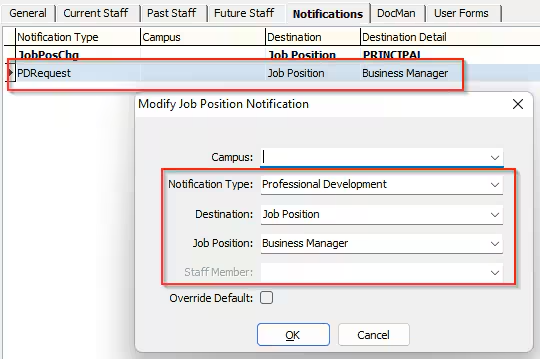
Add a PD Request notification (or confirm one exists)
Notification Type = PDRequest (Professional Development)
Destination can be :
Job Position - (Enter A value in Job Position Field)
Reports To - (Refer General Tab for Reports to Job Position)
StaffID - Enter a value in Staff Member field
2a - Mail Profile configuration
PD Notification Emails use Database Mail Profile. Confirm the Mail Profile is configured correctly.
Select System -> Configuration File maintenance
Filter on System | Email | MailProfile | SynergeticTaskNotify
Ensure SynergeticTaskNotify(Key 4) has a Valid MailProfile in the Value field.

2b - Lookup Table configuration
Select luJobPositionNotificationTypes

Select luJobPositionNotificationDestinations

3 - Mail profile setup in SQL Server Management Studio
Confirm Database Mail Profile is configured correctly via this link. Step 2 is dependent on a correct SSMS configuration
Database-MailProfile
4 - SQL Server Agent Job
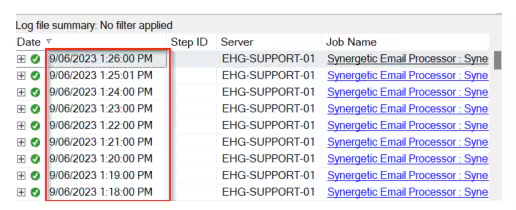
When an email is generated from a Database MailProfile message it sits in a temporary holding table until a SQL Server Agent job processes any unsent emails. This Agent job runs every minute and processes any unsent emails.
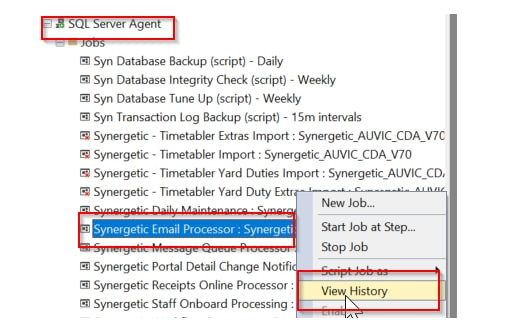
In SSMS (SQL Server Management Studio) navigate to SQL Server Agent
Search for Agent job Synergetic Email Processor : Synergetic_DBName
Right Click and View History
Ensure the Email Processor Agent job is processing every minute and has completed successfully since the PD Request was generated
Note: It does not matter if the agent job has failed on 1 or 2 occasions throughout a day(this does occur). The next successful run has processed all outstanding emails.
5 - Check mail logs
In SSMS (SQL Server Management Studio) query the following Synergetic Database table
select *
from media.SystemEmail
where processeddate >= getdate() -1
and paramsubject like 'A PD request%'
(this returns records for the past 24 hours so adjust accordingly)
Review the result set
Confirm the DB MailProfile in the ParamProfileName field is valid and matches the above profile (from (2))
Confirm the Email recipient appears in the ParamRecipients Field
Check for Error messages in the ErrorMessage Field
Ensure a date value is in ProcessedDate Field
If ProcessedDate Value = NULL then there is an issue with Step 4(Agent Job)
If no records are found then the issue is Step 1 or Step 2

You can also Query the following Database Table
select * from msdb..sysmail_allitems
where sent_date > getdate() -1
and subject like 'A PD request%'
(this returns records for the past 24 hours so adjust accordingly)
Check Sent Status
 If no records are found or sent_status = Failed then the issue is with previous Steps 1,2,3 or 4
Once the Email notification has been received the recipient can then navigate to the requestors Staff Maintenance -> P.D Tab, view and action the request

Was this article helpful?
That’s Great!
Thank you for your feedback
Sorry! We couldn't be helpful
Thank you for your feedback
Feedback sent
We appreciate your effort and will try to fix the article