Used to verify your email configuration in Synergetic and test communication with your email server.
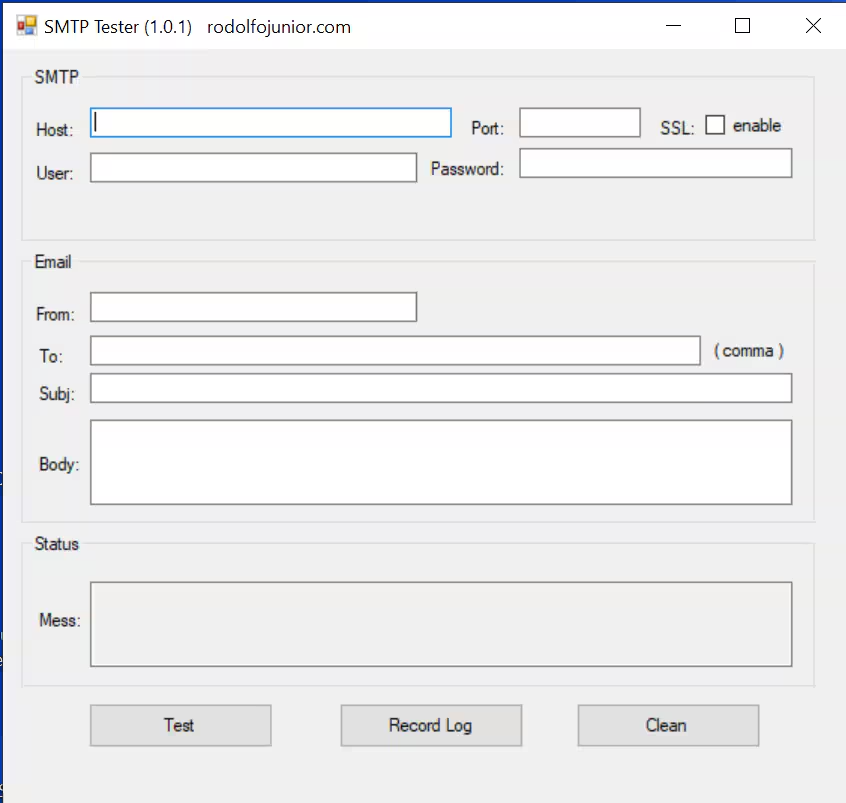
This tool can be downloaded and run on any server or desktop: SMTP Tester File (please ensure you are logged in)
To test...
In the Synergetic application select System → Email/SMS Configuration Settings
Enter the following fields
| SMTP Tester field | Synergetic Email/Configuration field |
|---|---|
| Host | Mail Server Name |
| Port | Mail Server Port |
| SSL | TLS/SSL (if enabled) |
| User | User Name (if Auth = Y) |
| Password | Password (if Authentication = Login) |
| From: (A valid from email account | |
| To: A Valid To Email Account | |
| Subj : Enter any Subject | |
| Body : Enter any Body |
Select Test to send email
Was this article helpful?
That’s Great!
Thank you for your feedback
Sorry! We couldn't be helpful
Thank you for your feedback
Feedback sent
We appreciate your effort and will try to fix the article