Synweb Staff Kiosk has the capability to email a notification to a recipient advising a staff member reporting to them has generated a leave application(Staff Kiosk-> Leave -> My Leave -> Leave Applications)
For a more detailed guide on the Leave application process referProcessing Online Leave application
The requestor and the recipient are determined by their Job position
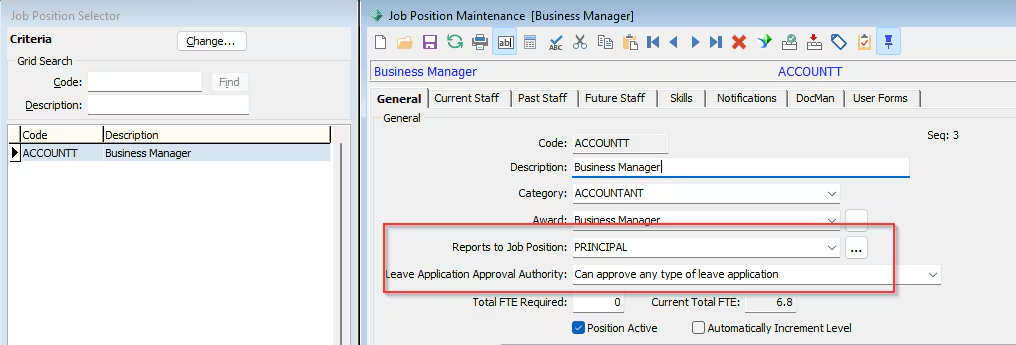
In Synmain select HR -> Job Position Maintenance
Ensure all relevant Job positions have the following fields correctly set
| Field | Description |
|---|---|
| Reports to Job position | The job position who will receive the notification |
| Leave Application Approval Authority | Set to Can approve leave applications that do not require elevated permissionOR Can approve any type of leave application |
Select HR -> Staff Maintenance -> Job Position Tab
For each Staff member ensure they have a job position which has a Reports to Position in Job Position Maintenance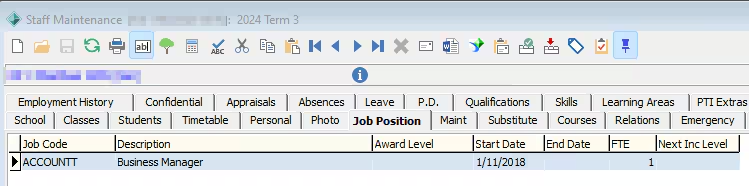
Leave Application Notifications
Leave application notifications are generated when an application is submitted in Synweb and are created via Action Center Messages.
An Action Centre message can be generated
- When an application is submitted : Recipient is the Manager
- Outcome of an application : Recipient is the Requestor
Select System -> Settings Maintenance (Action Centre)
Navigate to Staff -> Leave Application
There are 2 possible Leave Application messages
- Manager Receiving a leave Applijcation
- Outcome of a Leave Application
Ensure both are Active
For an additional Email notification ensure Select Email when message is created
The Email subject can also be modified
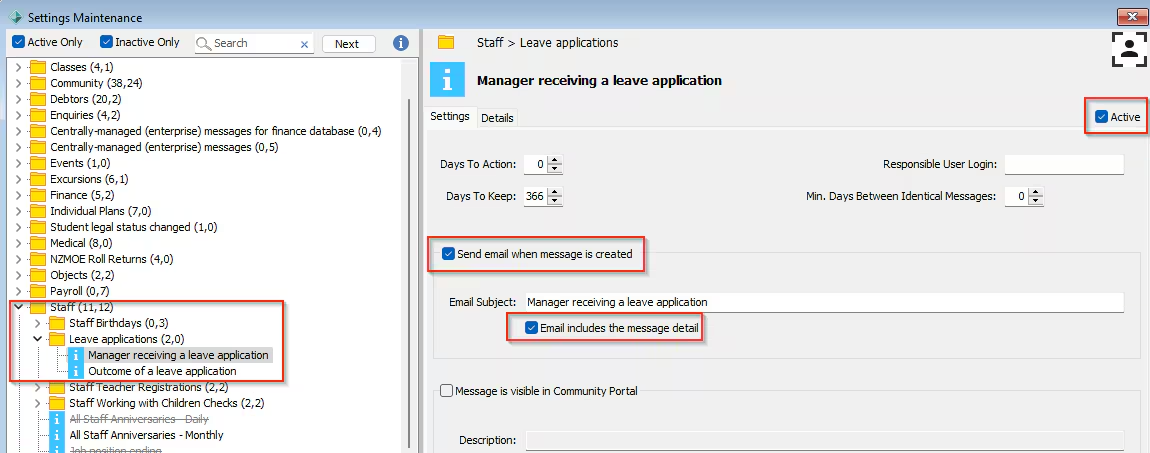 Note: These are both Targeted Action Centre Messages so once activated there is no need to subscribe.
Action Center messages also require MailProfile to be configured correctly
Refer Action Centre and MailProfile troubleshooting tips
Was this article helpful?
That’s Great!
Thank you for your feedback
Sorry! We couldn't be helpful
Thank you for your feedback
Feedback sent
We appreciate your effort and will try to fix the article