VSR has a requirement to report students with Court Order related Access Restrictions
To facilitate this a Synergy Meaning has been added to lookup table luCourtOrderType
Victorian schools need to apply the Synergy Meaning: AccessRestriction to any Court Order associated with Access Restrictions.
VSR will then be informed these students have an Access Restriction.
Applying access restriction to a student
Select System → Lookup table maintenance
Select lookup table luCourtOrderType
Apply SynergyMeaning = AccessRestriction to the required court order code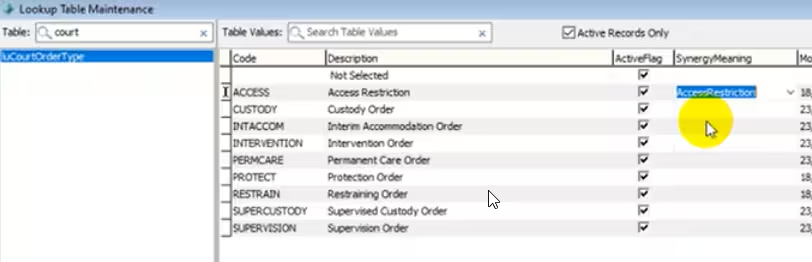
Select Students → Current Student maintenance → Legal Tab
Select a student
Assign court order type with the Synergy Meaning of AccessRestriction to the selected student.
A blue text will appear (Victorian Schools Only) - Student has an access restriction and VSR will be notified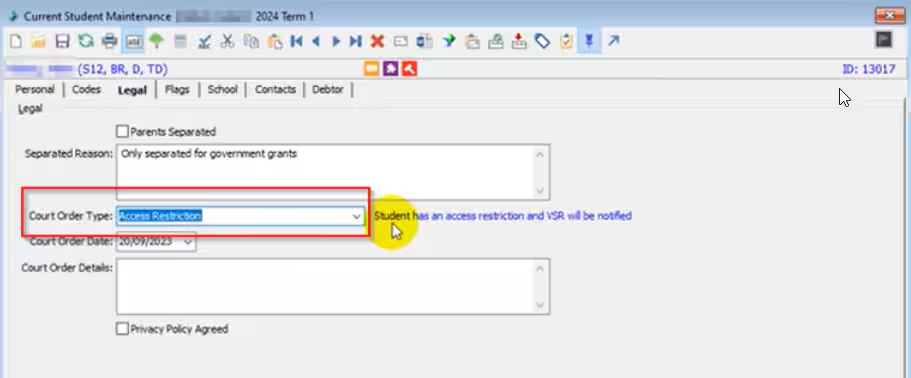
Note : this can also be applied to the Legal tab within Future Student maintenance
Removing access restriction from a student
To remove the access restriction change the court order type to a non Synergy Meaning coded one or remove the court order type. VSR will be informed and the blue text message will not appear.
Useful Query
The following SQL can be run to extract a list of students with the access restriction court order type
SELECT
 s.ID,
 VSN = s.StudentGovernmentStudentnumber,
 S.StudentSurname,
 S.StudentPreferred,
 S.StudentCampus,
 S.StudentYearLEvel,
 S.LegalCourtOrderType,
 S.LegalCourtOrderTypeDescription
FROM dbo.vStudents s
WHERE s.CurrentSemesterOnlyFlag = 1
  AND s.LegalCourtOrderTypeAccessRestrictionFlag = 1
ORDER By
 S.StudentSurname,
 S.StudentPreferred
Was this article helpful?
That’s Great!
Thank you for your feedback
Sorry! We couldn't be helpful
Thank you for your feedback
Feedback sent
We appreciate your effort and will try to fix the article