The Following steps go through the basics of troubleshooting the VSN service and if followed in order, may lead to a resolution or a clear direction to take:
Subscriber Status (Last Sent):
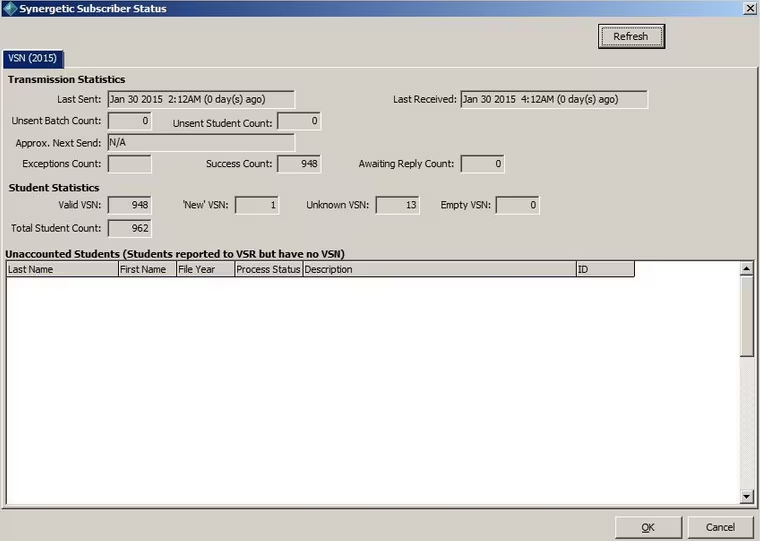
Find this in System > Subscriber Status
The service should send or receive data either when students are waiting to be sent to the VSR for a VSN, or at least once every 14 days (for reconciliation) if there are no students to send.
If the number of days since the last sent date is above 14 days, there may be issues with the service.
Service:
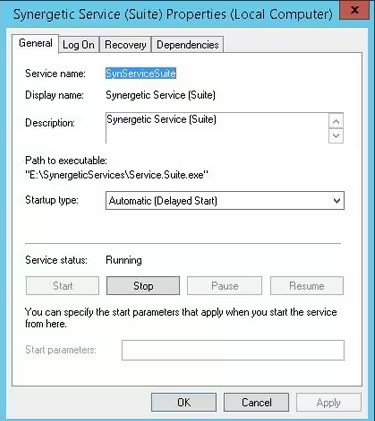
Check this in Services.msc, service is called 'Synergetic Service (Suite)'
The Synergetic Service Suite should always be running in the background.
The service should generally be set to 'Automatic (Delayed Start)' and use the 'Local System account' option under the 'Log On' tab. Some sites may use a specific account for the service, which is fine, however, permissions must be set for the VSN service to be allowed to communicate with the VSR's servers.
Restarting the service may allow a batch to be sent successfully.
Config check:
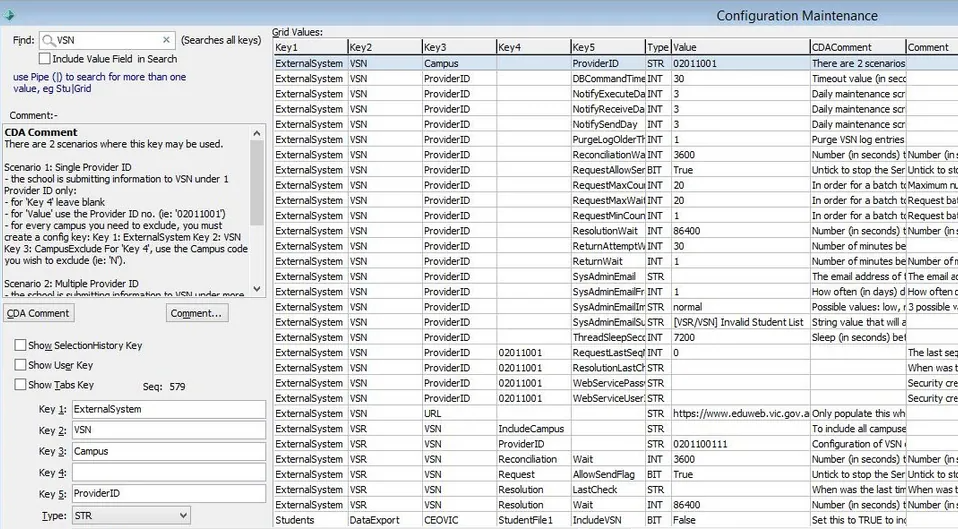
System > Config File Maintenance > Seach: VSN
The config must be set up according to the school's required specifications and will use a unique username and password for accessing the VSR's site
The things to look out for in Config File Maintenance are:
ExternalSystem|VSN|Campus|ProviderID
- Should be the value given to the school by the VSR, default is 02011001
ExternalSystem|VSN|Campus|RequestLastSeqNumber
- Last batch number that was successfully sent to the VSR, we will come back to this later
- Key4 should be the same number that appears in ProviderID
ExternalSystem|VSN|ProviderID|ResolutionLastCheck
- The last time Synergetic checked for a resolution batch. This field is updated automatically
- Key4 should be the same number that appears in ProviderID
ExternalSystem|VSN|Campus|WebServicePassword
- The password for the VSN batch website, if this is incorrect, connections to the VSR will not work correctly
- Key4 should be the same number that appears in ProviderID
ExternalSystem|VSN|Campus|WebServiceUserID
- The username for the VSN batch website, if this is incorrect, connections to the VSR will not work correctly
- Key4 should be the same number that appears in ProviderID
- Usernames will always include the ProviderID (eg: VSN02011001)
Resolve VSR site on the server and try to log in:
Log into the VSR Website from the server that has the Service Suite installed. The site will be listed in the config along with username/password
Go to the following site:
https://www.eduweb.vic.gov.au/VSRWebSite
You should be met with a prompt to log into the site, use the username and password that is shown in the config.
if the site does not load for any reason, then this may be because of a proxy or firewall restriction. This is also likely the issue stopping the service from sending, because if you can't access the site, neither can the service.
Last Seq Number:
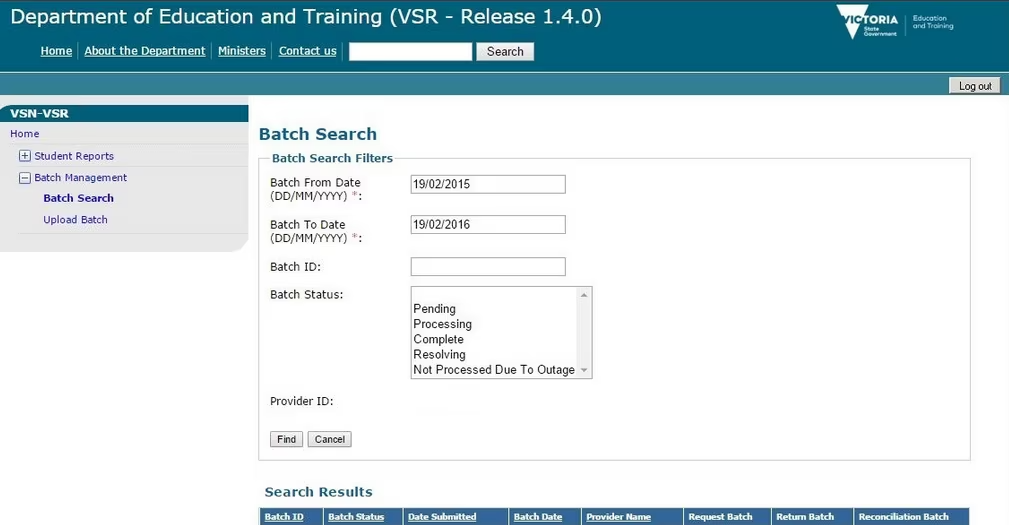
Once you have logged in successfully, go to 'Batch Search' and search over a large date range
Check the last batch that was sent (should be at the bottom of the search results), if there is a mismatch in Config File Maintenance, that is a problem and there will be a batch that needs to be deleted.
Logs:
Logs can be found in the 'Synergetic Service' folder Synergetic Service > Logs
Check the Log file for the VSN service (Usually Found in C:\Synergetic Service\Logs\Synergetic.Service.VSN on the SQL server) and look for an error message, you will likely find it towards the end of the logs. The listed errors will likely be long and hard to read, but they can point to the problem.
Lookup Table:
Check that there are records in luYearLevel marked for VSN, i.e. the ExteralSystemType set to VSN and the ExternalSystemCode set to the relevant value.
select * from luYearLevel |
Issue with Batch Size
On some clients we have observed errors when syncing to VSR, particularly at the start of the year when there is a lot of student change.
This can be fixed with a change of RequestMaxCount which adjusts the count of students in each packet being sent to the VSR service.
VSR have advised that while batch size is not a new limitation, most Government systems limit it to 50 while 100 is not uncommon. Batches of 300 have also successfully uploaded. It is just when the VSR is busy that batch size runs the risk of being timed out.
A safe approach seem to limit this to 50 as advised.
This value can be seen/changed via System - Configuration File Maint
| Key1 | Key2 | Key3 | Key4 | Key5 | Value |
| ExternalSystem | VSN | ProviderID | RequestMaxCount | 50 |
Please contact support if you need any assistance with this.
Was this article helpful?
That’s Great!
Thank you for your feedback
Sorry! We couldn't be helpful
Thank you for your feedback
Feedback sent
We appreciate your effort and will try to fix the article