Summary
How to add a credit note
End Result
The Creditor will have a Credit balance until this amount is used to pay the creditor or when the company sends a payment of the credit amount to the school (this would likely only occur if you are not going to use this supplier again)
Method
The Below steps explain how to enter the negative invoice to represent the credit amount.
- Go to Creditors > Creditor invoice entry
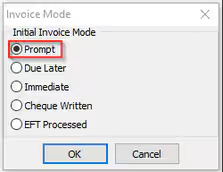
- Select New Creditor Invoice Posting... and select invoice mode as Prompt (P).
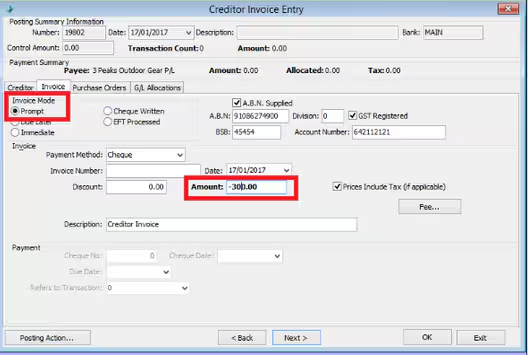
- Enter the amount as negative. This amount ideally should be balancing an existing Invoice amount.
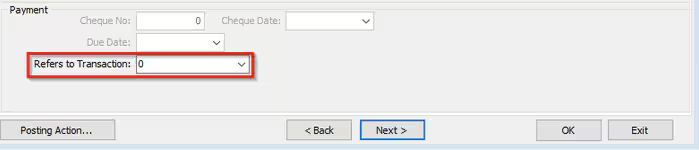
- In Payment section> Refers to Transaction Field, select the original invoice to be linked to this negative invoice.
- Close the posting and you should then see the amount applied to the creditor record. You can see this amount in outstanding tab in creditors maintenance until you have closed off EFT posting. Then it will be moved under Paid Invoices tab.
Was this article helpful?
That’s Great!
Thank you for your feedback
Sorry! We couldn't be helpful
Thank you for your feedback
Feedback sent
We appreciate your effort and will try to fix the article