Summary
This article explains where to change the email address that sends the notification when the invoice is paid.
End Result
The invoice notification is sent from the nominated email address instead of from the logged in user.
Method
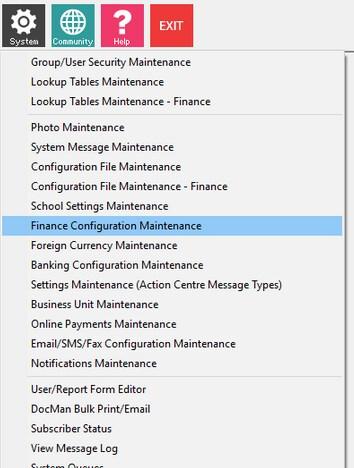
- Open System > Finance Configuration Maintenance
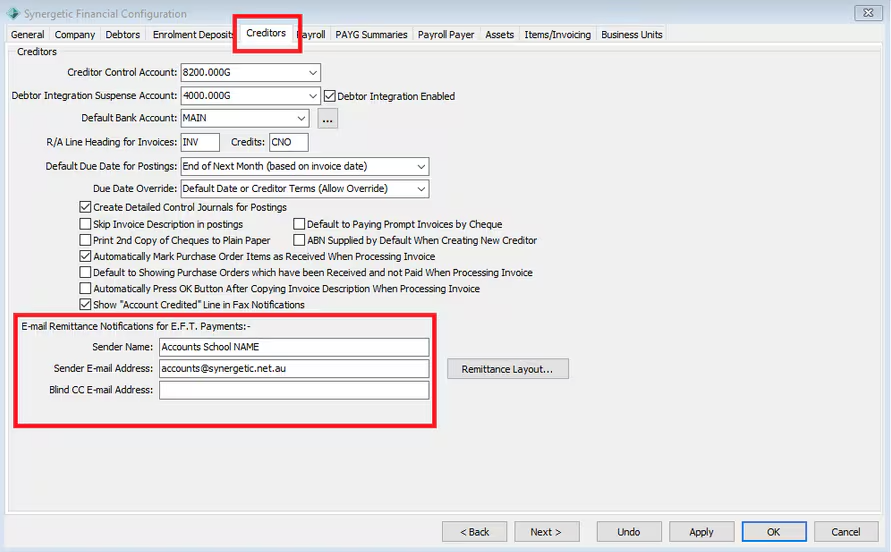
- On the Creditors Tab - Enter the Sender Name and email address for the notifications.
Considerations
You may wish to include a secondary BCC Email address if you have more than one person who needs to see copies of the email.
Was this article helpful?
That’s Great!
Thank you for your feedback
Sorry! We couldn't be helpful
Thank you for your feedback
Feedback sent
We appreciate your effort and will try to fix the article