SMTP Status Code Logs

Modified on Mon, 27 Apr at 2:25 AM

TABLE OF CONTENTS


a. Enable SMTP Logs

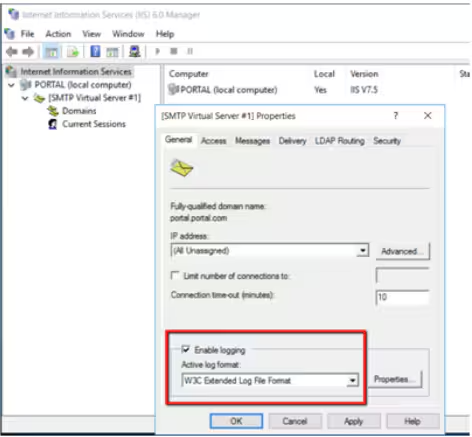
Open Internet Information Service (IIS) 6.0 Manager. Right-click "SMTP Virtual Server" and choose "Properties". Check "Enable logging".
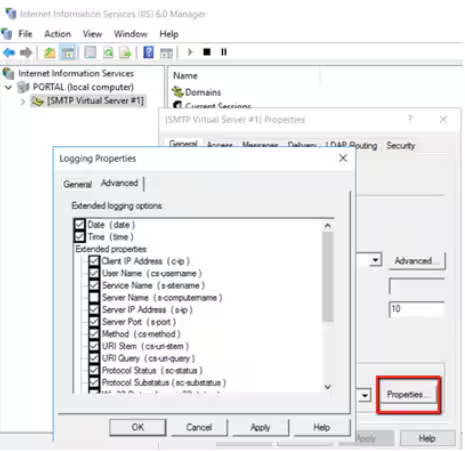
Click "Properties ..." to check all options.

b. Check SMTP Logs

You can check the SMTP log files at C:\WINDOWS\system32\LogFiles\SMTPSVC1.

Status CodeDescription
211System status, or system help reply
214Help message
220Service ready 
221Service closing transmission channel 
250Requested mail action okay, completed 
251User not local; will forward to 
334Server Challenged
354Start mail input; end with "."
421Service not available, closing transmission channel
450Requested mail action not taken: mailbox unavailable
451Requested action aborted: local error in processing
452Requested action not taken: insufficient system storage
500Syntax error, command unrecognized
501Syntax error in parameters or arguments
502Command not implemented
503Bad sequence of commands
504Command parameter not implemented
535Authentication Failed
550Requested action not taken: mailbox unavailable
551User not local; please try <....>
552Requested mail action aborted: exceeded storage allocation
553Requested action not taken: mailbox name not allowed
554Transaction failed

Was this article helpful?

That’s Great!

Thank you for your feedback

Sorry! We couldn't be helpful

Thank you for your feedback

Let us know how can we improve this article!

Select at least one of the reasons
CAPTCHA verification is required.

Feedback sent

We appreciate your effort and will try to fix the article