TABLE OF CONTENTS
Error Message
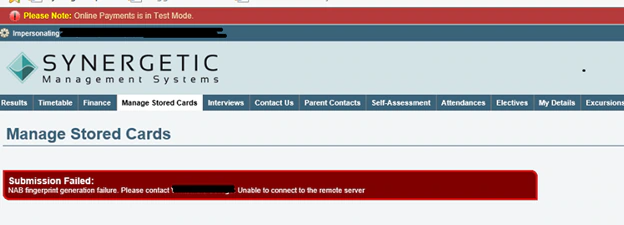
NAB Fingerprint generation failure. Please contact [School Name]. Unable to connect to remote server.
Cause
This error can occur during initial set up of the Online Payments Module.
The error is generated when the Merchant ID/Password (known as a 'fingerprint') entered into Online Payments Maintenance does not match the password given by NAB. When a mismatch is found, the portal will give the error 'Submission Error – NAB Fingerprint generation failure'.
Another scenario is that the firewall or proxy at the school is blocking the connection to the NAB servers.
Identification
Troubleshooting this issue will require the test merchant credentials which can be found in this article.
Enter the test merchant details and set all levels with the live NAB Merchant ID to the test one. Do this for all levels.
Go to the portal and try to make a payment using a dummy credit card number.
If you do not receive a fingerprint error, skip ahead to Scenario 1
If you do receive a fingerprint error, skip ahead to Scenario 2
Resolution
Scenario 1
In this scenario, the issue lies with the username and password set up for the merchant, the 'fingerprint' in this case refers to the Merchant ID in System > Online Payments Maintenance
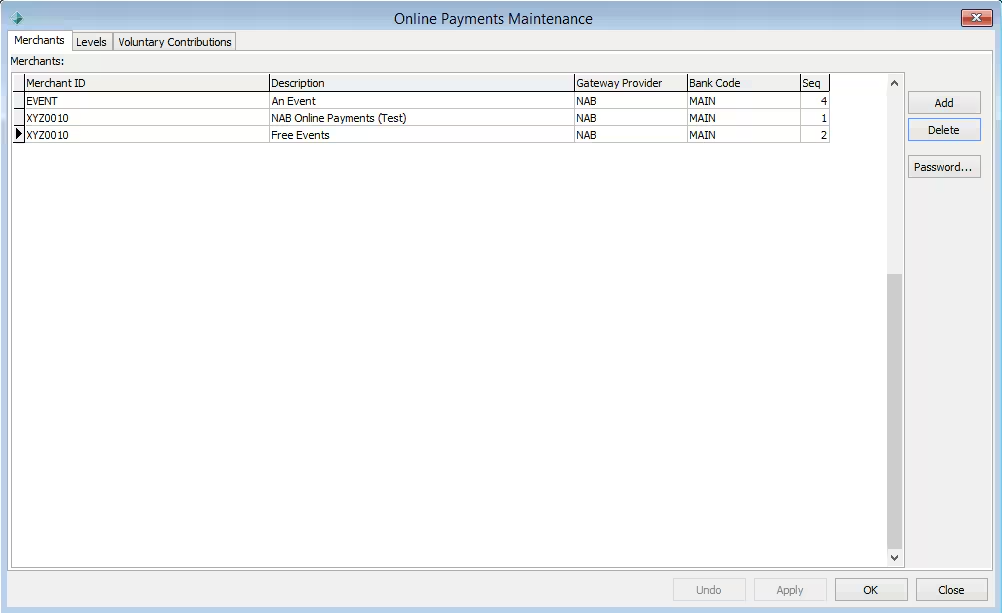
- Ensure that the MerchantID in this grid is correct.
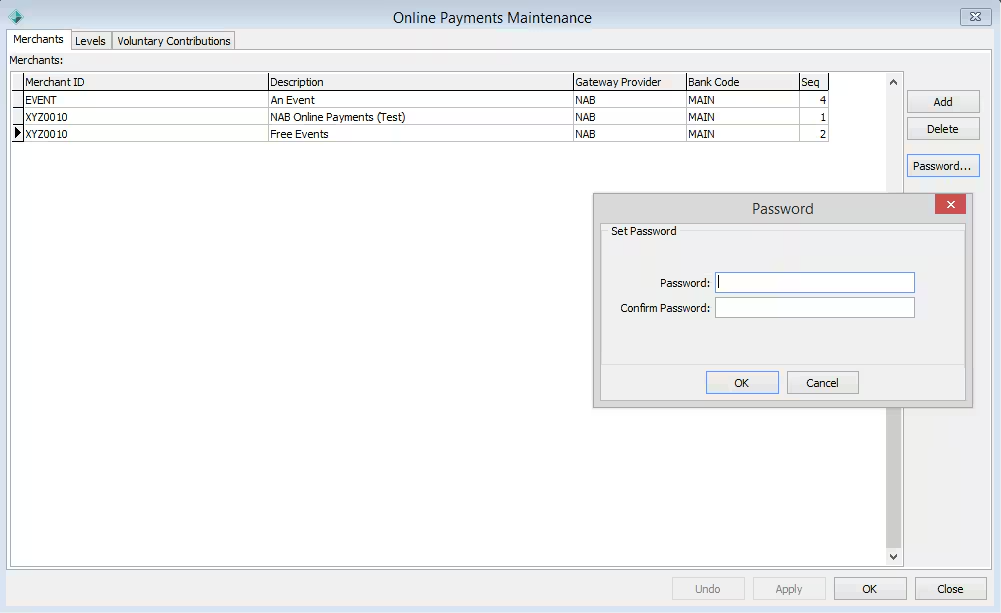
- Highlight the MerchantID that you are using for payments and click the 'Password' button, this will bring up a dialogue box with the option to set your password. Enter this password exactly as it came from NAB.
- Go back into the portal and try to process another online payment/store a card.
- The issue should now be resolved.
Scenario 2
In this case, the connection is likely being blocked by the school's firewall or proxy, much like in the above scenario, the Community Portal is trying to authenticate with NAB's servers but can't get a meaningful response from the server because of the block.
In order to fix this, the school's IT department will need to set up their firewall/proxy settings to allow the portal to communicate with NAB's servers inbound and outbound.
The following is a list of ports that require whitelisting in the firewall/proxy settings:
| Port # |
|---|
| 80 |
| 443 |
| 7070 |
Synergetic Support is limited to general suggestions when it comes to proxy/firewall settings as it falls outside the scope of support, please contact your internal IT to assist. |
Considerations
If the issue is not resolved after performing the above steps, it would be best to re-enter the full details to ensure that no typos were made when the MerchantID/Password was originally entered.
The NAB Transact Demo site can be used to validate your login details as well, it can be found here: https://transact.nab.com.au/nabtransact/
Was this article helpful?
That’s Great!
Thank you for your feedback
Sorry! We couldn't be helpful
Thank you for your feedback
Feedback sent
We appreciate your effort and will try to fix the article