TABLE OF CONTENTS
Employment Termination Payments (ETP) are used to pay lump sum figures to employees that are leaving the organisation. It is important to know how much the payment will be, and for tax purposes, whether it falls under a lump sum payment or not.
What constitutes an ETP?
An ETP can include the following lump sum payments:
- Payout of unused RDOs
- Payments in lieu of notice
- A significant severance package/golden handshake
An ETP does not include:
- Lump Sums being paid out for unused leave entitlements
A more detailed set of criteria can be found on the ATO website:
ConsiderationsHow much is the payment? does it fall within the ATO's definition of an ETP (Above)?
These questions are important to note and you may need to get in touch with the ATO regarding this information or if you're not sure how much tax this lump sum payment will attract.
The following links to the ATO website may assist:
Depending on the type of ETP you are processing, you may or may not be able to salary sacrifice or pay Superannuation on the pay run. For clarification on whether your ETP is subject to these rules, please speak with the ATO.
Please Note
Synergetic support cannot give advice on whether your specific situation constitutes an ETP or what the taxable amounts are for an ETP, we can only give general/procedural, non-personalised advice in this area
How to Process an ETP
1: Set up a new pay code, this code should begin with a 'Z' to show that the pay code is specifically for ETPs. The code will need to be allocated to the correct PAYG summary section 'Termination Pay A/B/C/D/E'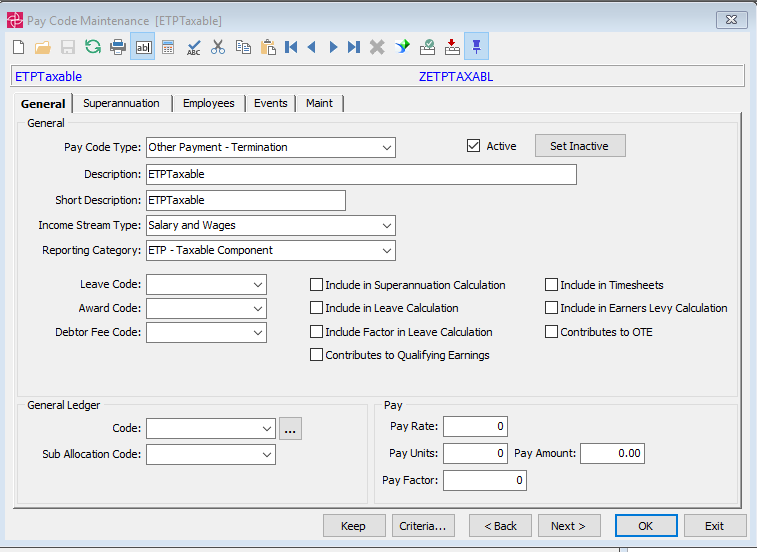
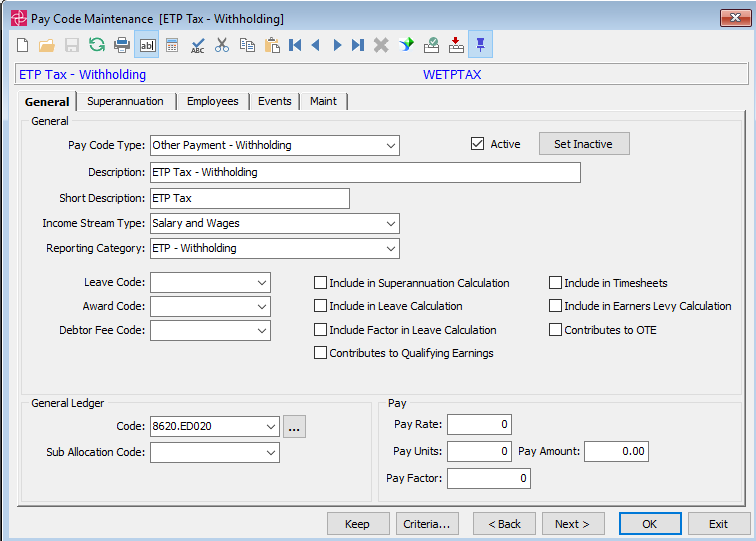
2: If there is a taxable amount to be withheld from this ETP, create another pay code to handle the tax. Name it appropriately and set it up as an 'Other Payment - Witholding' 'W' pay code type. This Pay Code will need to go directly to your Tax Withheld control account.
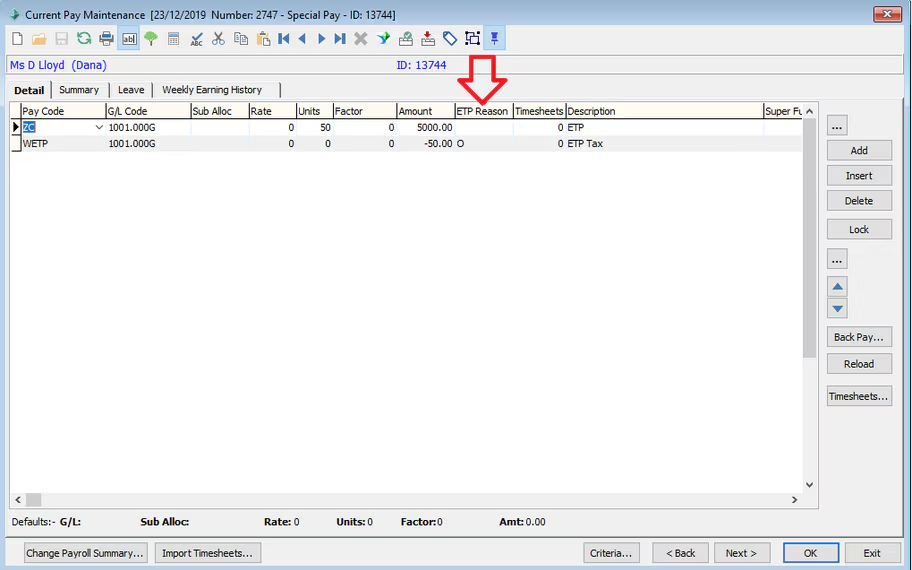
3: Create a new special pay for the terminated employee, this pay should only have an amount against the 'Z' (termination) pay code and the 'W' tax deduction pay code (if applicable), all other codes should be 0 or removed from the pay run.
Ensure you select the ETP reason code as this is required for STP
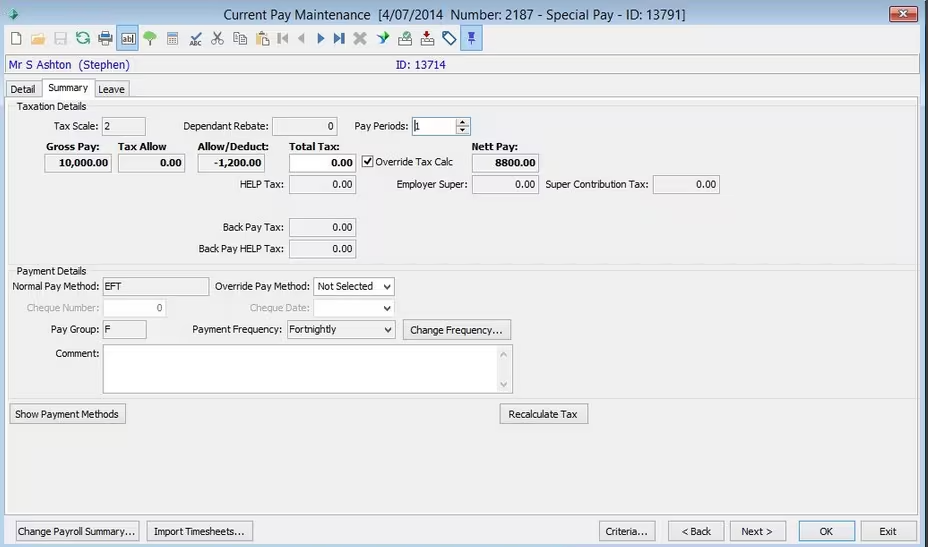
4: PAYG/HELP likely should not be calculated on this payment, so ensure that the 'Summary' tab shows no PAYG amount listed under 'Total Tax'. If there is an amount under 'Total Tax', tick the 'Override Tax Calc' flag and change the amount to 0.
5: Close the pay and process the STP as normal.
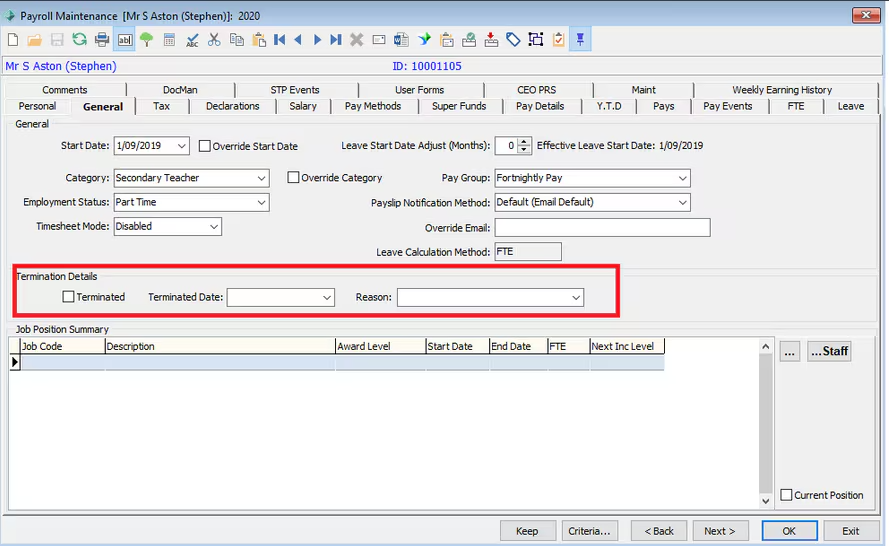
6: Once the STP is complete you can then fill in the Termination Details on the employees record
The terminated flag and date will populate when the pay is processed. This Reason code is for internal business purposes and not the same as the ATO requirement (for tax purposes) in the Pay itself.
Was this article helpful?
That’s Great!
Thank you for your feedback
Sorry! We couldn't be helpful
Thank you for your feedback
Feedback sent
We appreciate your effort and will try to fix the article