TABLE OF CONTENTS
- Online Leave Application webinar 1 (Phase 2)
- Online Leave Application webinar 1
- Frequently Asked Questions
- When is Phase 2 likely to be rolled out?
- If the leave has already been approved, can it be amended or deleted by the employee?
- Can you import leave balances from CEVN into Synergetic?
- Is there a space we can you upload a copy of leave policy for employees to refer to before applying for leave?
- Can the leave be submitted for a day or days that is past? for example, call in sick, need to submit form upon return to work?
- Can someone apply for leave even if they don't have enough balance?
- Can you generate reports on upcoming leave that has been applied for?
- Can an email also be sent in addition to Action Centre notification (to reviewer)
- What if the job position reports to a position and not a person, will this still work?
- Does this module only work in SynWeb?
- As the Daily Organiser, can I view details of what has been approved. I am not the approver, but I need to know who is applying for leave. Can that be automated or do we need it communicated in another way to us from the approver? So could I be a part of the notification chain even though I am not the approver?
- Where are the attachments to the leave application stored/accessed?
- Does this interact with Synergetic Timesheets at all?
- Does this system allow multi-step leave approvals?
- What is the best way to cc in payroll to the leave approvals in the action centre? Is this possible?
- Can you issue emails from Synergetic?
- Is there any way for the teacher to specify the hours in the day that they are applying for. For example from 10:00am to 2:00pm?
- Is there a calendar that will show leave scheduled for all staff.
- Will the import work if you pay staff based on FTE rather than hours?
- Can a manager edit the leave?
- Can you make comments mandatory for certain types of leave?
- Can you have 2 approvers for different positions?
- Can hours be edited e.g. half day?
- When there is not enough leave accrued does the 'approver' see how many hours they are short?
- Can you add multiple leaves taken? Will the system calculate the hours automatically?
- Can there be a 2nd or 3rd leave approver?
- Can the approvers view a calendar of all staff leave?
- How does it handle unpaid leave applications?
- REFERENCES
Online Leave Application webinar 1 (Phase 2)
Online Leave Application webinar 1
Frequently Asked Questions
When is Phase 2 likely to be rolled out?
We expect to roll out Phase 2 by July 2023.
If the leave has already been approved, can it be amended or deleted by the employee?
Currently no. But our aim in Phase 2 is to introduce the ability for the leave approver/manager to unapprove approved leave.
Can you import leave balances from CEVN into Synergetic?
No.
Is there a space we can you upload a copy of leave policy for employees to refer to before applying for leave?
No.
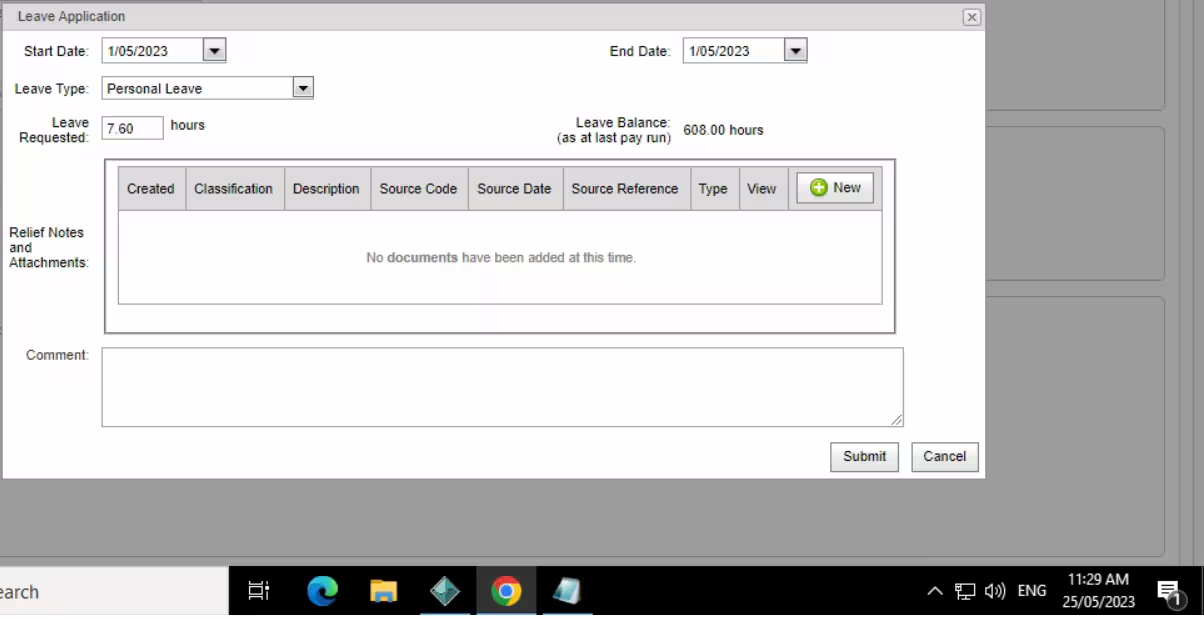
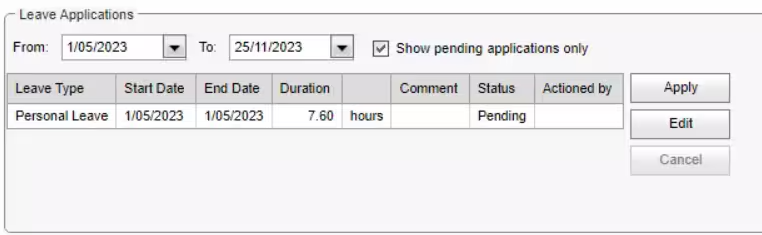
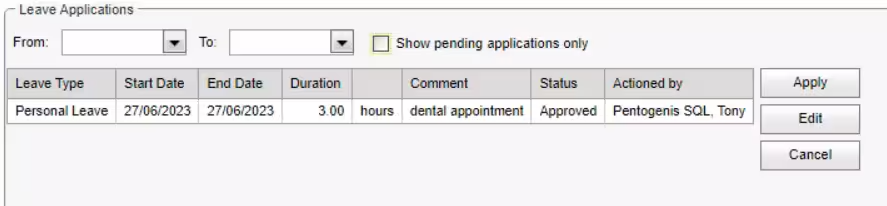
Can the leave be submitted for a day or days that is past? for example, call in sick, need to submit form upon return to work?
Yes, please see below example.
Can someone apply for leave even if they don't have enough balance?
Yes they can, however when they apply for a particular leave the window will display their Leave Balance as at last pay run. In Phase 2, we plan to change this to instead display estimated balance as of last day of leave.
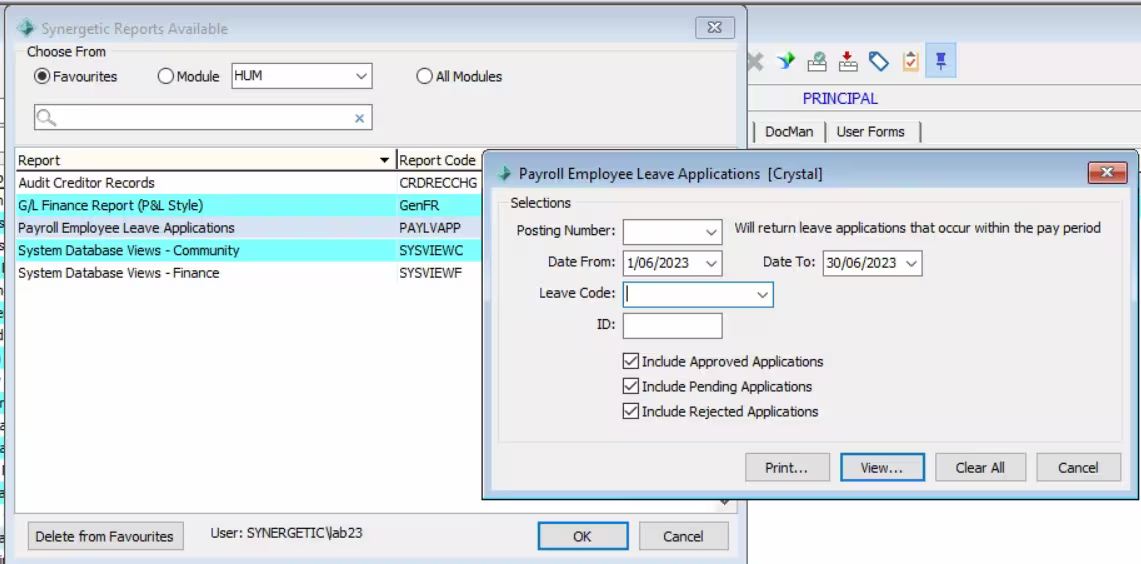
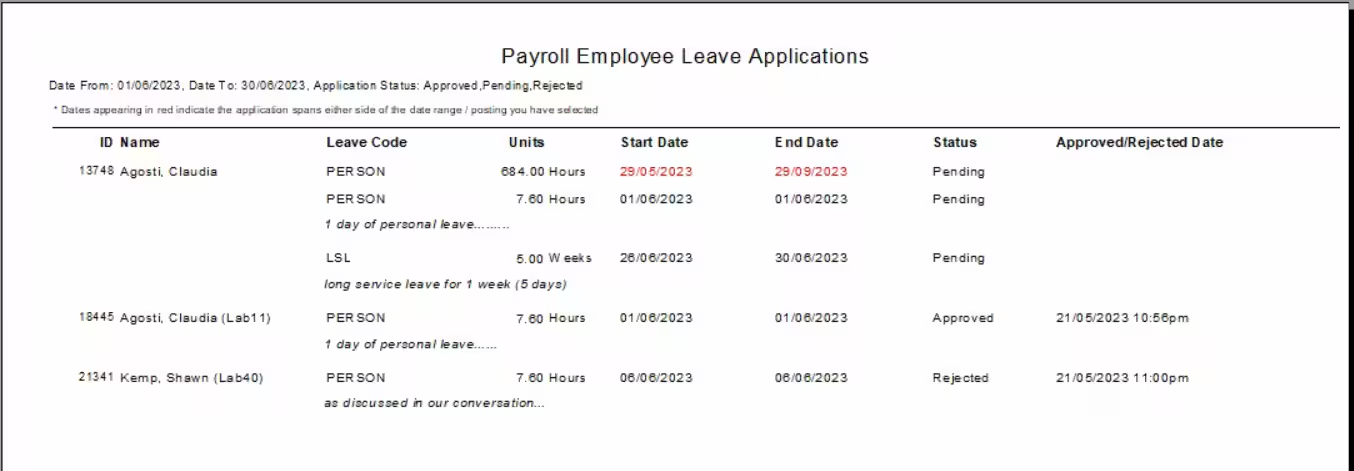
Can you generate reports on upcoming leave that has been applied for?
Yes, with the Payroll Employee Leave Applications report, there are filters to include Approved, Pending or Rejected Applications.
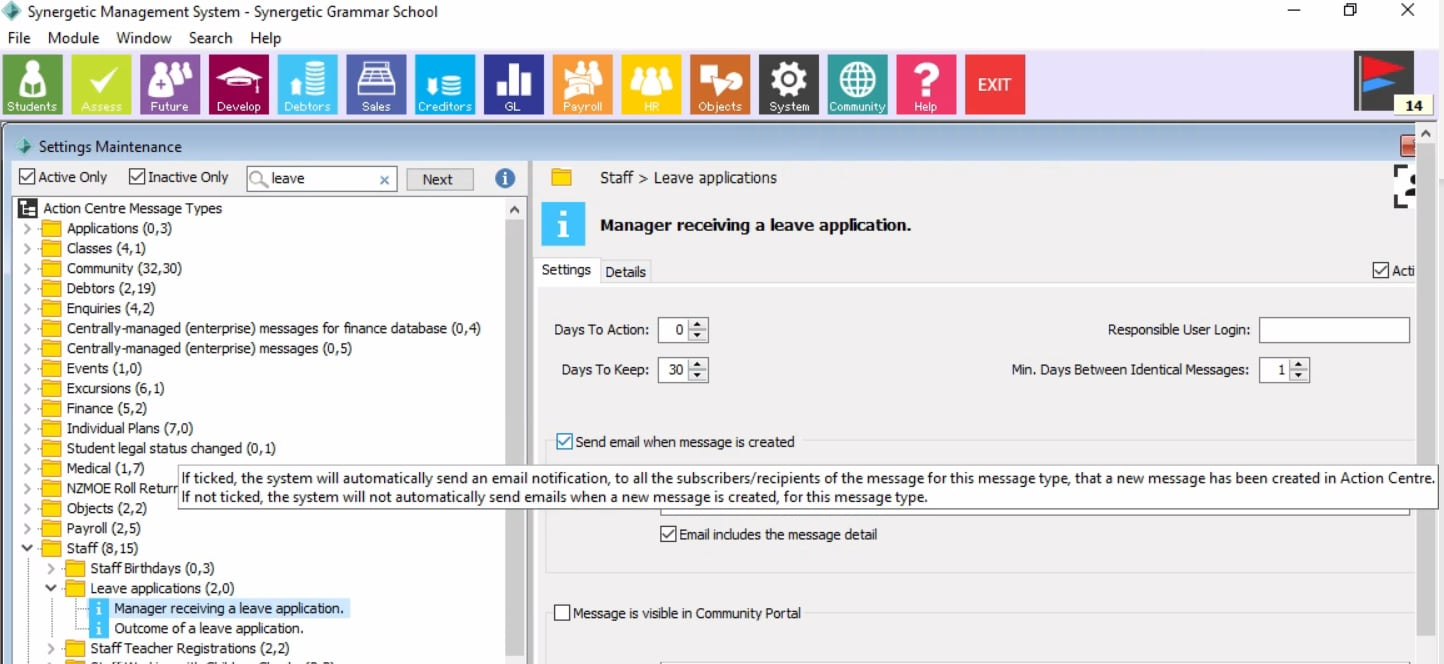
Can an email also be sent in addition to Action Centre notification (to reviewer)
Yes, by going to System > Settings Maintenance > Search for “Leave” and ticking the box Send email when message is created (see screenshot below)
What if the job position reports to a position and not a person, will this still work?
Yes.
Does this module only work in SynWeb?
Yes.
As the Daily Organiser, can I view details of what has been approved. I am not the approver, but I need to know who is applying for leave. Can that be automated or do we need it communicated in another way to us from the approver? So could I be a part of the notification chain even though I am not the approver?
You can view the leave details via the Payroll Employee Leave Applications report. You can filter report by pending leave. Unfortunately only the reporting manager/managers are able to receive a notification.
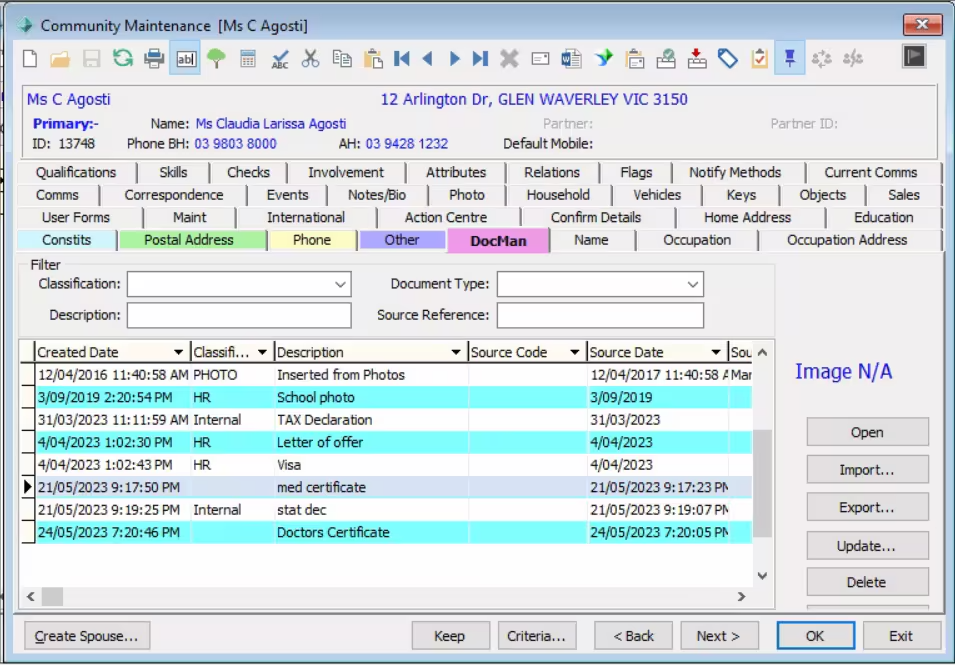
Where are the attachments to the leave application stored/accessed?
Attachments are saved into the leave requester’s Docman folder
Does this interact with Synergetic Timesheets at all?
Currently no.
Does this system allow multi-step leave approvals?
Currently no.
What is the best way to cc in payroll to the leave approvals in the action centre? Is this possible?
Best way for Payroll is on top of leave approvals is via the Payroll Employees Leave Applications report.
Can you issue emails from Synergetic?
Yes you can, please click here for more information.
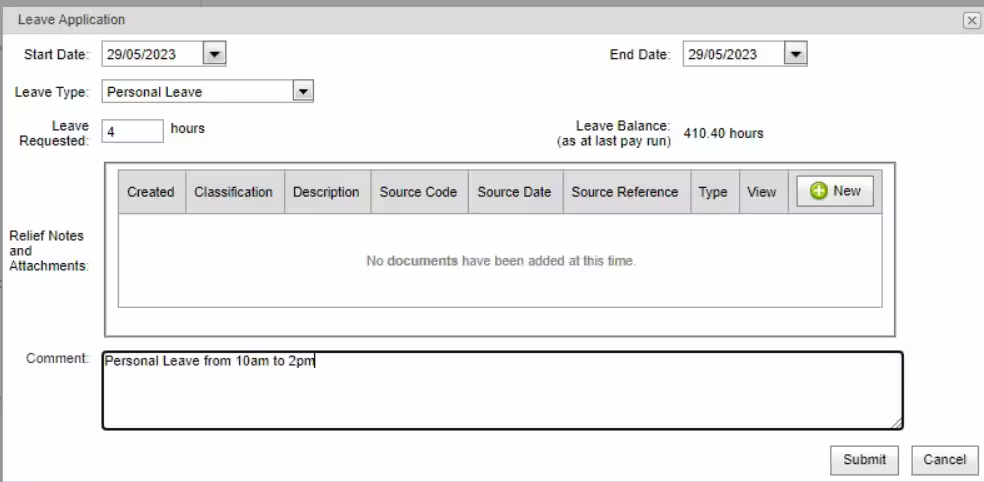
Is there any way for the teacher to specify the hours in the day that they are applying for. For example from 10:00am to 2:00pm?
Yes, you can specify the hours in the comments section.
Is there a calendar that will show leave scheduled for all staff.
No calendar, but the Payroll Employee Leave Applications report should provide the details you need.
Will the import work if you pay staff based on FTE rather than hours?
Yes, the import will work based on FTE.
Can a manager edit the leave?
No, for security reasons a manager cannot edit a submitted leave.
Can you make comments mandatory for certain types of leave?
At this point, this feature is not available.
Can you have 2 approvers for different positions?
An employee’s leave application can be sent to multiple immediate leave approvers (e.g. they might have multiple roles). However, it only takes one of them to approve the application.
Can hours be edited e.g. half day?
Yes, employees can request for half a day or certain hours (see below). However, we don’t currently support times in the application (e.g., 3 hours of leave, but you can’t specify 2:00pm-5:00pm).
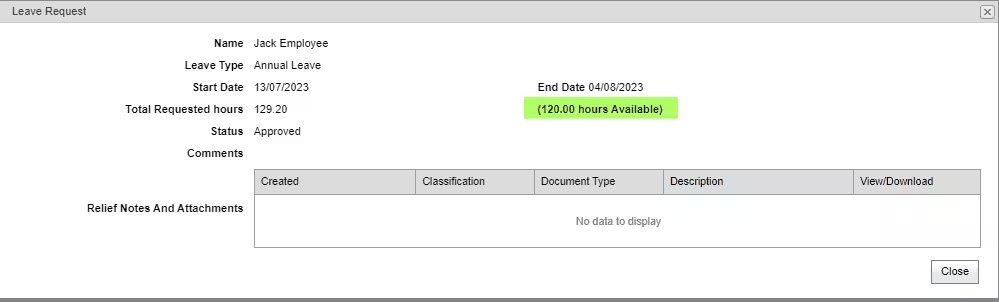
When there is not enough leave accrued does the 'approver' see how many hours they are short?
You can press the ‘View’ button on the application list and this will show you. It does not appear on the main grid.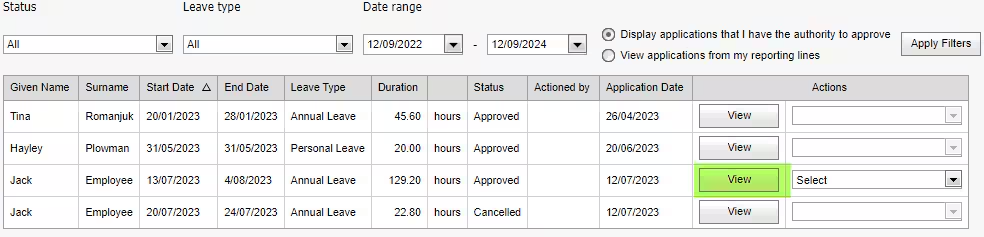
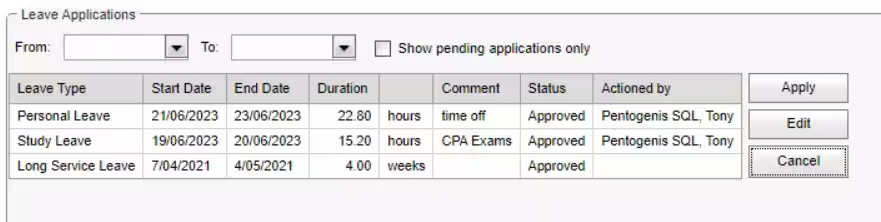
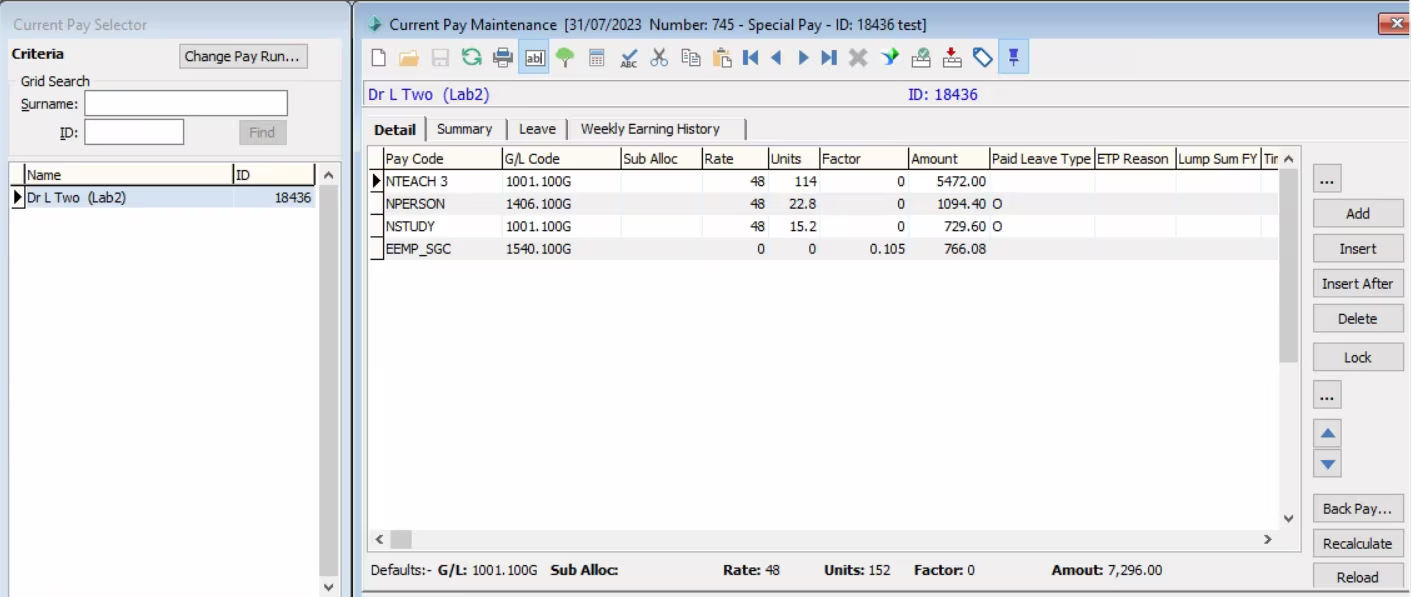
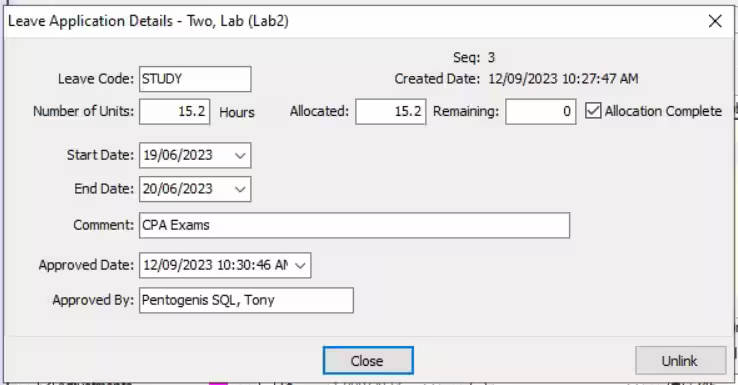
Can you add multiple leaves taken? Will the system calculate the hours automatically?
Yes, Synergetic will import multiple leaves (e.g. an employee has approved personal and study leave in the same pay period).
Can there be a 2nd or 3rd leave approver?
There can be multiple leave approvers but any of them can approve it. We do not have an approval hierarchy currently.
Can the approvers view a calendar of all staff leave?
At this point, this feature is not available.
How does it handle unpaid leave applications?
Synergetic will handle unpaid leave just like any other leave. So long as the unpaid leave type is part of the employee’s FTE, they will be able to apply for it.
REFERENCES
- Staff Kiosk - My Leave tab
- Staff Kiosk - Staff Leave tab
- Processing leave application requests
- Maintaining Action Centre messages
- Job Position Maintenance - General tab
- luPayrollLeave lookup table – defines which leaves are confidential & require elevated leave approval
Was this article helpful?
That’s Great!
Thank you for your feedback
Sorry! We couldn't be helpful
Thank you for your feedback
Feedback sent
We appreciate your effort and will try to fix the article