TABLE OF CONTENTS
Summary
This article explains how the Leave Liability Report (PAYLVLI) 'Rate' column is calculated.
End Result
An understanding of how the Rate column works.
Method
The leave liability report requires a rate of pay per-unit of leave. For example, if leave is recorded in hours, then the report requires an hourly rate. If leave is recorded in days, then the report requires a daily rate etc.
Synergetic allows flexibility with respect to how pay details are used. There is not necessarily a single figure to represent an employee's daily or hourly rate. A 'normal' employee with only one standard Normal Pay line which uses 'Units' to represent the same units of time as leave is recorded should have the same rate on the leave liability report as on their standard pay details.
Just as an approximate indicator of the calculations behind the Rate Figure in the report for an employee with one line Normal Pay adjusted for the FTE would be :
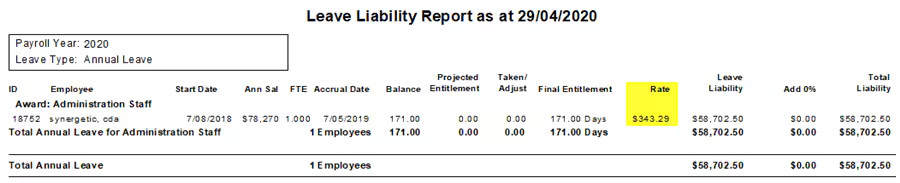
Annual salary / (units per year * FTE)
E.g. for an employee with Annual salary of $78270, FTE of 1 and Units per year 228 days
78270 /(228 x 1) = $343.29
If a user is not seeing the expected rate figures on the leave liability report, this is most likely due to one of the following:
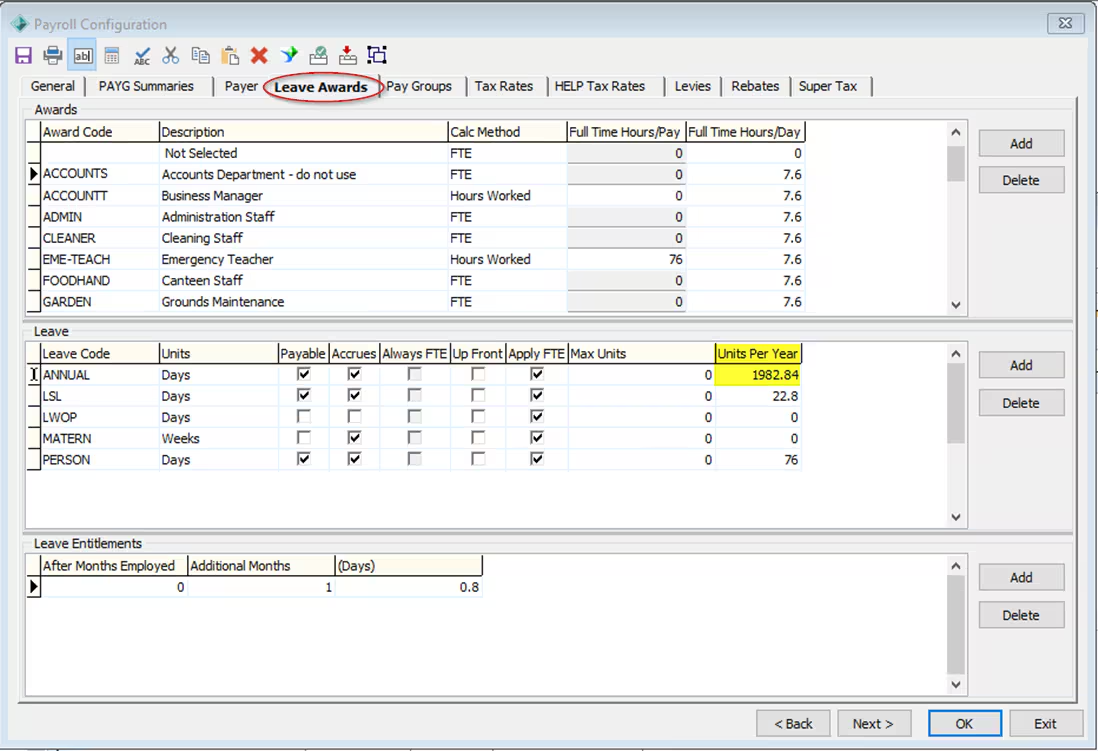
- The 'Units Per Year' figure from Payroll Configuration Maintenance -> Leave Awards being incorrect. To check this, refer to Payroll> Payroll Configurations Maintenance> Leave Awards Tab> Leave Section, This figure must represent the number of working units for employees under this award. Just as the Annual Salary calculation is based on the Divisor figure from luPayrollPayFrequency, the 'Units Per Year' figure from Payroll Configuration Maintenance -> Leave Awards should be based on the same figure.
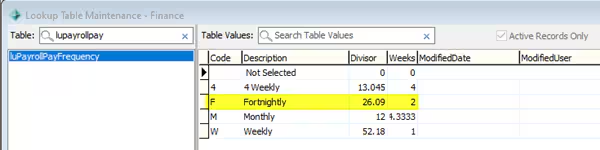
For example, if an employee is paid fortnightly and the Divisor for their pay group is 26.09, then 'Units Per Year' should be 26.09 multiplied by the number of units a full-time employee would work in a fortnight
e.g. typically:
7.6 h x 5 d= 38 h
38 x 2 = 76
26.09 x 76 = 1982.84 hours per year
2. Annual Salary being incorrect due to either having been manually overridden or the Divisor figure or luPayrollPayFrequency being incorrect.
3. Not realising that the Annual Salary calculation takes into account all standard Normal Pay lines. An employee may have multiple standard Normal Pay lines, each with a different rate.
For example, an employee may have a standard pay line of 30 hours at $35, plus a standard line of 46 hours at $40, plus a standard line with no rate or units for $200. Assuming 76 hours per-fortnight, this employee would have an hourly rate of:
((30 x 35) + (46 x 40) + 200) / 76 = $40.66
Considerations
The report cannot simply take what appears to be a simple figure from a given employee's pay details tab.
There is also no requirement to utilise the rate column at all, and even if it is used there is no guarantee that the pay units reflect the leave units.
Was this article helpful?
That’s Great!
Thank you for your feedback
Sorry! We couldn't be helpful
Thank you for your feedback
Feedback sent
We appreciate your effort and will try to fix the article