As part of the ATO’s work to strengthen data security, they require that businesses who report their Single Touch Payroll (STP) data via a Payroll Software Provider and Sending Service Provider – which is the case for Synergetic Payroll school - to notify the ATO of this arrangement.
Providing the ATO with the Software ID (SSID) issued for your ABN using Access Manager is the way you notify the ATO.
This must be completed by mid-June 2026.
After the mid-June launch of these changes, pay runs for schools that have not notified the ATO of their SSID will fail.
This is the link to Access Manager.
This is the link to the ATO’s instructions for using Access Manager to notify them of your Sending Service Provider.
If you encounter difficulty using Access Manager, please contact the ATO. This can be done via the “Contact Us” and “Help” links from the Access Manager page.
Please note that Tes can only provide your Software ID (SSID). Tes cannot assist with Access Manager use, STP notifications, or any ATO related queries. Schools must contact the ATO directly for all other support.
Where to get your Software ID (SSID)
Tes will provide your SSID via a secure link, to the signatory contact for Synergetic at your school in April. If you need further access to your SSID, please contact our Support Team.
Using Access Manager
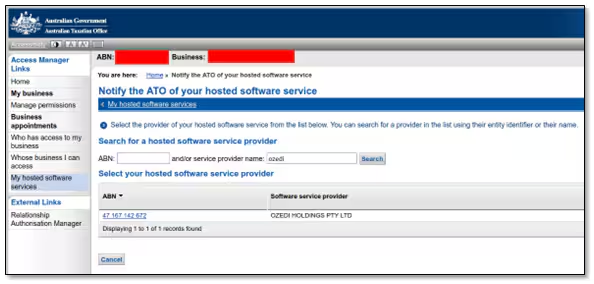
The screenshot below shows the screen in Access Manager where you notify the ATO of your Software Service Provider. Search for “OZEDI” using the box for “service provider name”. This is the name of the Sending Service Provider that Synergetic partners with to report Single Touch Payroll (STP) data from Synergetic Payroll.
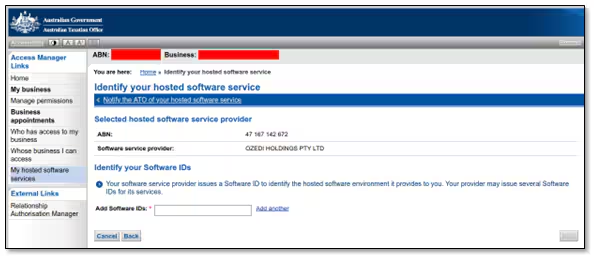
The screen to add your SSID appears as follows:
Was this article helpful?
That’s Great!
Thank you for your feedback
Sorry! We couldn't be helpful
Thank you for your feedback
Feedback sent
We appreciate your effort and will try to fix the article