Problem
How to setup security access for Purchase Order Module.
Solution
Generally, it would advisable to setup the group security based on the task the user is set out to perform.
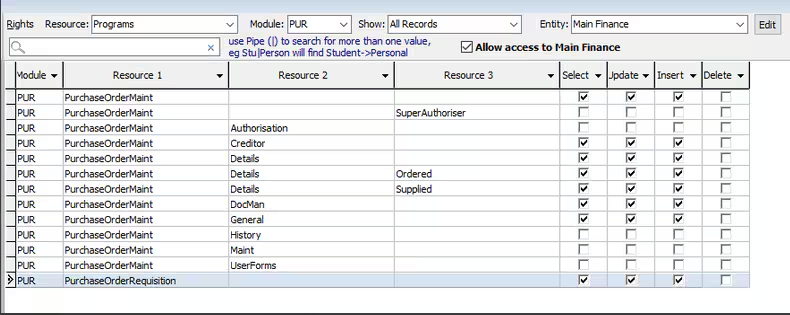
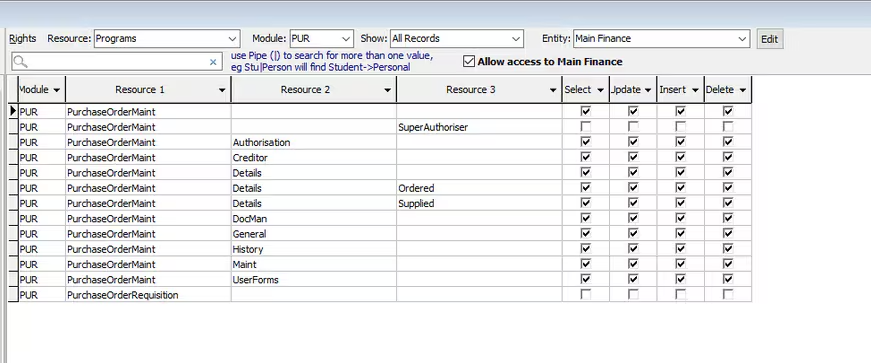
For Purchase Order module, there are 3 types of security group that would typically be set up:
- POR - Purchase Order Requester Group
- POA - Purchase Order Authorizer Group
- POSA- Purchase Order Super Authorizer Group
**Please note: It is recommended that you modify the security groups/permissions to suit your school
So if a user is set on a business unit to only be the Requester - this is the security they should have:
If a user is set on a business unit to only be the Authorizer- this is the security they should have:
If a user is set on a business unit to only be the Super Authorizer- this is the security they should have:
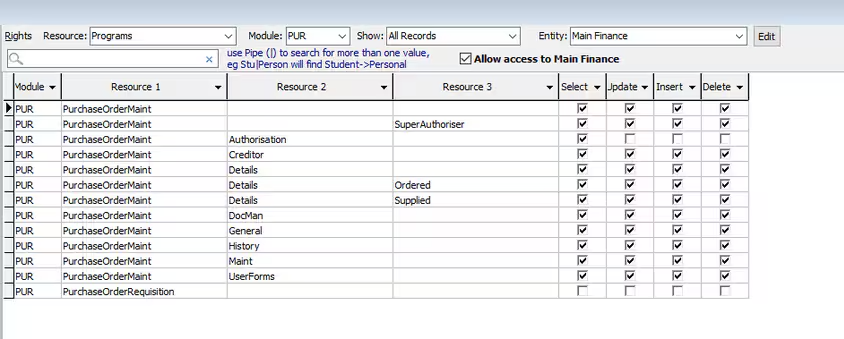
A Super Authorizer is someone who can approve any Purchase Order, regardless of the budget or amount of the purchase order.
For eg. Single level authorization -The Business Unit has a budget and threshold and the PO is above the threshold - the Authorizer will not be able to approve the PO instead the Super Authorizer will have to approve it.
Two-level Authorization
For the status Department Approved to work, a business unit will need two level authorization flagged.
You will need to assign the Authorizer to the business unit and flag them as the 'Purchase Order Authorizer'.
You will also need to assign the Super Authorizer to that business unit but you would not flag them as the 'Purchase Order Authorizer' (if you do, every PO raised will send an email notification to the Authorizers in the business unit whether is within or above threshold)
When a PO is raised <> business unit threshold:
If the Authorizer approves it the status will change to 'Department Authorized' (this means the PO is not fully authorized and would require a Super Authorization)
If the Super Authorizer approves it, the status will change to 'Authorized'.
Was this article helpful?
That’s Great!
Thank you for your feedback
Sorry! We couldn't be helpful
Thank you for your feedback
Feedback sent
We appreciate your effort and will try to fix the article