Summary
This will assist you to identify why users raising PO Requisition through SynWeb are unable to see the all the supplier's listing
End Result
The correct settings in group security will allow users raising PO Requisition through Synweb to be able to view all supplier's listing
Method
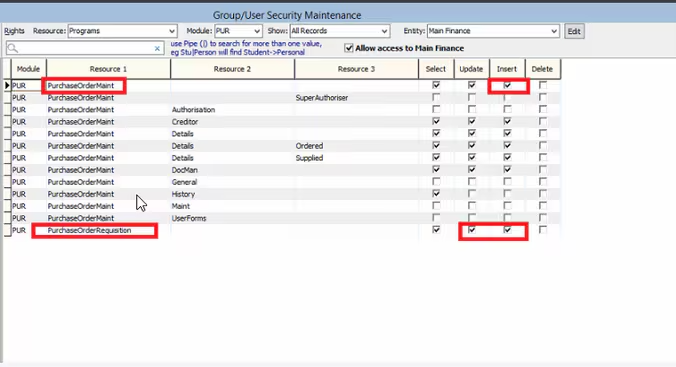
In group security maintenance, the users will need the "Select", "Update" and "Insert" enabled for:
- PurchaseOrderMaint
- PurchaseOrderRequisition
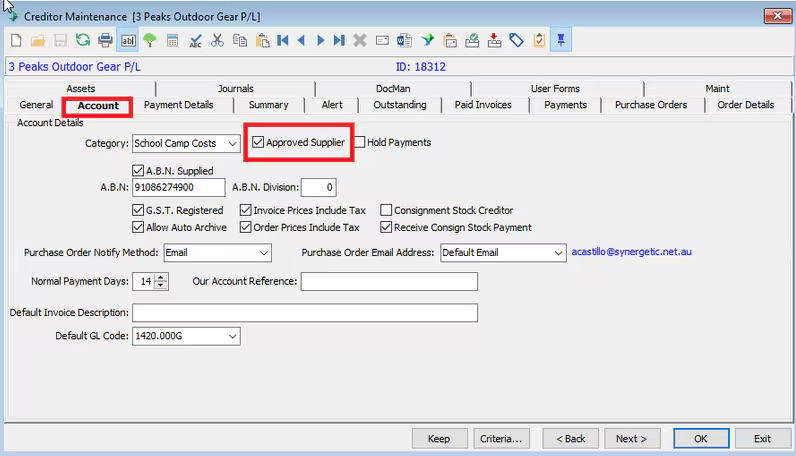
Approved Suppliers are creditors who are approved by your organisation.
This can be flagged in the Creditors Maintenance >Account tab:
Considerations
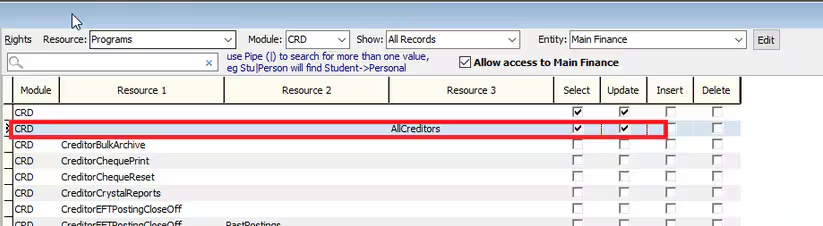
If the user is granted access to AllCreditors -the user is able to view all Approved and Non-Approved Creditors when raising PO Requisition.
The only reason a user might not be able to view a creditor in the listing is possibly because the creditors status is inactive.
Was this article helpful?
That’s Great!
Thank you for your feedback
Sorry! We couldn't be helpful
Thank you for your feedback
Feedback sent
We appreciate your effort and will try to fix the article