Finance User Guide: Stripe Dates and Reconciliation Integrity
The Reconciliation Improvements for Synergetic Payments initiative aims to reduce manual reconciliation effort and minimise errors by automatically aligning payment dates. The following rules explain how dates are used in balancing reports and why manual changes must be avoided.
Understanding the Two Critical Financial Dates
For every Stripe payment, Synergetic maintains two separate dates: the Initiation Date (customer-facing) and the Clearance Date (accounting truth).
Date Type | What it Represents | Where You See It in Synergetic |
Receipt Date (Initiation Date) | The date the debtor made the payment. | Online Receipts List, Cash Receipts Audit Print, individual debtor receipt (PDF) |
Transaction Date (Clearance Date) | The date the money officially cleared into the school’s bank account via Stripe’s payout process. | History tab in Debtor Maintenance, Receipts tab in Debtor Maintenance, General Ledger Maintenance Journals, and Bank Reconciliation screen, Financial Reports |
Date Alignment for Balancing Reports
Balancing reports, such as the Debtor Aged Receipts report, rely on the Transaction Date (Clearance Date) to determine when funds were officially received. For reports to accurately reflect your financial position, the General Ledger Journal Date (GL Date) and the Debtor Transaction Date must always match.
Although the report is called “Debtor Aged Receipts,” it uses the debtor transaction date, not the receipt date. Be aware that if debtors make payments on or just before their due date, they may appear to be “overdue” on some reports.
You can use the Online Receipts List report to confirm when payments were initiated.
Synergetic's Approach: Clearance Date is King
Synergetic's improved Stripe process recognises that the clearance / payout date is the most accurate financial date for auditing purposes:
- Initial Posting: When a Stripe payment is successful (“Succeeded” in the Stripe dashboard), it is temporarily recorded in an initial Cash Receipt Posting - one posting each day for Card payments, and one for BECs payments
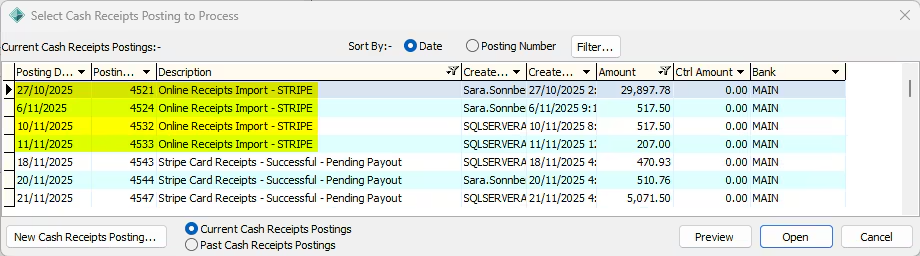
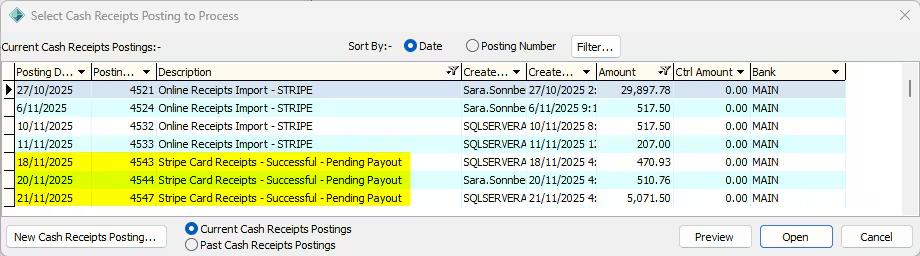
Pending Payout: While payments are pending payout, they are retained in this temporary posting. Historically, this initial posting could cause reporting issues because the GL Date (Succeeded Date) might diverge from the Receipt Date (Initiation Date)
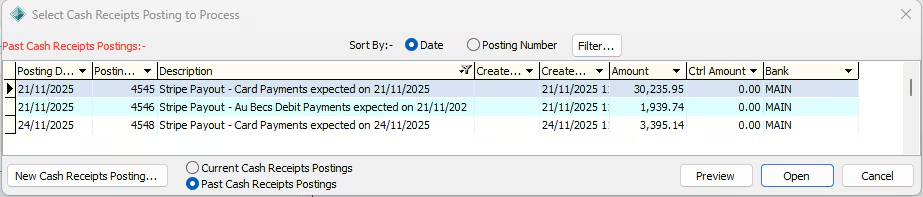
Payout Posting (Final Posting): The system automatically detects the final Stripe payout (the net amount deposited into your bank account) and creates a Cash Receipt Posting that exactly matches this deposit (one for Card and one for BECS).
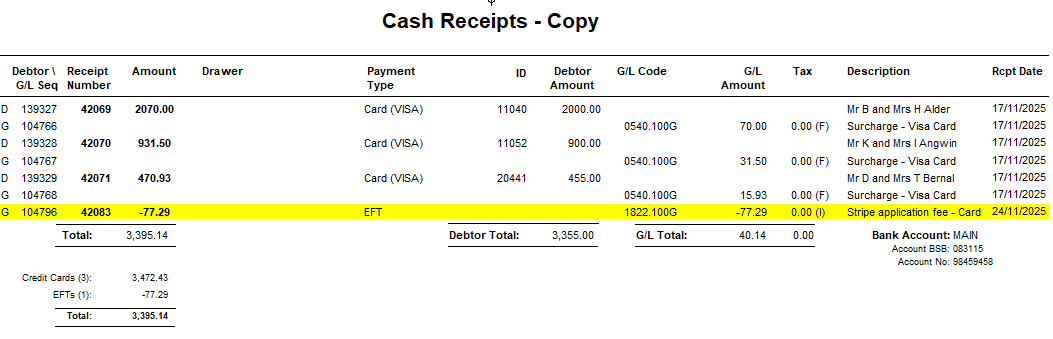
Automated Alignment: When transactions are moved to this final Payout Posting, the system again automatically performs date synchronisation:
- The Receipt Date is preserved as the Initiation Date.
- The GL Date and Transaction Date are both set to the Payout Expected Date (Clearance Date)
This automation ensures your GL and Debtor records are dated correctly for audit purposes, streamlining bank reconciliation.
If a Stripe transaction is currently in a posting has been closed off, abandoned, or already reported on BAS, the automated process will not move the transaction into the Payout Posting, and the dates will not be changed.
⚠️ CRITICAL WARNING: Do Not Manipulate Receipt Dates in Stripe Postings
To protect the integrity of the automated reconciliation process, receipt dates in Stripe initial postings and payout postings should not be manipulated using the “Modify Receipt” posting action.
Manual modification of the Receipt Date bypasses the automated synchronisation logic and risks breaking the link between the Debtor Transactions and the General Ledger.
The Risk
If you use the Modify Receipt action to change the Receipt Date in an initial posting:
- The system may update the Debtor Transaction Date (seen on the Debtor Maintenance → History tab), causing it to adopt your new date
- However, the GL Journal Date (seen in General Ledger Maintenance → Journals tab) is fixed to the summary Posting Date and will NOT update.
Consequence
By changing the receipt dates, you risk changing the balancing dates behind the receipt date, which can cause balancing issues if these dates cross financial periods (e.g., if the Debtor Transaction Date changes to June, but the GL Journal Date remains in July
Can I change the Summary Posting Date on a Stripe Cash Receipt Posting?
Traditionally, Finance Users might adjust the Posting Summary Date to ensure the batch date matches the date the physical deposit appears on the bank statement. This ensures the Debtor Transaction Date (which can be seen in Debtor Maintenance → History) and the GL Journal Date (seen in General Ledger Maintenance -> Journals) align with the actual date the funds cleared in the bank.
It is usually unnecessary to change Stripe Posting Dates
For Stripe payments, manually changing the Posting Summary Date is discouraged, as the new automated workflow is intended to handle this alignment automatically.
- Payout Postings are Already Correctly Dated: Synergetic automatically creates the final Payout Posting with the Payout Expected Date as the Posting Summary Date. This Clearance Date is the most accurate financial date for auditing.
- Alignment is Automated: When transactions move to the Payout Posting, Synergetic forces the GL Journal Date and the Debtor Transaction Date to match the Posting Summary Date.
- Receipt date is “initiated date”: The Receipt date (as seen on the debtor’s individual receipt) will remain as the “initiation date” and is not used in balancing reports – it should remain the same throughout the entire payment process
Conclusion
If the GL Date and Transaction Date both already match the current Summary Posting Date, the GL Date and Transaction date will move together, maintaining the balance. So, in theory, changing the Summary Posting date shouldn’t cause a misalignment.
However, relying on the automated Payout Posting process ensures the Transaction Date used for balancing reports reflects the expected Clearance Date, thereby eliminating the manual reconciliation effort that this feature is designed to resolve.
Was this article helpful?
That’s Great!
Thank you for your feedback
Sorry! We couldn't be helpful
Thank you for your feedback
Feedback sent
We appreciate your effort and will try to fix the article