TABLE OF CONTENTS
Summary
The Direct Debit Payment batch is not appearing on Stripe
Resolution
The most common cause for this to become stalled is that the Synergetic Services on the server have stopped running
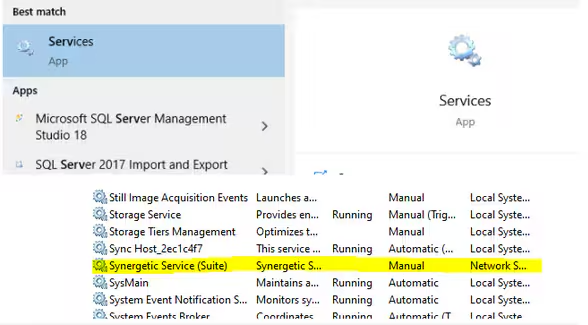
On the SQL Server in Windows go to services
Locate the SynergeticServiceSuite
Right click on the service and Restart the service
Monitor the Online Receipts List and your Stripe Dashboard and you should start to see the transactions appearing
Considerations
This is not the only reason submissions become stuck. If you still do not see the transactions either on the Online Receipts Listing report or on your Stripe Dashboard, please log a ticket with our Service Desk.
To decrease the likelihood of the service stopping you can set the Synergetic Service (Suite) service to attempt to restart itself whenever it fails by right clicking on the service > Properties > Recovery tab > set all the 3 failure drop downs to Restart the Service.
Was this article helpful?
That’s Great!
Thank you for your feedback
Sorry! We couldn't be helpful
Thank you for your feedback
Feedback sent
We appreciate your effort and will try to fix the article