Summary
Displayed Family position of a Current Student
Method
Family position is calculated on the following
- Date of Birth (for twins or multiples you can specify this down to the time of birth)
- Siblings by SC1 contact
- File Year
Family position one will always be the eldest child who is a current student.
So for example, if a Student is the second eldest child in the family, but the oldest at the school they will be family position one even though they are the second born. Another example would be a family of 3 Students, when the eldest finishes year 12, the middle child will move into position one as they are now the eldest attending child. and then youngest would move into position two.
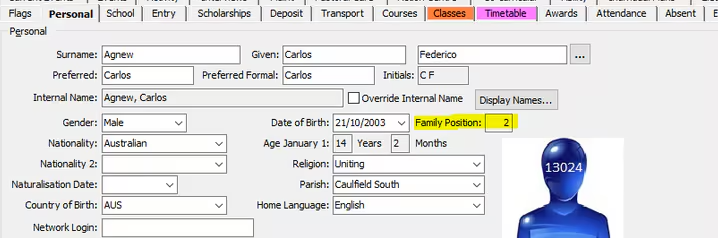
The family position on a student may display incorrectly despite the SC1 and date of birth being correct. In this case one safe way to resolve it is to edit the date of birth for one family member, save and then change it back to the correct value. This causes the trigger to fire again and recalculate the family position for all siblings in that school family
Was this article helpful?
That’s Great!
Thank you for your feedback
Sorry! We couldn't be helpful
Thank you for your feedback
Feedback sent
We appreciate your effort and will try to fix the article