The issue will occur when clients use a standard report selection screen with a site report copy.
This can result in a mismatch of parameters similar to the following error:
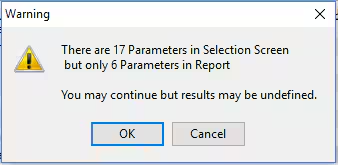
The resolution is to either:
- Add parameter placeholders in the report (this may confuse people when they are expecting those parameters to have some effect in the report!),
- Copy the selection screen to a site interface and remove the non-essential parameters,
- Take a new instance of the standard report and make any required changes, or
- Use the standard report.
- If the report is using a stored procedure, make sure that the Crystal Report database role that is running the report has execute permission for the stored procedure, eg.
GRANTEXECONcrsp_myprocTOSynergetic_report_finance_ReservedDBRole- Note: The database role/user executing the report may differ per client/program/schema, e.g.
Synergetic_report_dbo_ReservedDBRole,Synergetic_report_finance_ReservedDBRole, Synergetic_report_extrafinance_ReservedDBRole
- Note: The database role/user executing the report may differ per client/program/schema, e.g.
Was this article helpful?
That’s Great!
Thank you for your feedback
Sorry! We couldn't be helpful
Thank you for your feedback
Feedback sent
We appreciate your effort and will try to fix the article