How to upload signatures to staff record
- Ensure you have a signature file saved as JPG, BMP
- Ensure you have a Signature entry in luDocumentClassification
- Code: Signature
- Description: Staff Signature
- SynergyMeaning: Signature
- SecurityMeaning: GROUP
- ActiveFlag: Ticked

- Navigate to HR > Staff Maintenance > Docman
- Click Import
- It should open the Import Document screen
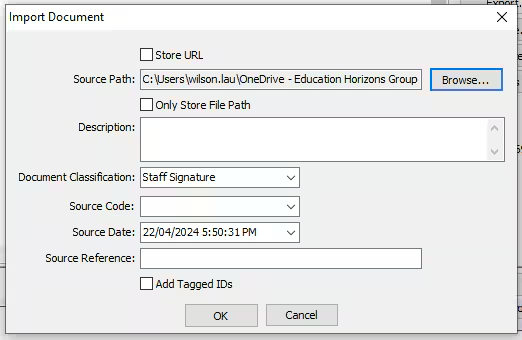
- Click Browse
- Find the signature file
- Change Document Classification to Staff Signature (what ever you have categorized in luDocumentClassication)
- Enter a Description
- Depending on your processes, you could change other fields ie Store URL, Only Store File Path, Source Code etc
- Click OK
- You will see the imported signature in the docman list

Was this article helpful?
That’s Great!
Thank you for your feedback
Sorry! We couldn't be helpful
Thank you for your feedback
Feedback sent
We appreciate your effort and will try to fix the article