TABLE OF CONTENTS
Summary
In some circumastances where employees are alumni or are parents they may wish to make donations to the school directly from thier pay.
End Result
The employee makes a donation to the school and is shown in donation reports.
Method
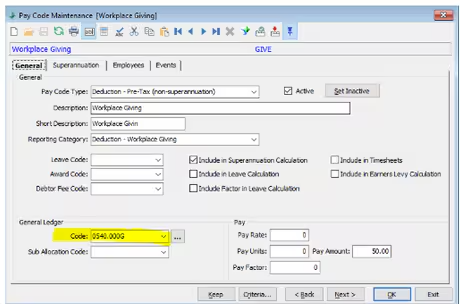
1. Create a Pay code - This needs to be set with a reporting category of 'Workplace Giving'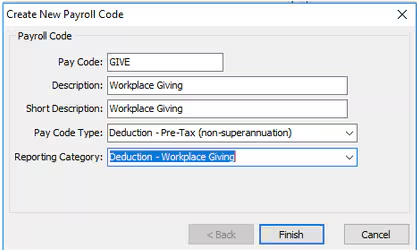 2. In the Pay Code the GL Code needs to be set to that of a fund that the donations will go to.
The GL will need to be linked to a fun in Lookup Table Maintenance - Finance > luFund
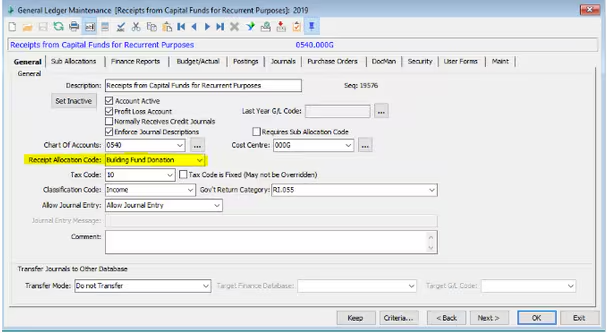
3. The GL Code Must have a Receipt Allocation code set to the chosen fund.
4. Add top the Employees Pay Details
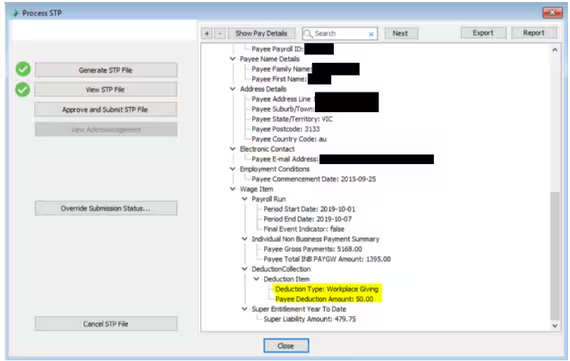
5. Process the Pay - The amount should appear as Workplace Giving on the STP Summary
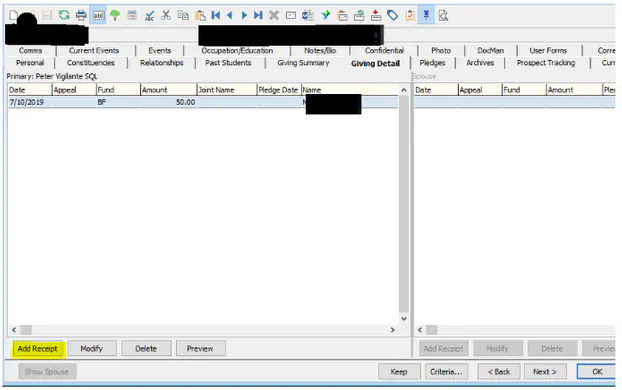
6. In Development Maintenance > Giving Detail Tab > Add Receipt
This is a manual step and the user will need permissions to add a receipt in the Development Module
7. The Receipt Method should be 'Other' and the Comment should indicate where the donation came from
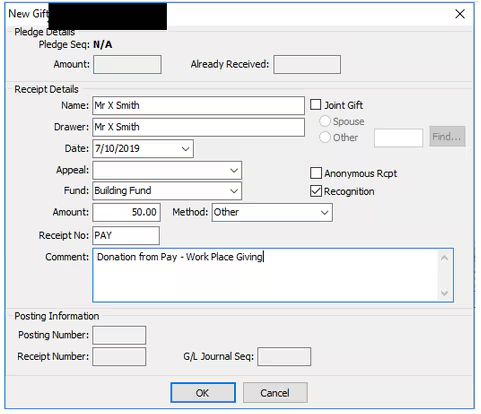
8. The donation will the be visible on donation reports (except for those that focus on a specific appeal).
9. At the End Of Financial Year - You can run the Crystal Report - Donor Annual receipt Summary (DONRECANN) which you can give the employee for tax purposes.
Considerations
This is the best way to process ongoing donations. If it is a once off, processing through payroll is probably not best.
Was this article helpful?
That’s Great!
Thank you for your feedback
Sorry! We couldn't be helpful
Thank you for your feedback
Feedback sent
We appreciate your effort and will try to fix the article