NZQA requires schools to change the method by which they submit a certain set of data.
This becomes a mandatory change in April
Currently Synergetic supports the relevant submission by allowing schools to export the ‘Student Results File’ report, that is then uploaded by the school to the relevant NZQA submission portal/site.
Moving forward, the relevant data will be submitted via API, from Synergetic, to NZQA
Onboarding Process for Schools
Task | Responsible | Dates | Complete? |
NZQA have made schools aware that the required submission method is changing, and they are working with SIS providers to implement suitable solutions | NZQA | Happened in 2025 | ü |
Send schools comms re. upcoming changes, and onboarding steps, inc. 2x forms that schools need to submit:
| Sala | Mid-Feb | ü
|
Send completed forms to NZQA | School User | Mid-Feb onward |
|
Send API credentials – specifically machine username and machine password - to school | NZQA | Mid-Feb onward |
|
Send API key to school | Tes | Late-Feb |
|
Add API credentials into Synergetic via the screen below
| School User | Before end of march |
|
Run ‘Test Connection’ task to ensure configuration details are all correct. If there is an error, check and adjust API credentials | School User | Before end of march |
|
Usage steps for School
Configurations and Setup:
- Add API credentials into Synergetic screens as below
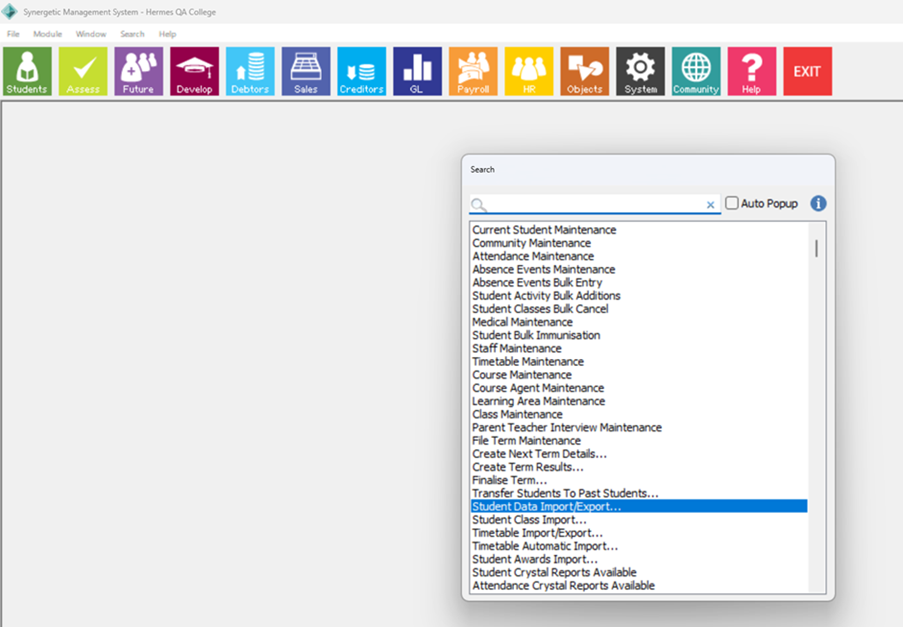
- Step1: Global Search for ‘Student Data Import/Export’ (Simply click on the ‘Search’ menu option)
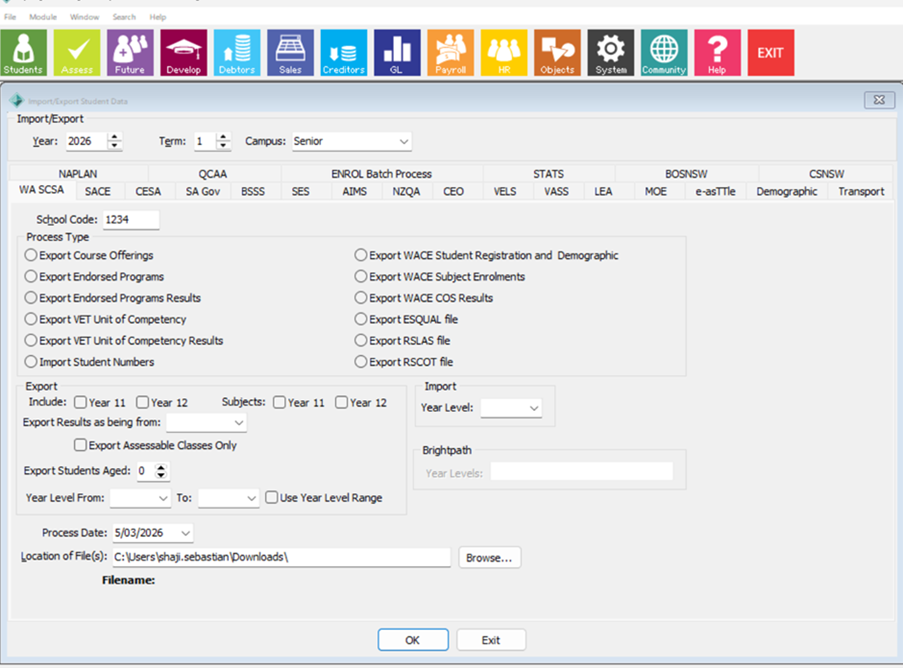
- Step2: Click on ‘Student Data Import/Export’ option. A window will open as given below
- Step3: Click on NZQA tab -> select Export Entries and Results File -> click on configure button
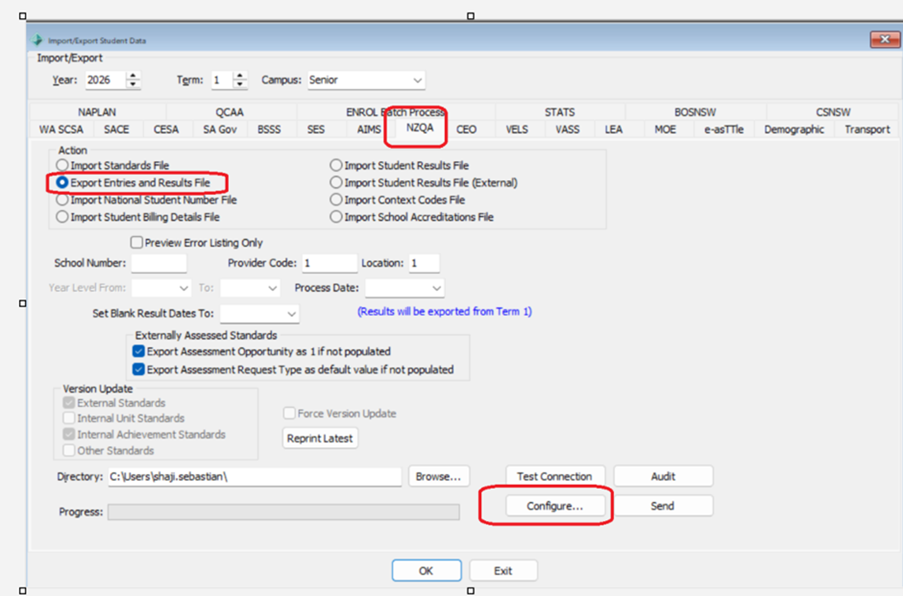
- Step4: To enter API key value, simply click on the check box ‘update API Key’. When the check box is enabled the field API key field will be enabled to enter new value. Now enter the new API key and click on OK button to Save the changes. To change the Passphrase value, follow the same approach
- API UR: Please enter https://api-sms.nzqa.govt.nz
- API Key : Tes sends this info to schools.
Machine Username: NZQA sends this info to schools - Machine Password: NZQA sends this info to schools
Send data to NZQA:
School users kick off Student Results file transfer in Synergetic, by navigating to:
- Import/Export Student data screen
- NZQA tab
- Select ‘Export Entries & Results file’ action
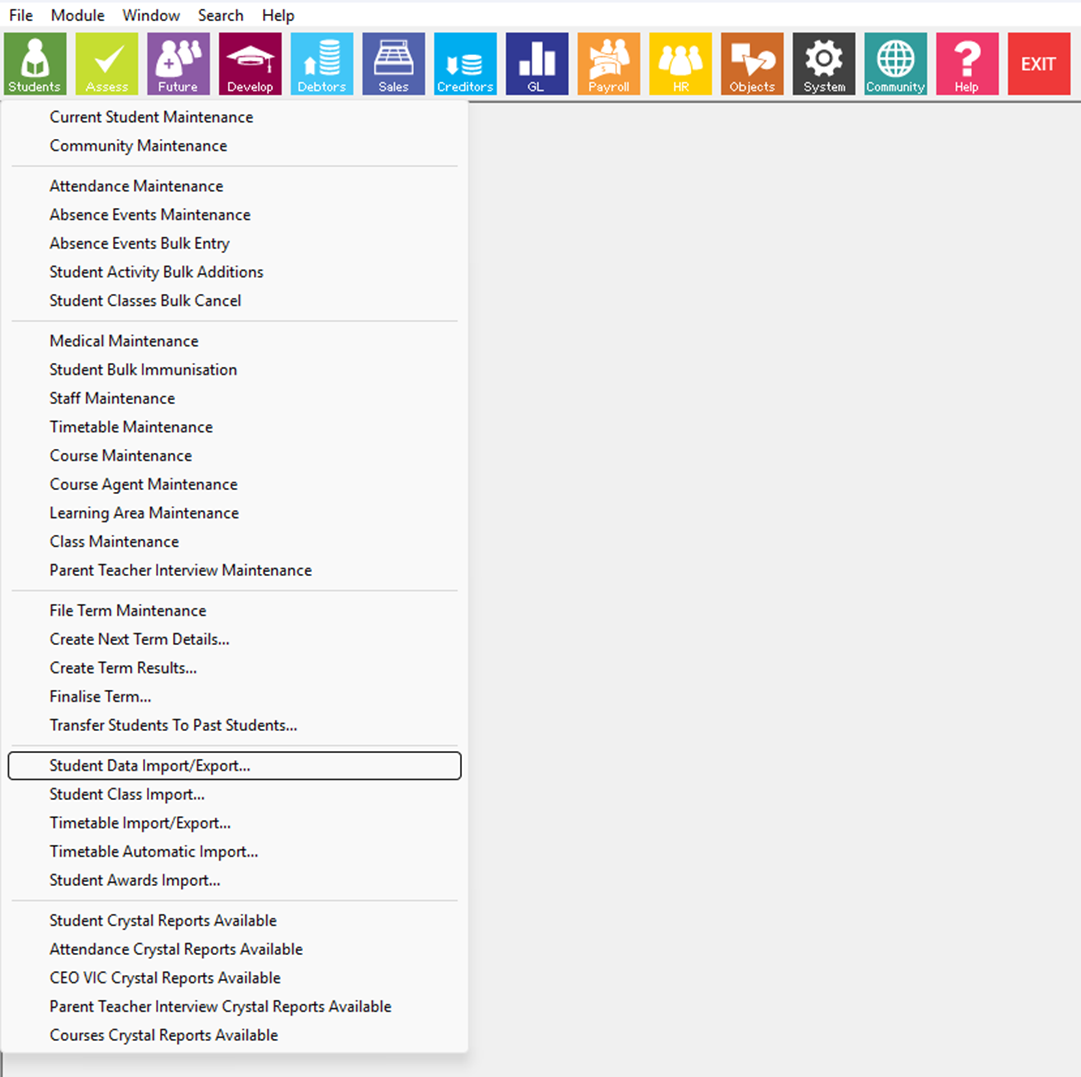
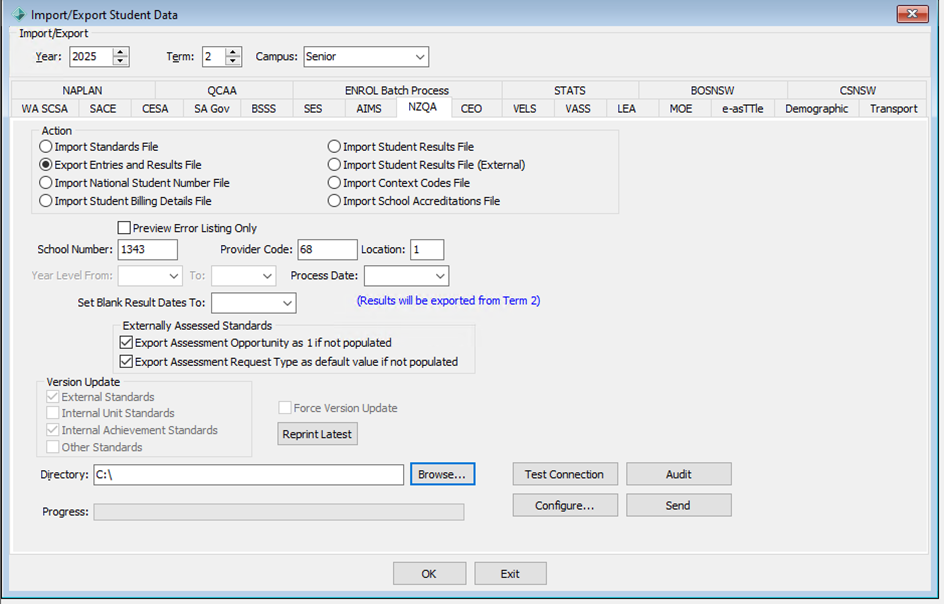
- When user clicks ‘Send’, Synergetic checks for validation errors and advises user that errors have been encountered (eg. adjustments to be made so that data meets NZQA requirements before file is submitted)
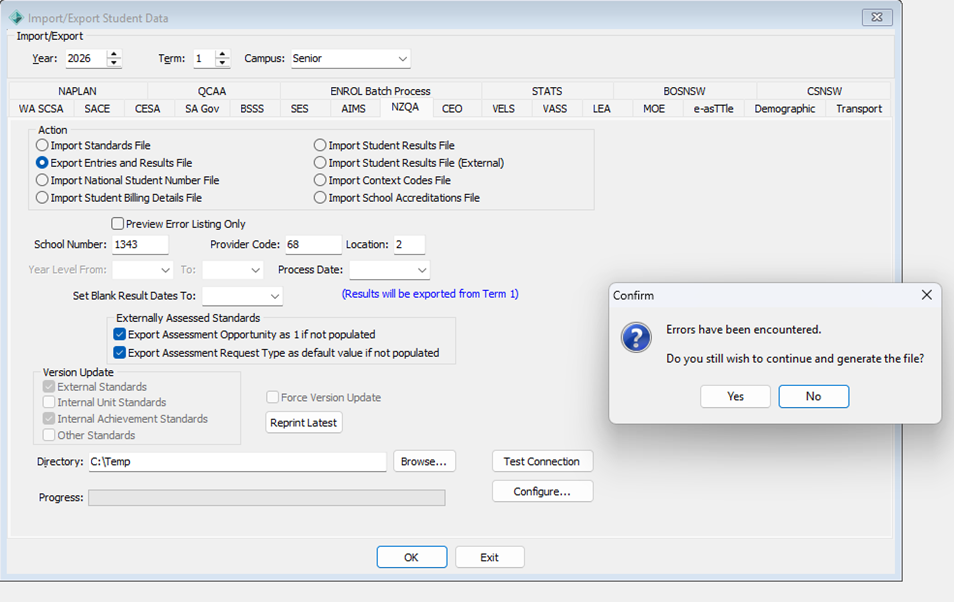
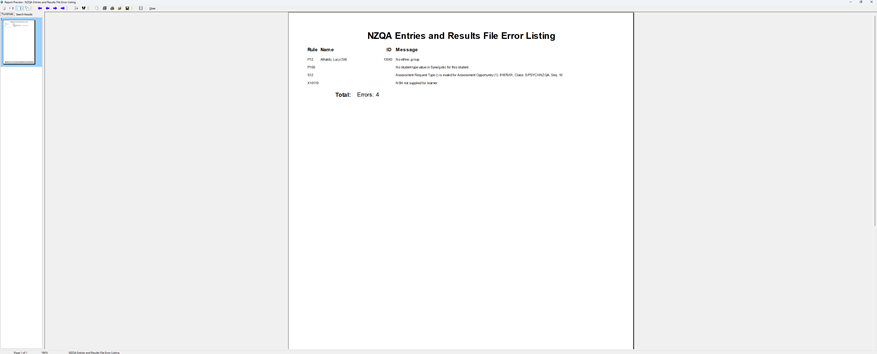
- If any errors are found, users can review them using the ‘NZQA Entries and Results File Error Listing’ report View, which will pop up on the screen
- Users can also access the ‘NZQA Entries and Results File Error Listing’ report by selecting the ‘Preview Error Listing Only’ checkbox and clicking ‘Send’ (note that no actual send action will occur when selecting this option)
- Once data errors have been corrected, User use the send button on screen to action data transfer
- This replaces the need to export the Student Results file report and upload to the MyNZQA school portal
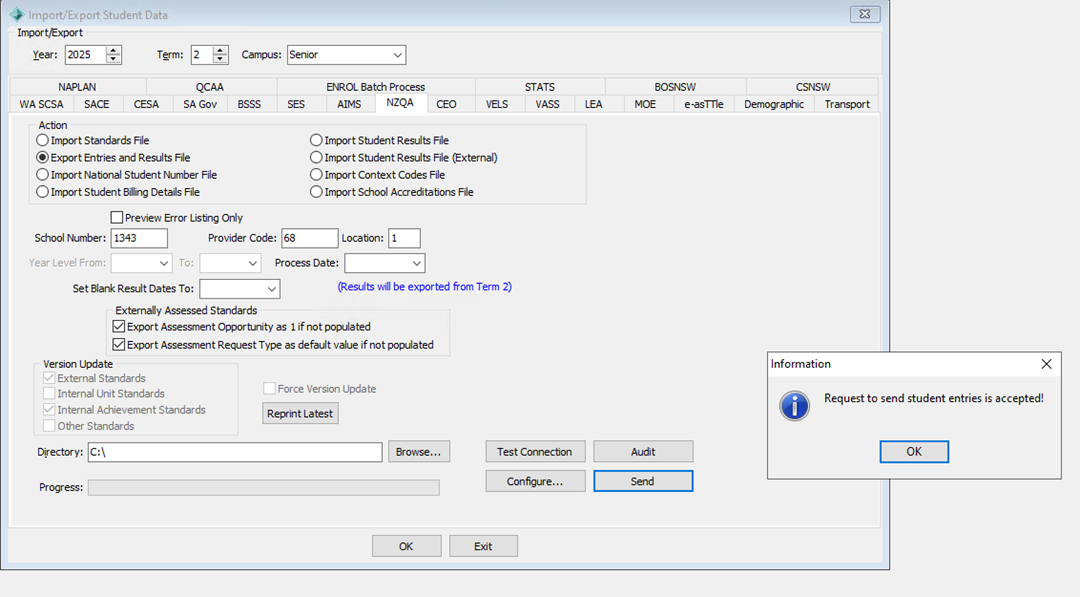
- This begins a background process to sync the Student Results File. If NZQA returns any validation errors one the file has been submitted, they are shown to user on the screen shown when the “Audit” button is clicked, so the relevant data can be adjusted in Synergetic
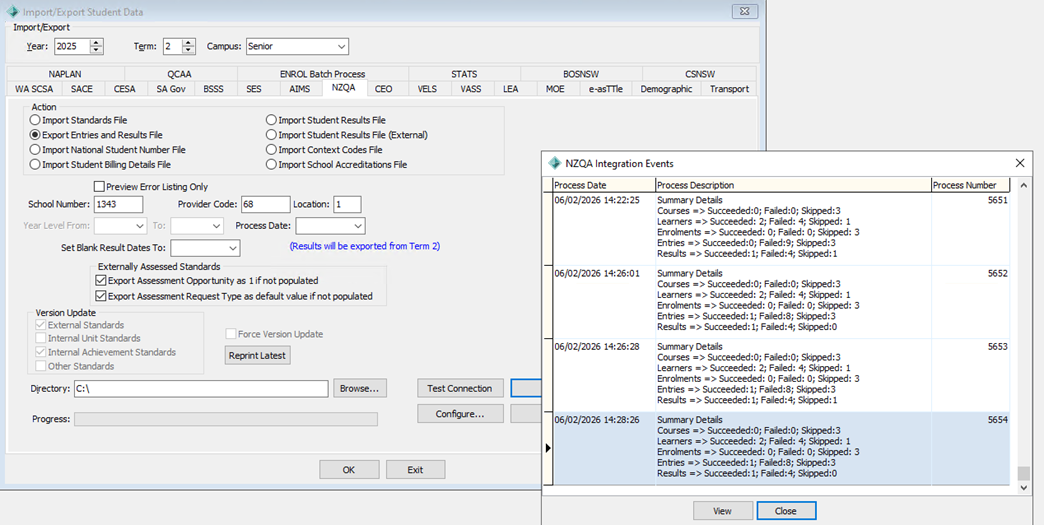
- The Audit screen shows an overview of each run, and the View button can be clicked to view detailed errors, which can also be provided to Synergetic Support or NZQA in the case of any issues that cannot be resolved by the user.
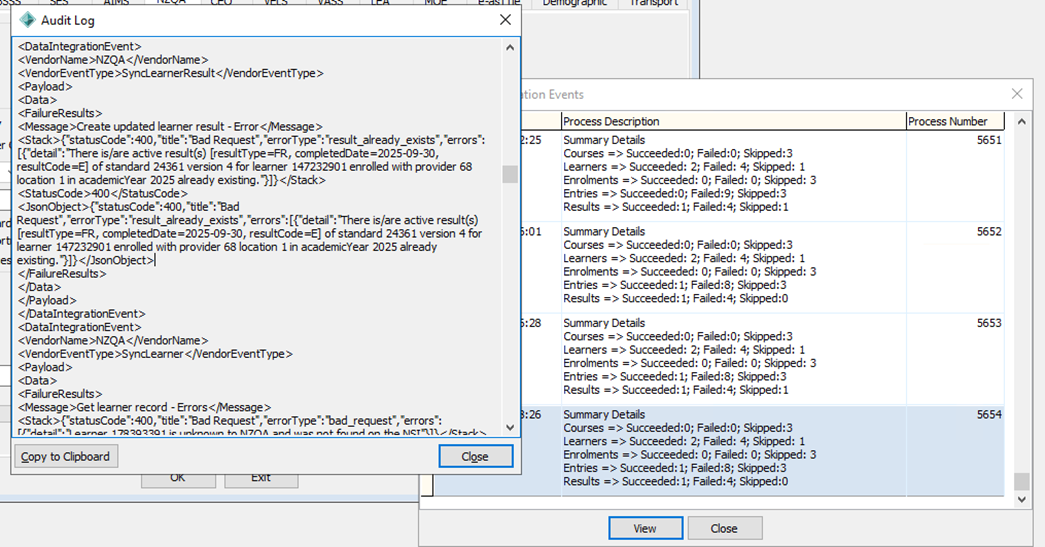
Error returned | Example Message | Plain English translation / fix |
Unknown server error | Unknown server error | This is an issue with the NZQA servers or Synergetic data. Try again later or contact Synergetic support |
Validation of the date of birth failed | Invalid date of birth | Student date of birth must match NSI data for their NSN, update the date of birth in Synergetic to be correct. |
The input NSN is unknown to NZQA | The learner with NSN=111 is unknown to NZQA. | The NSN was not found in NZQA or NSI data, check the correct NSN was entered in Current Student Maintenance NZQA tab. |
The learner is already known to NZQA | Learner 13 is already known to NZQA | If this error occurs, please contact Synergetic support. |
Invalid academic year | Invalid academic year | Results submitted for the wrong academic year, please check the academic year selected in Synergetic when syncing. |
Enrolment does not exist | The learner enrolment for learner (NSN=123) with provider (number=999, location=1) is not known to NZQA | If this error occurs, please contact Synergetic support.
|
A different provider attempts to enroll a learner who is already enrolled at another provider | Learner NSN=123456 is currently enrolled at provider 567-1 in academic year 2025 and must be withdrawn before this enrolment can be created. | Students have an active enrolment with another provider; this cannot be resolved directly with Synergetic. If this should not be the case it may need to be raised with NZQA. |
Provider attempts to re-enroll a learner already enrolled under the same provider | Learner NSN=123456 is currently enrolled at provider 567-1 in academic year 2025 and must be withdrawn before this enrolment can be created. | If this error occurs, please contact Synergetic support.
|
Validation of leaving date failed | Invalid date of leavingDate. | Check the leaving date in Current Student Maintenance is correct; it may be before or after the reporting period. |
Entry does not exist | Cannot find the entry known to NZQA for this patch operation. | If this error occurs, please contact Synergetic support.
|
Entry already exists | There is an entry of standard 12927 version 5 for learners 1234567 enrolled with provider 9999 location 1 in academic Year 2025 already existing | If this error occurs, please contact Synergetic support.
|
Result not found | Cannot find the active result known to NZQA for this patch operation. | If this error occurs, please contact Synergetic support.
|
Results already exist | There is/are active result(s) [resultType=FR, completedDate=2021, resultCode=A] of standard 345 version 1 for learner 12 enrolled with provider 999 location 1 in academicYear 2025 already existing. | If this error occurs, please contact Synergetic support.
|
Secondary course not found | Secondary Course with code Math-123 already exists for this provider in academic year 2025 | If this error occurs, please contact Synergetic support.
|
- When user has fixed the errors, they can repeat the process on the Import/Export Student data screen / NZQA tab to re-submit their data to NZQA.
Was this article helpful?
That’s Great!
Thank you for your feedback
Sorry! We couldn't be helpful
Thank you for your feedback
Feedback sent
We appreciate your effort and will try to fix the article