Online Form Builder can be used to develop and publish online applications. This page lists some trouble shooting tips and FAQ's when developing forms through the Online form builder module.
Refer this Online Form builder Wiki link for more information on creating and modifying application forms and publishing to the application dashboard.
Troublshooting tips
Online Application Portal: "Redirect URL to Payment Methods" not redirecting to payment screen.
When a parent clicks “Submit” on an application form within the Online Application Module, a parent is given the Success message.
• Upon submit, the user should be directed to nab payment gateway but the site goes back to the portal login screen.
The resolution is to re-create the click event which is linked to the Submit button.
Instructions to recreate the click event on the Submit button
1. Navigate to Synweb > Onlineformbuilder
2. Select the appropriate form
3. In the form, ensure editor mode is set to 'Control'
4. Scroll down to the Submit button and click on properties
5. Click on the event icon (in between the 'Systems' and 'delete' icons)
6. Remove the existing click event
7. Add a new event - selecting 'On Submit for Synergetic Application Form' and add the other appropriate details.
8. Save and then republish the form
9. Test the form - ensure to clear the cache before reloading.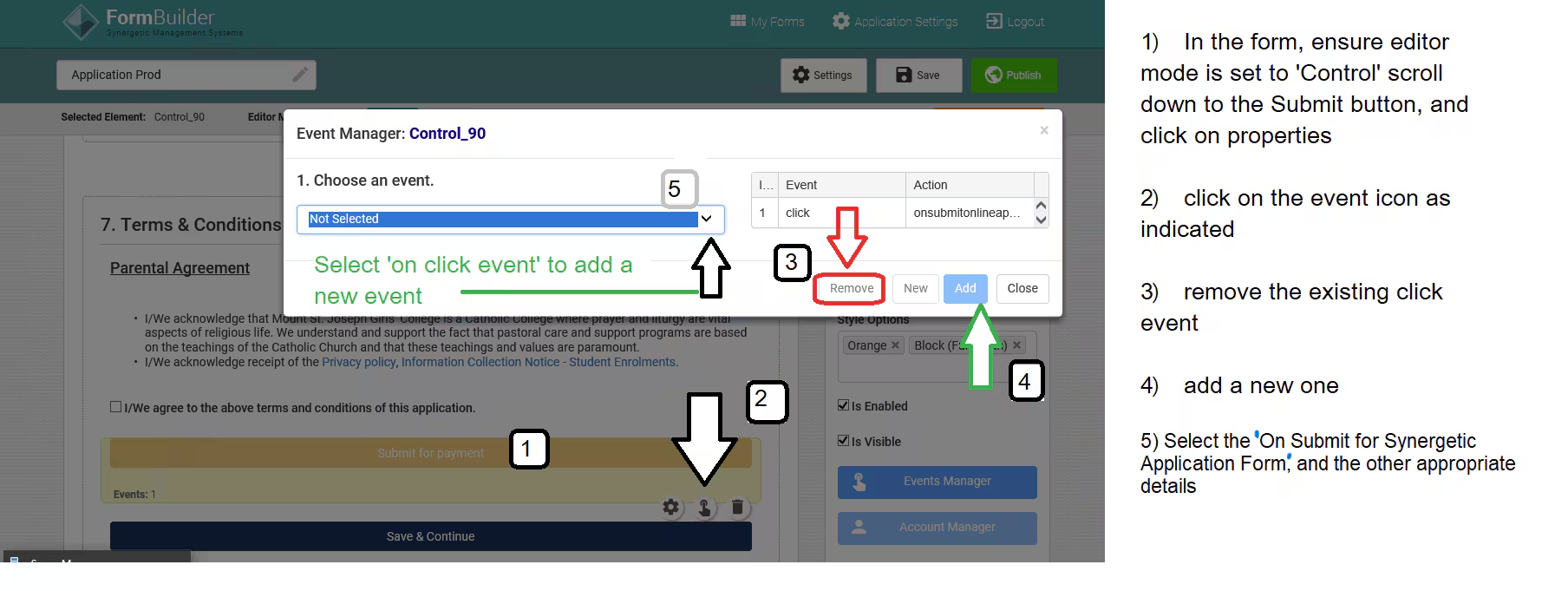
Was this article helpful?
That’s Great!
Thank you for your feedback
Sorry! We couldn't be helpful
Thank you for your feedback
Feedback sent
We appreciate your effort and will try to fix the article