TABLE OF CONTENTS
Summary
This article explains how to create a debtor invoice separate from the standard school fees (i.e charging for damages/charging other schools or companies).
End Result
An Invoice will be created against the Debtor record with an outstanding amount.
Method
In order to generate an invoice for a single charge you can use the following steps;
1. Ensure the debtor has no outstanding charges that an invoice/statement needs to be generated for (This step can be skipped if it is a one off debtor and not a debtor who normally receives statements).
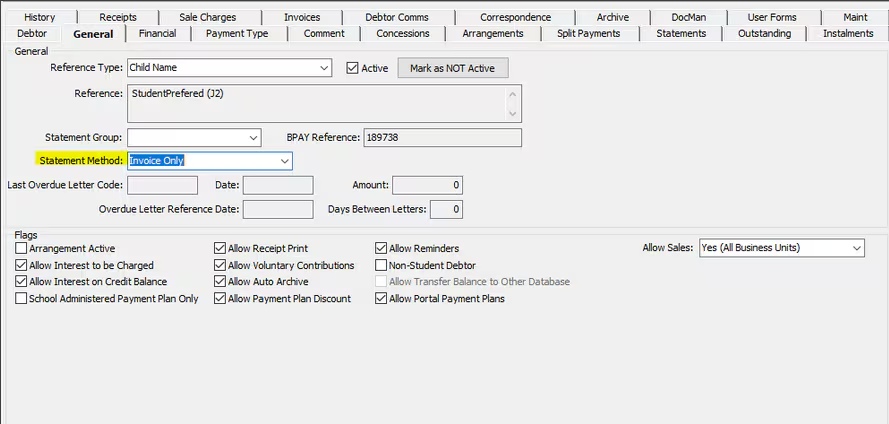
2. On Debtors > Debtor Maintenance under the General Tab, and ensure the Statement Method is Invoice only.
3. Go to Debtors > Debtor Charges Entry and create a posting for the which you wish to produce the invoice for.
4. Go Debtors > Debtors Maintenance > Statements tab > click on the Prior Statements tab and click the Generate New Button.Follow the prompts to generate a new statement.
5. Once the statement is generated a box will pop up, Click on the Select Statement Run button and click on Generate Invoices and then View All Invoices.
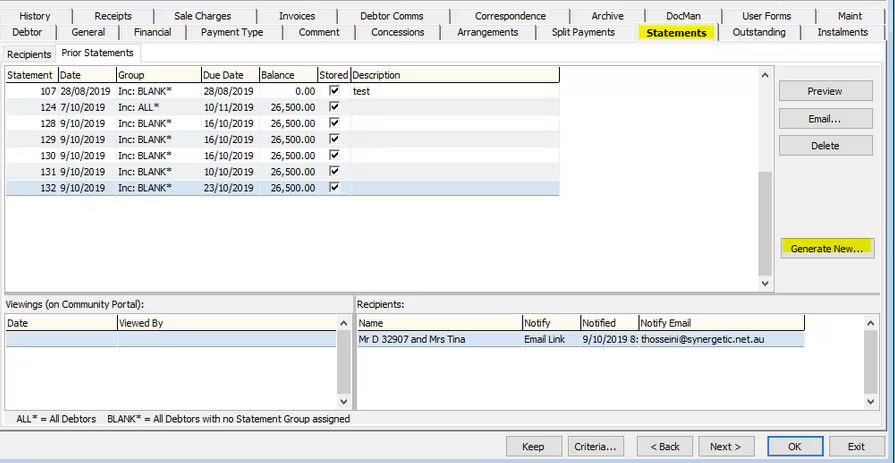
6. For a single debtor, you can Save the Invoice when you view it and send it across to the debtor by email. For sending invoices to multiple debtors, click store Invoices in Database and then click on authorise and then on Email Statements/Invoice button to send emails.
Once you have completed the above steps; if required change the statement method back to Statements as outline in step 2.
Considerations
You may wish to have a Custom Invoice created with the schools branding.
Was this article helpful?
That’s Great!
Thank you for your feedback
Sorry! We couldn't be helpful
Thank you for your feedback
Feedback sent
We appreciate your effort and will try to fix the article