Print one off PAYG
Sometimes there is a need to print off an individual PAYG Summary for an employee. It is possible and is done through the Create PAYG Summary tool within the Payroll Module.
How to:
To print a one off PAYG Summary you need to know the date the original PAYG was printed. This is found on the Tax Tab of Payroll Employee Maintenance.
To Print the PAYG follow the steps below.
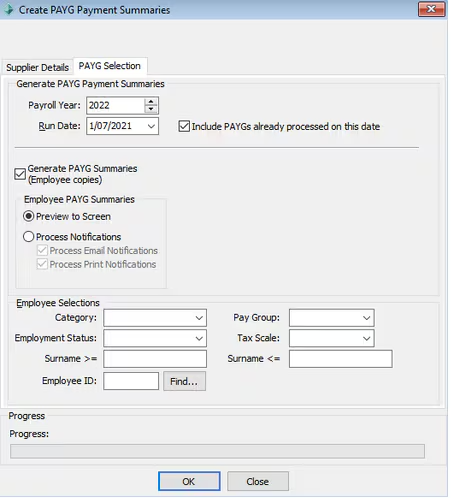
- Create PAYG Payment Summaries (payroll> print PAYG summaries)
- PAYG Selection TAB
- Insert the original run date
- Select Generate PAYG Summaries
- Then select the employee at the bottom the screen screen selector.
- Press Ok - The program will generate the PAYG Summary
Was this article helpful?
That’s Great!
Thank you for your feedback
Sorry! We couldn't be helpful
Thank you for your feedback
Feedback sent
We appreciate your effort and will try to fix the article