Summary
The new field 'GL Date' was implemented in Version 69.28 and above.
The new "GL Date" is to be used when creating a new Pay. It appears on the payroll creation screen as well as summary screens. This is the date that will be written to the general ledger when the pay is closed. The GL date is NOT submitted to the ATO and the existing pay date is still submitted.
You will also notice that when you run EFT payments the 'Process Date' field is greyed out.
Details
The reason for this change was so that you have the option of having a different posting date to your actual pay date. This change was implemented based on feedback received from our clients.
The biggest change to note is that the EFT Process date when finalising the pay is now read only. This is set when setting the Pay Date.
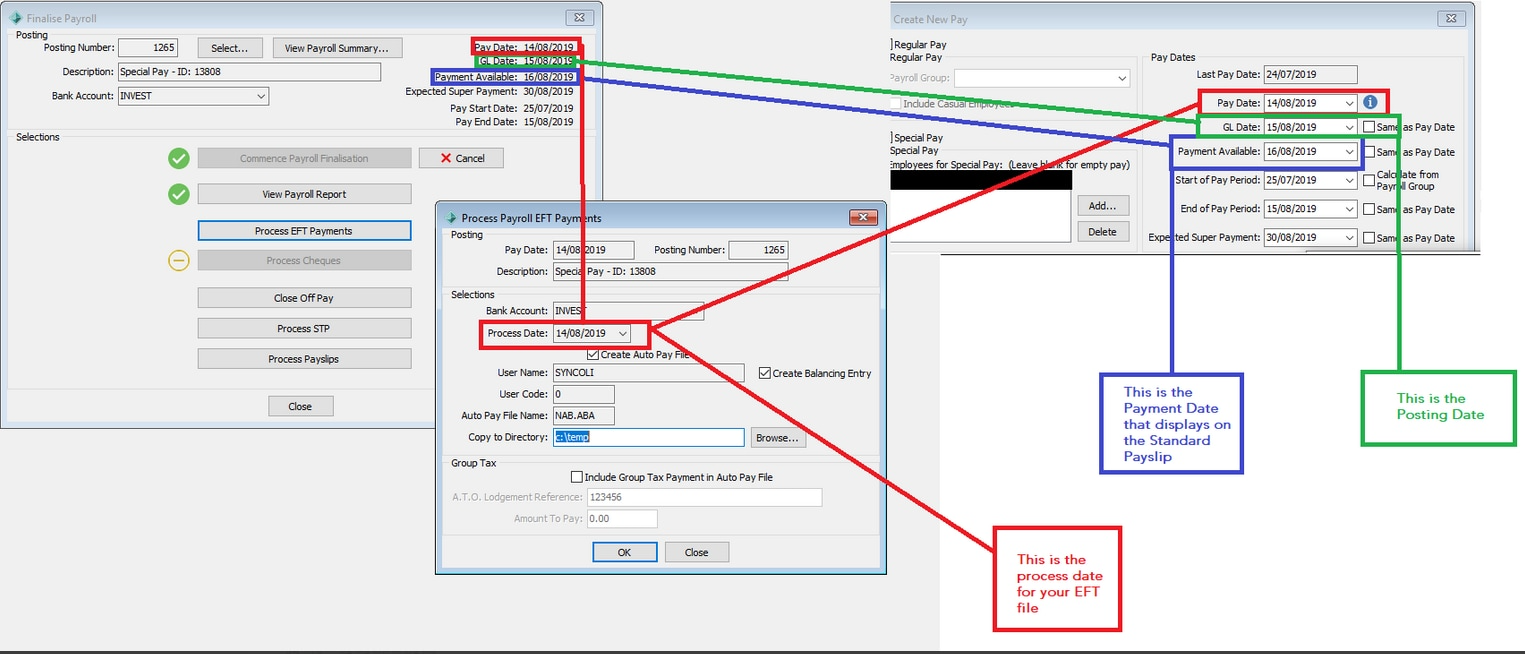
Pay Date - This is the date used for processing the EFT and the date you want the bank to pay the money. This IS the Date that is submitted as the Pay date to the ATO
Payment Available Date - This date displays on the Payslip, and is usually the date your employees expect to be paid by.
GL Date - This is now the Posting Date and is the date that is written to the General Ledger when the pay is closed off. This date IS NOT submitted to the ATO
Please see the diagram below to see how the dates link together on each screen.
Considerations
These dates need to be set when the Pay is created and can not be edited later.
Another consideration to make is, many clients choose the EFT to process a day early to ensure payment is paid on time, this will now need to be set at the start of the pay as it can not be edited during the finalisation process.
Was this article helpful?
That’s Great!
Thank you for your feedback
Sorry! We couldn't be helpful
Thank you for your feedback
Feedback sent
We appreciate your effort and will try to fix the article