Summary
Most employees elect to have their pay or salary paid into one bank account. However, you can split an employee's salary over multiple bank accounts. These split payments can be calculated as either by a percentage or by directly entering an amount. There is no limit on the number of bank accounts an employee can nominate.End Result
Employees Nett amount of pay will be divided between multiple bank accountsMethod
To set this up for the employees , please refer to the Payroll Employee maintenance> Pay Methods Tab
Use Add button to add a line and enter the bank account details in the bottom of the screen, You can use Split Percentage or Split Amount
See below Examples:
Example 1)
The employee would like that $1040 of her pay goes to the bank account 1234567
and the rest of her pay be paid to the second line bank account
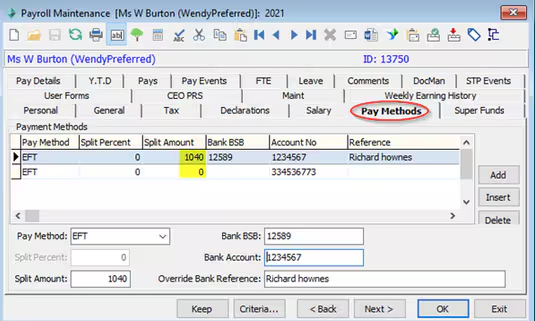
Example 2)
The employee would like that 20% of her pay goes to the first line bank account, 30% to the second and 50% to the third line.
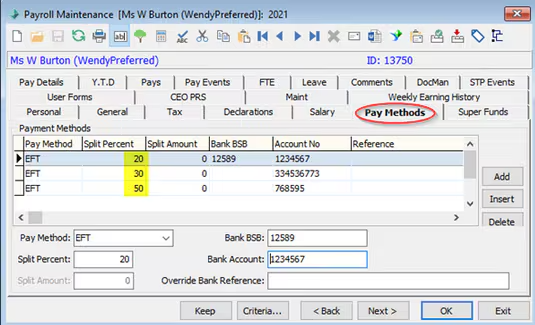
Considerations
Please note!
The order of the lines is a crucial in splitting the pay.
If you are using Percentage to split the pay between accounts the sum of all the lines must add up to 100%
If you are splitting by Amount make sure that the first line has got the split Amount and is not set to Zero, otherwise system will not be able to split the pay and the whole amount goes to the first line bank account.
Was this article helpful?
That’s Great!
Thank you for your feedback
Sorry! We couldn't be helpful
Thank you for your feedback
Feedback sent
We appreciate your effort and will try to fix the article