Summary
This article will step through what needs to be configured for leave balances to display on the employee pay slip.
End Result
Employees will be able to see the current balances for each leave type displayed on their pay slip each pay cycle.
Method
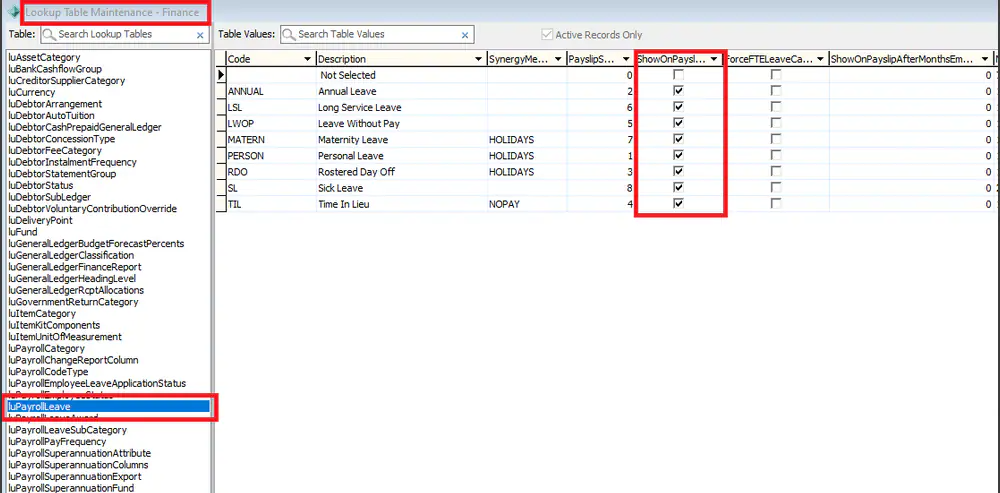
1.In System > Lookup Table Maintenance - Finance > luPayrollLeave - Tick the Show on Pay slip flag for each type of leave you wish to display
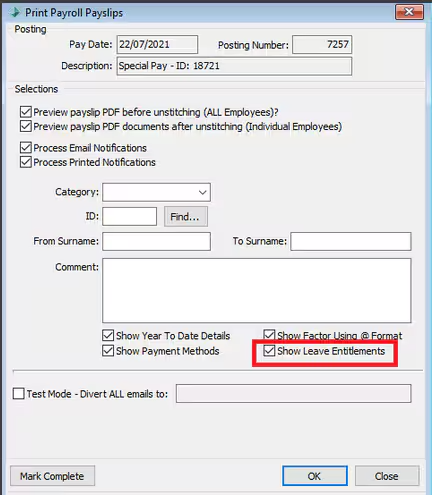
2. When processing the pay slips ensure the Show Leave Entitlements Flag is ticked.
Considerations
- If the employee does not have a leave balance entered in the Synergetic it will display 0.00.
- If your school is using a custom Pay slip the leave balances may not be included due to the formatting of the pay slip and may require further customisations.
Was this article helpful?
That’s Great!
Thank you for your feedback
Sorry! We couldn't be helpful
Thank you for your feedback
Feedback sent
We appreciate your effort and will try to fix the article