Error : Sum of transactions (value) does not equal GL control amount (value) Difference of value
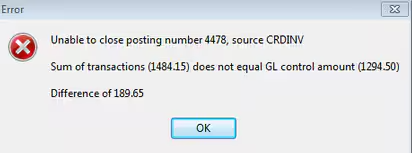
Cannot Close Off or Abandon a Creditor Posting
This error normally occurs after the Invoice Mode has been modified and then the transaction deleted; where the original Invoice Mode was originally either 'Cheque Written' or 'EFT Processed'.
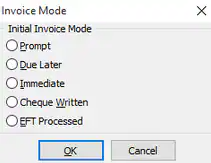
In both these instances, the invoice is considered paid, a bank transaction is created and that transaction is considered reconciled, the error is because the posting was unable to make the required adjustments to the control accounts.
Resolution
If you need to modify either a Cheque Written or EFT Processed transaction you MUST firstly delete the EFT/Cheque Date and Cheque Number.
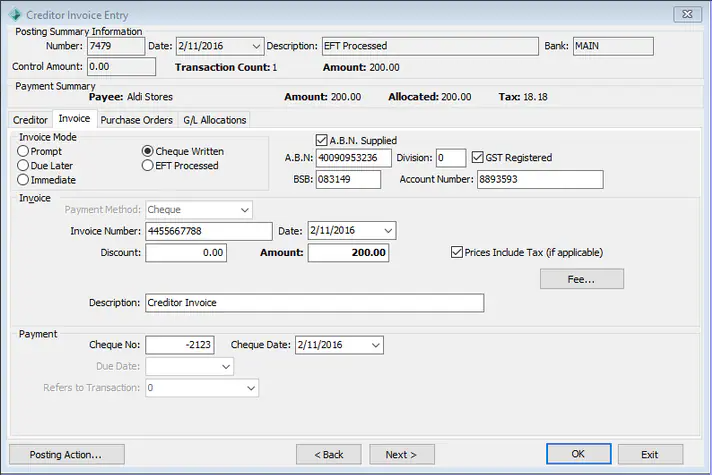
Note: In the case of an EFT Processed you will need to change it to Cheque Written to be able to do this.
If you try to close off the posting without this being done it should through a warning OR this error.
Try to modify the invoice in the posting so that both the cheque number and date are removed; noting that the invoice mode will need to be Cheque Written to do this.
If it won't close due to the above ERROR and you have attempted to fix the Invoice Mode then you may need to contact support for further assistance.
Was this article helpful?
That’s Great!
Thank you for your feedback
Sorry! We couldn't be helpful
Thank you for your feedback
Feedback sent
We appreciate your effort and will try to fix the article