Summary
How to pay creditors in instalments.
End Result
Creditors will be payed over a series of instalments
Method
This is done manually using multiple creditor invoices as there is not currently any functionality to split one invoice into multiple instalments.
Create a new Creditor Invoice Entry for each of the instalments.
- You can use the control amount $
- Invoice Mode = Use ‘Due Later’
- Invoice Payment Method = E.F.T (to recognise instalments will be through Direct Debits)
- Invoice Number = Use the creditors invoice No. and then / reference to the instalment e.g. 12345/1
- Description – as well as the description reference the instalment
- Due Date = will be the date the instalment will be Direct Debited (this will change as each instalment will have a different date according to the month it's Direct Debited)
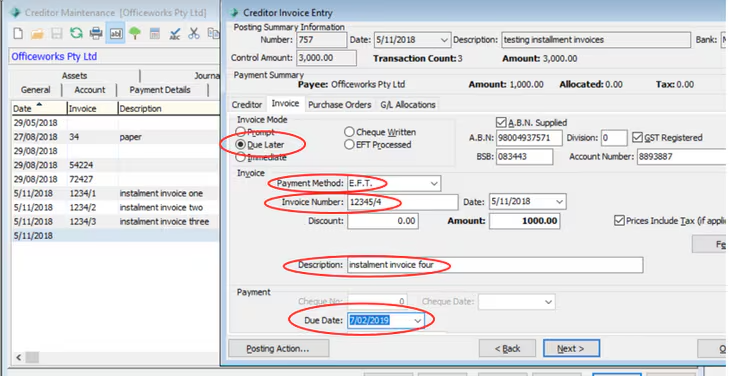
Once all instalments entered then close off
Continue through each of the payment process steps
Because instalments have been forward dated it may be best to finalise in the one day
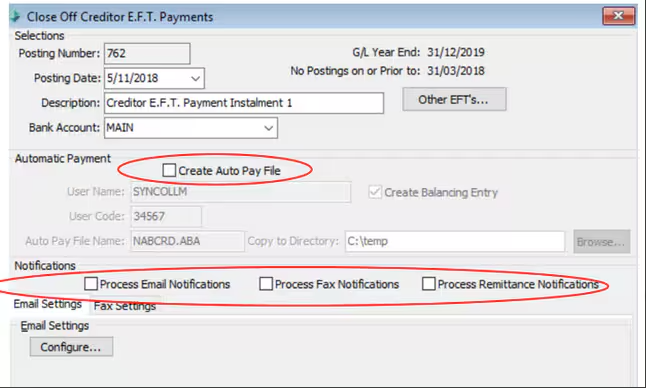
Close off the Creditor EFT Payments (to create the payment)
This process step needs to be completed for each instalment individually.
- Make sure the auto create file is unticked (don't want to create a file to upload to the bank because instalments are Direct Debits)
- And notifications are also all unticked (not required for Direct Debiting)
- As you will be forward dating for each instalment a warning will appear and you will be then required to enter ‘FUTURE’ (The person processing will require security permission)
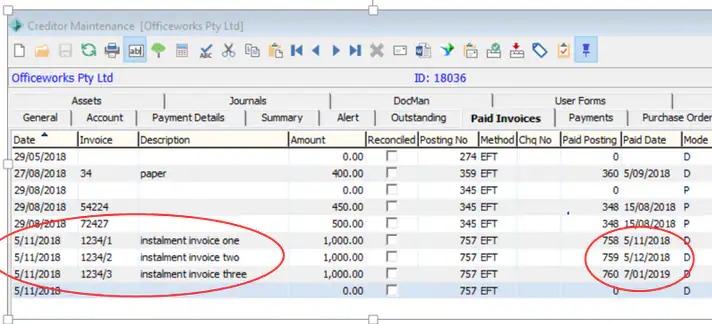
To review go to
Creditor Maintenance>Paid Invoices – shows posting date to GL for all the invoice instalments same dated and shows the Paid Date as the actual date the DD’s will be processed from the schools bank a/c
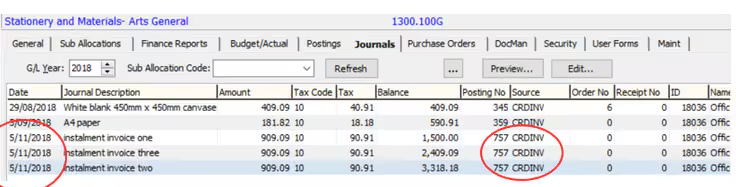
General Ledger Maintenance – The date demonstrates the original posting’s total expense has been picked up in the first month
Considerations
If the instalments will be paid over two GL Years, the new GL Year will need to be created before entering the invoices.
Was this article helpful?
That’s Great!
Thank you for your feedback
Sorry! We couldn't be helpful
Thank you for your feedback
Feedback sent
We appreciate your effort and will try to fix the article