TABLE OF CONTENTS
In the first instance, CEO Schools experiencing data validation errors on the CEVN website should get in touch with the CECV help desk for advice around what is required. |
Background
CECV schools were sent a notice on 27th July 2018 in regards to an updated validation check for Refugee students for the Census data submission due 3rd August.
As per the updated guidelines, Schools are requested to ensure that Refugee students who have become Australian citizens are not listed as holding a visa.
Synergetic Support has received a number of calls for assistance in regards to this change where schools have been receiving the below upload error from CEVN:
Student ID [XXX] – Australian Citizens no longer hold a visa. Please remove the Visa Subclass
Current Situation
Synergetic has been in contact with CECV on this matter. The general advise received thus far from CECV as a short term fix is to delete the affected students visa information, extract and submit the file, and then re-enter the visa information in Synergetic.
Synergetic suggests that alternatively, schools could first ensure the affected students have their International history recorded in Synergetic correctly (see below), submit and see if the error is fixed.
Subsequent Error
If you receive a subsequent error on the CEVN website as 'Refugee (Now or in the last 7 years)' due to the Refugee flag being ticked under the 'Flags' tab in Synergetic, Schools can choose to:
- Directly adopt the CECV advice as a first solution, or alternately
- First try ensuring their former refugee students International data is correctly recorded, if the error is still encountered then adopting the CECV advised solution.
Based on the feedback received thus far, it is highly likely that you will receive the 'Refugee (Now or in the last 7 years)' subsequent error when submitting the file to the CEVN website. If you encounter this, as a workaround we recommend you untick the Refugee Flag, submit and then re-apply it again. Reminder you can use Tag Lists and Bulk Set Active Field Value when doing this. |
If you still encounter errors during the upload, we advise that you contact CECV helpdesk directly. |
Recording Citizenship History
Below we outline how a refugee student who becomes an Australian citizen should be recorded in the system.
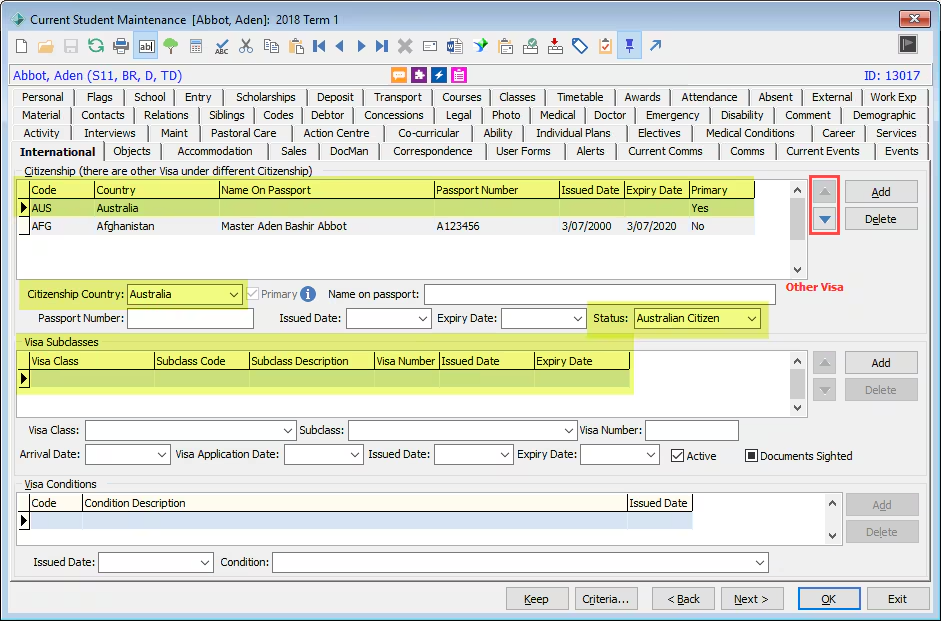
In the Student’s International tab, where a former International Student is now an Australian citizen, there will be a row for each Citizenship the student held. The top row is the latest and current citizenship, as this is the Australian citizenship row, this does not have a visa row associated with it.
Students > Current Student Maintenance > International
For a student who was formerly not an Australian Citizen but has been granted Citizenship recently, ensure the International tab > Citizenship panel has a top row of Australian citizen, with no attached Visa row. To do this, click the <Add> button to the right of the Citizenship panel, complete the data entry on the row, and ensure the new row is promoted to be the top row using the arrow buttons on the right of the grid.
Configuration
You may also want to check that your configurations around Citizenship are correct:
Configuration File Maintenance
System > Configuration File Maintenance
System | Default | CitizenshipStatus
CDA Comment: This key is used for CEOVIC for what to use as the default Citizenship Status. This is only used at export time.
Code | Description |
Not Selected | |
AC | Australian Citizen |
EX | Exchange Student |
RS | Permanent Resident |
TR | Temporary Resident |
Lookup Table
System > Lookup Tables Maintenance > luCitizenshipStatus
Code | Description | ActiveFlag | ExternalSystemType | ExternalSystemCode |
Not Selected | TRUE | |||
AC | Australian Citizen | TRUE | CEOVIC | AC |
EX | Exchange Student | TRUE | CEOVIC | EX |
RS | Permanent Resident | TRUE | CEOVIC | PR |
TR | Temporary Resident | TRUE | CEOVIC | TR |
For CECV schools, the ExternalSystemType should be CEOVIC.
Was this article helpful?
That’s Great!
Thank you for your feedback
Sorry! We couldn't be helpful
Thank you for your feedback
Feedback sent
We appreciate your effort and will try to fix the article