Summary
Permissions are based on the constituency the ID is in.
This will restrict users from being able to see records of people within a specific constituency, For example, they have permission to community but you don't want them to see @STF records. Please be aware this is not an exact science, For example if restricting @STF, but they are also an @PC or @SP etc, unfortunately these won't work meaning if the @STF is a @PC etc as well then they will be visible in community maintenance.
Method
If you want to restrict the access on a constituency level, you need to do the following :
1. In the lookup table - luconstituency, change the synergy meaning of the constituency to Group.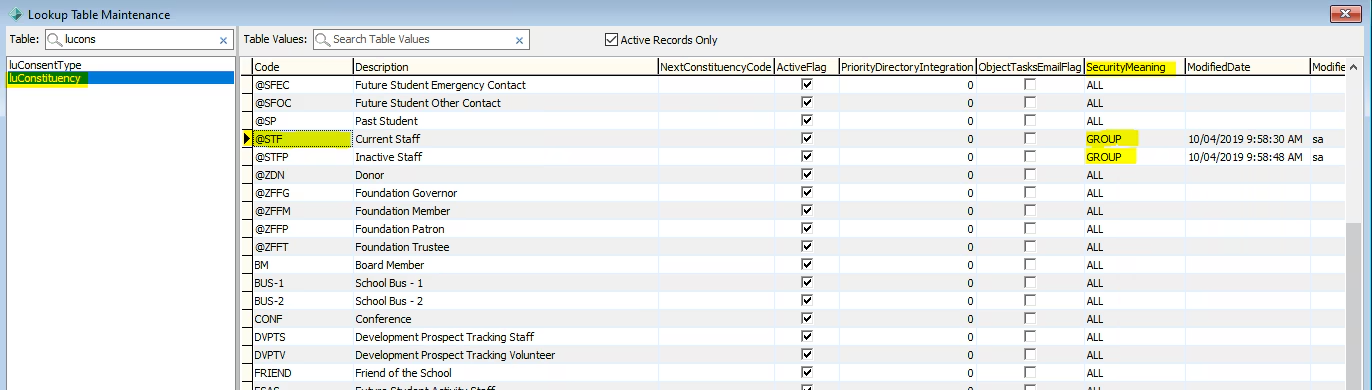 2. You'll be able to control access to constituencies with a Synergy meaning of "Group" from Group/User Security Maintenance.
All other groups will not have this ticked (this is the default).
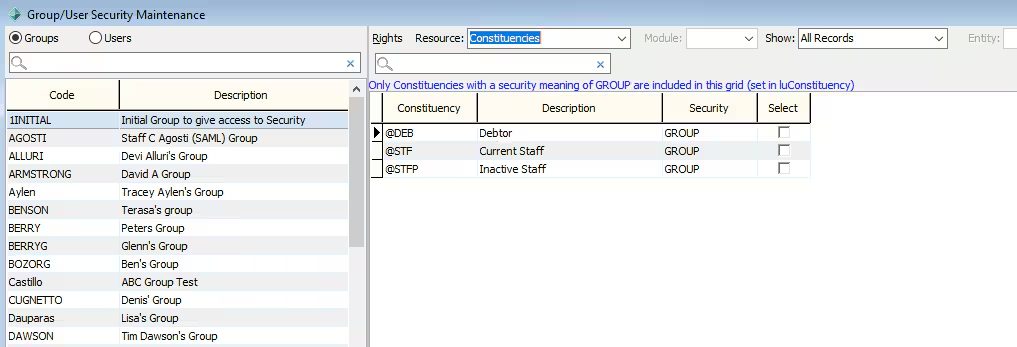
3. On Group/User Security Maintenance, you can select the Resource drop down list at the top of the window and Specify whether the group can view that constituency or not.
Considerations
Before setting this up please consider all circumstances as to why someone may be a part of a specific constituency. An unexpected person in the constituency may lead to them having permissions you did not want to grant.
Before setting these permissions is it also recommend you review System-assigned Constituencies
Was this article helpful?
That’s Great!
Thank you for your feedback
Sorry! We couldn't be helpful
Thank you for your feedback
Feedback sent
We appreciate your effort and will try to fix the article