Summary
This article explains how to set up the layout and formatting for a default communication in the Communication Module using the Communication Type
End Result
The default layout will be set ready to use in Communication Maintenance each time a Communication is sent.
Method
1.Go to Development > Communication Types Maintenance > Add - Fill in the default requirements for your communication type
2.Select the Default Email Notification Layout... Button
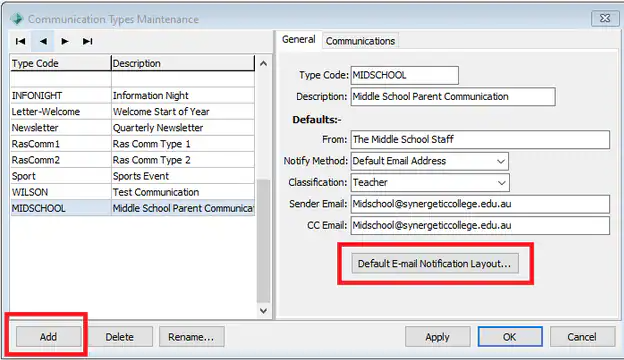
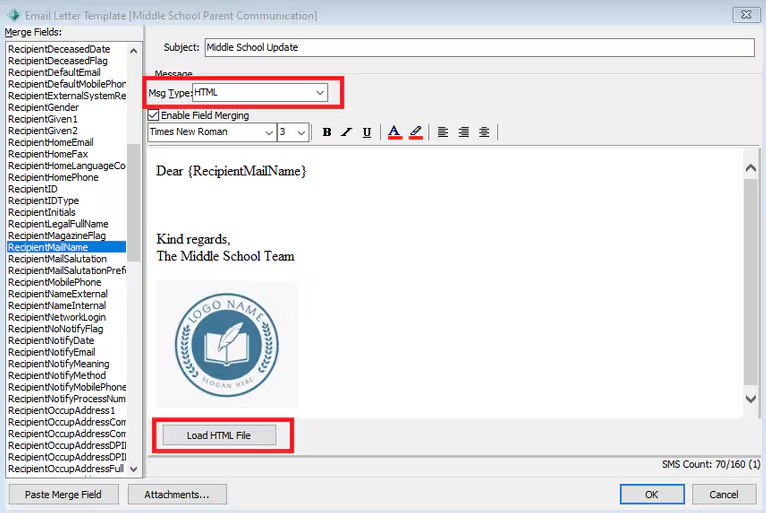
3. In the Notification Layout Editor Window you can select to work in either Plain Text or HTML, Add Merge fields - There is also an option to load a HTML file if you have one
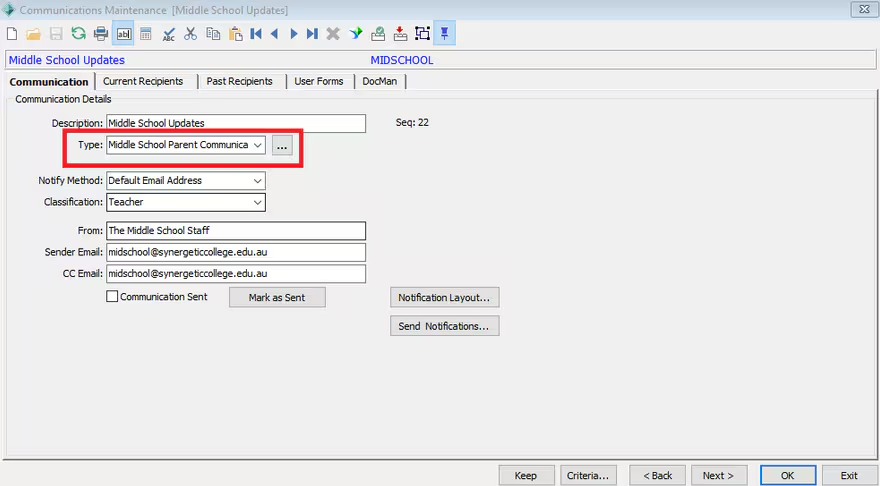
4. When you are ready to send out an email using that template go to
Development > Communication Maintenance > Select Communication and Update the Type to the newly created Type
You can use this type on pre-existing Communications or create a new communication specifically to match the type.
Considerations
You may wish to limit users who can update the Communication Types -
This can be done via System --> Group User Security - DEV | CommunicationTypes | Maint
Was this article helpful?
That’s Great!
Thank you for your feedback
Sorry! We couldn't be helpful
Thank you for your feedback
Feedback sent
We appreciate your effort and will try to fix the article