TABLE OF CONTENTS
Summary
With STP 2 the Working Holiday Maker HRXX tax scale will require some additional details to be set up on your Synergetic before it can be ATO compliant.
The main points being
- having a country code for the home country of the employee
- an income stream for the employee and pay code
- the use of a Tax adjustment pay code to determine the tax amount of the pay run.
Note: for Working Holiday Maker there are 3 tax scales:
- HFXX (No TFN) which uses a manual pay line of 45% for all salary amounts
- HUXX (School has not registered with ATO to withhold at working holiday maker tax rates) which uses the foreign resident rates as specified in the tax tables - system will auto calculate the withholding
- HRXX (School is registered) which means that the school must manually insert pay line and there are (currently as of 24/25 payroll year) 4 bands 15%, 30%, 37% and 45%. A pay code would be required for each of these if you use the factor method or 1 pay code with manually entered amounts. The pay code used for the tax adjustment must be updated or switched when the employee would reach the income threshold of their current year to date bracket and would move to the next year to date bracket.
All these pay codes can use the setup steps as they need WHM for income stream but only HFXX and HRXX needs the pay codes for tax adjustment.
- Video: WHM_HRXX_TaxSummary.mp4
Method
Setup
- Within luCountry (Lookup Tables Maintenance), for any countries that you will be reporting on. Ensure the ISOCode is populated

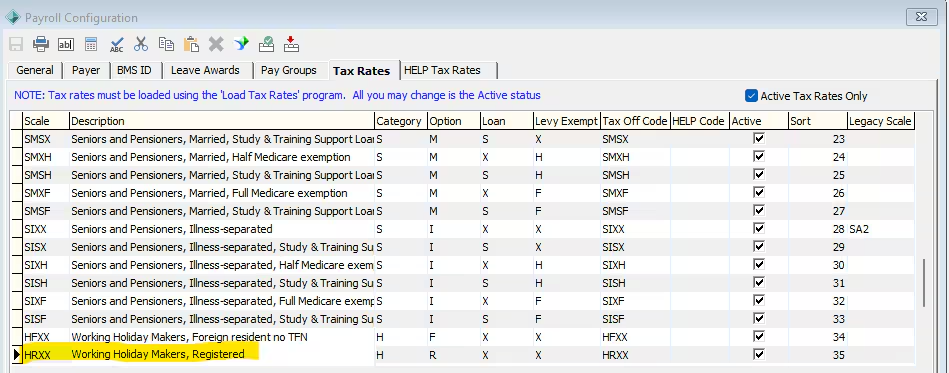
- Payroll Configuration Maintenance > Tax Rates tab. Note that there should be Scales beginning with ‘H’
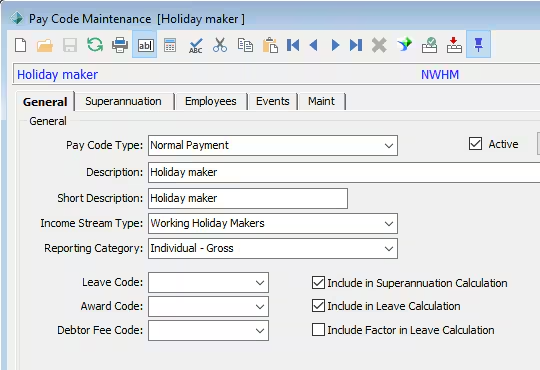
- Pay Code Maintenance. Ensure you have working holiday maker codes with the appropriate ‘Income Stream’ and ‘Reporting Category’
- NOTE: You may need to create multiple pay codes. E.g. If you have Salary and Wages income stream and Working Holiday Maker income stream employees and both use pay code NSP09 then you would need to make this into 2 pay codes such as NSP09 and NSP092 to have old one for Income Stream Salary and Wages and new one for Working Holiday Maker.
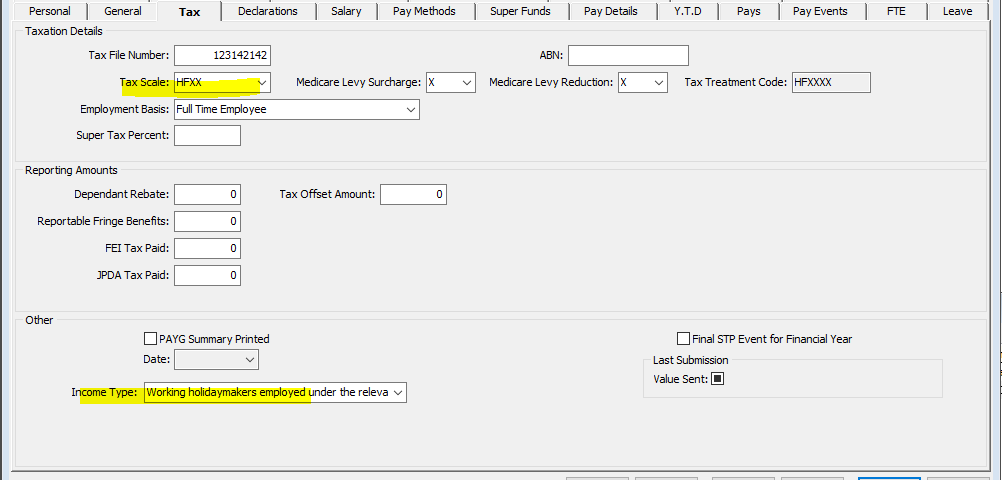
Within Employee Maintenance > Tax tab
- Select the appropriate ‘Tax Scale’ (i.e. the ones beginning with H)
- Select the most relevant ‘Income Type’
- Note: Some pay code Types do not need Income Stream such as Superannuation and some Deductions so these can be used for any employee and don’t need changing for WHM.
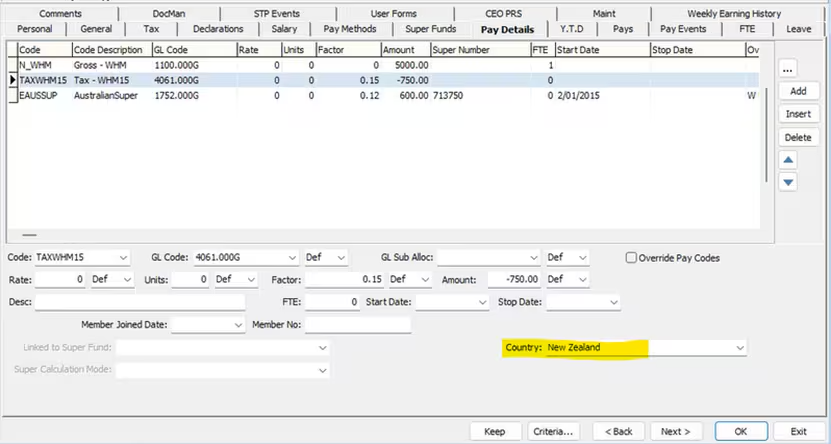
- The following may be located/maintained within Employee Maintenance > Pay Details tab, and/or Current Pay Maintenance > Detail tab. If you have added a WHM code a Country field will appear for you to populate
Tax Scale
Due to the ATO not providing weekly taxable amounts, Synergetic Payroll does not currently have a way to automatically calculate whether the Working holiday maker pay run would be using the tax scale of 15% (used for annual amount of $0 to $44,999 in 2024/25 payroll year) or the next threshold of 30% (used for annual amounts of $45,000 to $134,999 in 2024/25 payroll year) which means that a Tax Adjustment pay code would need to be made and the tax amount added manually for the pay runs.
- For the Tax Withholding you will need to create 4 pay codes by going to Pay code Maintenance > Create a Pay code for Tax Adjustment - Working Holiday with an income stream of Working Holiday Maker. The reason for making 4 is so you have one for each tax threshold percentage (see picture a few steps down) so as of 2025 year you would have for 15%, 30%, 37% and 45% pay factors (written as 0.15)
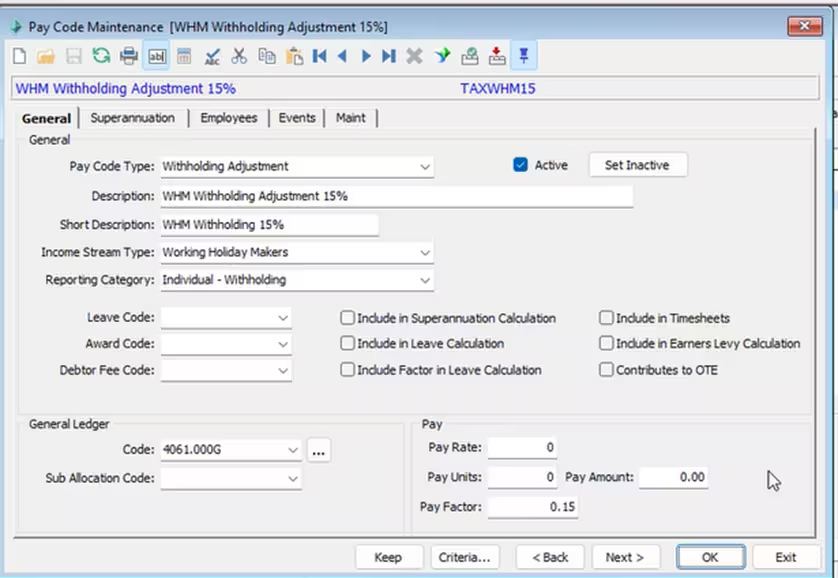
- You would need to apply this Tax Adjustment pay code to each pay run that the WHM employee has (either manually or in pay details in Employee Maintenance) until the employee is no longer on the HRXX tax scale
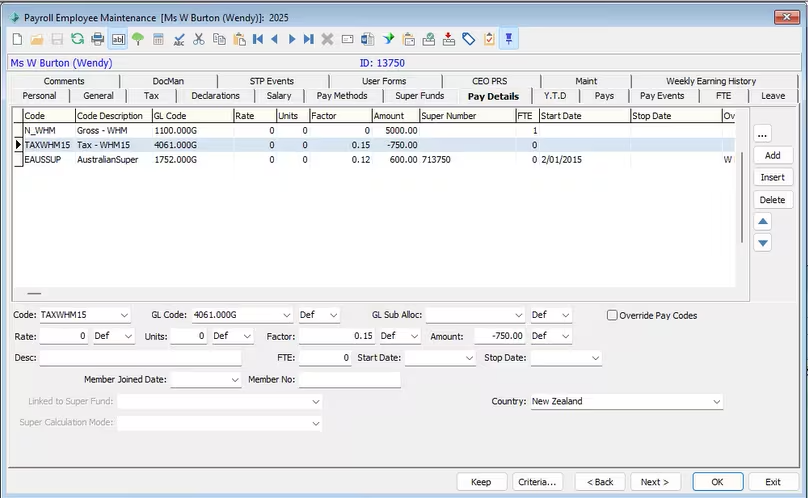
- The pay factor on the pay codes should auto calculate a percentage of any pay codes entered on a line above the Tax Adjustment pay code in the pay details/current pay page
- You can check the YTD amounts of the employee by going to Employee Maintenance > setting the tax scale to HRXX and checking the YTD tab for the employees listed or check the employees figures on a report like the payroll summary report
- Each threshold is for the current year to date amount this employee has earned, see ‘ATO WHM Tax Table’
*** website link to ATO https://www.ato.gov.au/tax-rates-and-codes/schedule-15-tax-table-for-working-holiday-makers
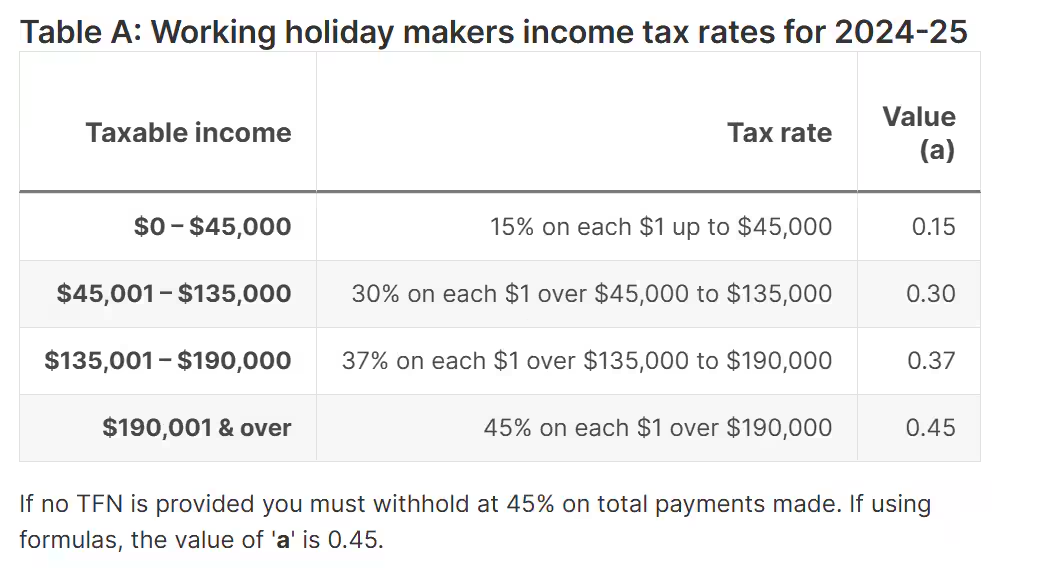
Note: for a pay run when you reach and exceed a threshold you would need to check the ATO website (above) for how the ATO wants the pay taxed.
Was this article helpful?
That’s Great!
Thank you for your feedback
Sorry! We couldn't be helpful
Thank you for your feedback
Feedback sent
We appreciate your effort and will try to fix the article