TABLE OF CONTENTS
Issue
Sometimes an employee needs to have a specific tax rate (eg 10%) applied to their income instead of the standard tax rates.
Resolution
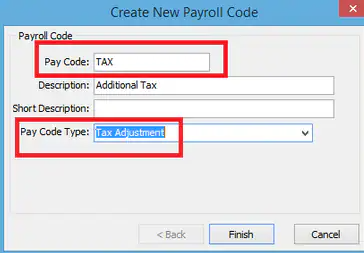
First of all, you MUST have a pay code set up in Payroll Code Maintenance which has a Pay Code Type of 'Additional Tax'. For this example, let's call the pay code 'TAX'
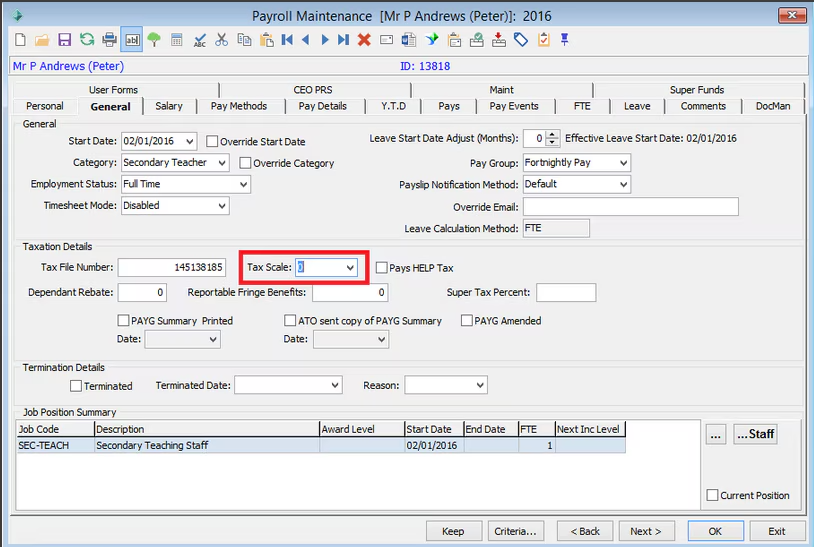
In Payroll Employee Maintenance now. On the 'General' tab give the employee the Tax Scale of 0 - No Tax paid.
The next step is to go to the 'Pay Details' tab, insert the pay code 'TAX' (code used from the above example) and set the factor to the tax percentage paid, eg if paying 10% tax then set the factor to 0.1.
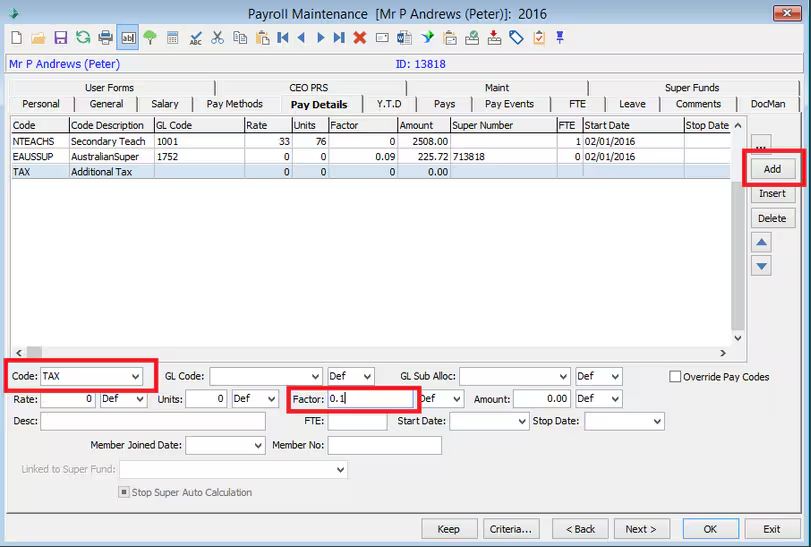
This figure will apply to every dollar earned, there is no threshold before it kicks in. It will calculate the sum of all normal pay, salary sacrifice and taxable allowances that appear before it.
This tax figure will then be recorded against the employees summary tax figures, which will then be reported on PAYG summaries.
Was this article helpful?
That’s Great!
Thank you for your feedback
Sorry! We couldn't be helpful
Thank you for your feedback
Feedback sent
We appreciate your effort and will try to fix the article