The Adobe Acrobat extension can cause issues when it intercepts traffic and redirects it causing the following issue in SynWeb.
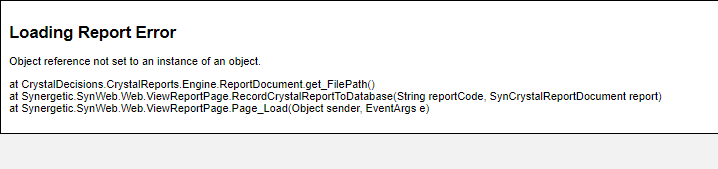
Loading Report Error Object reference not set to an instance of an object. at CrystalDecisions.CrystalReports.Engine.ReportDocument.get_FilePath() at Synergetic.SynWeb.Web.ViewReportPage.RecordCrystalReportToDatabase(String reportCode, SynCrystalReportDocument report) at Synergetic.SynWeb.Web.ViewReportPage.Page_Load(Object sender, EventArgs e)This is due to to Cross-Origin Read Blocking in the browser.
Synweb renders the report in its local temp file. Usually C:\windows\temp on the server. It then displays it on screen. If you attempt to open the file in Acrobat, it attempts to open the file from the path C:\windows\temp\ on your local computer. It clearly does not exist there!
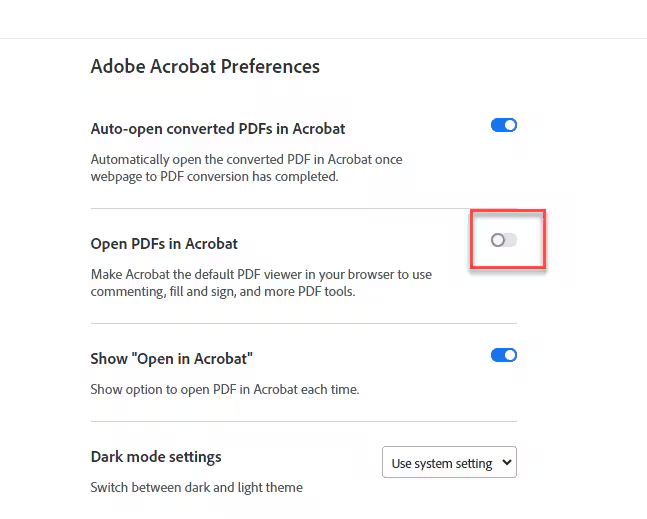
There is no need to disable the Adobe extension, however to mitigate this you will need to toggle the Open PDFs in Acrobat setting in the extension.
Was this article helpful?
That’s Great!
Thank you for your feedback
Sorry! We couldn't be helpful
Thank you for your feedback
Feedback sent
We appreciate your effort and will try to fix the article