Overview
The ACT Board of Senior Secondary Studies (ACTBSSS) is a statutory authority responsible for the certification of senior secondary school studies in government and non-government schools in the Australian Capital Territory.
BSSS collect Year 11 and 12 student data within the first two weeks of an assessment period (generally a semester).
The BSSS data submission process is different to most other data submission processes.
Normally the submission owner (eg State Gov) will define a data template that the school must populate with their data and upload to the submission owner, generally through a portal of some description. Where a Synergetic solution has been provided, the school will use this Synergetic functionality to produce populated templates for this upload.
ACT BSSS does not do this. Instead, they access the school’s database and gain the data directly. They produce a custom or tailored SQL solution for each school that will draw the data from that school for them.
In the case of Synergetic there are a number schools where the data transfer between the school and ACT BSSS has been developed without the involvement of Synergetic developers and these solutions are custom and not supported by Synergetic.
There is a Synergetic delivered Off The Shelf solution. For this the school populates a set of “transfer” tables designed and built to BSSS specification within the official Synergetic solution. The school initiates the population of these tables via functionality in the Student Data Import/Export area of Synergetic. ACT BSSS then access the tables and extract the data they require.
BSSS tab and tables
Use the BSSS tab to provide data to the BSSS (ACT Board of Senior Secondary Studies) for the following exports:
export students
export student classes
export student addresses,
Unlike other exports, no output files are created. Instead, processing each export populates a table in the Synergetic database. BSSS connects to this table and extracts the data.
Export file | Destination table name |
|---|---|
export students | xeACT_ST_XFR |
export student classes | xeACT_STMA_XFR |
export student addresses | xeACT_Student_Address_XFR |
Opening the BSSS tab
To open the BSSS tab:
Select Module > Students > Student Data Import/Export from the main menu.
The WA SCSA tab of the Import/Export Student Data window is displayed.
Tip: You can also access the student import and export functions by clicking
Click the BSSS tab.
The BSSS tab of the Import/Export Student Data window is displayed.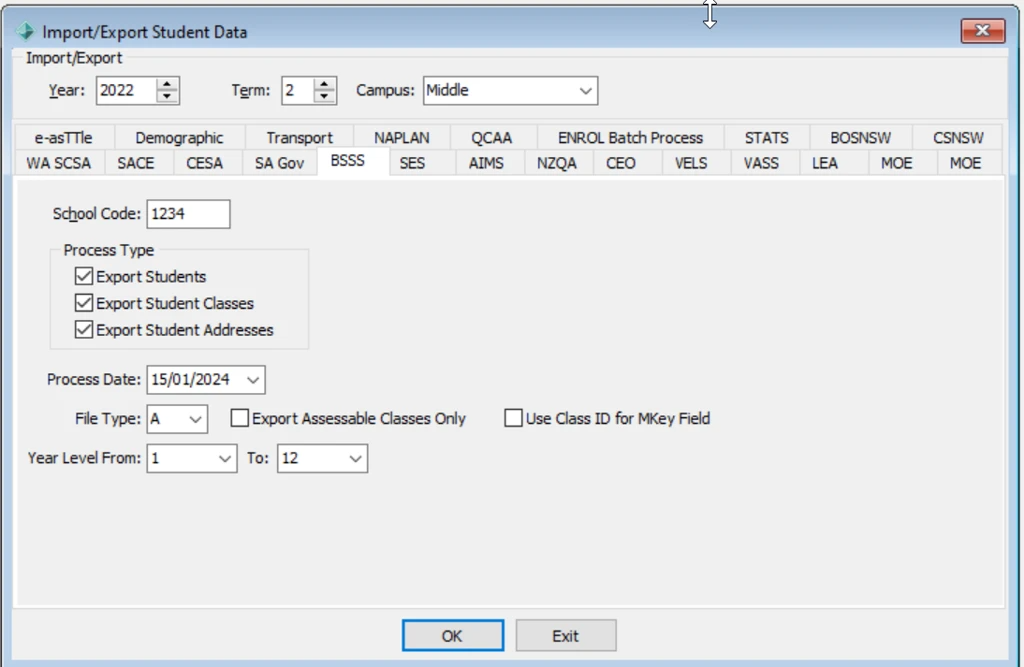

Import/Export Student Data - BSSS tab key fields
Field | Description |
|---|---|
School code |
BSSS school code for your organisation. |
| Process Type | Click any of the process type below to view configuration details: |
| Process Date | Date of the import or export. |
| File Type | Type of classes to be exported. For example:
|
| Export Assessable Classes Only | Select to restrict the export of student classes to those that are assessable. |
| Use Class ID for MKey Field | Select to determine how MKey is populated
|
| Year Level From / To | Year levels to export. |
Was this article helpful?
That’s Great!
Thank you for your feedback
Sorry! We couldn't be helpful
Thank you for your feedback
Feedback sent
We appreciate your effort and will try to fix the article