This page contains reported attendance marking errors and possible fixes
1.ERROR
Receiving below error when marking attendance (After selecting Submit)
Cannot insert the value NULL into column 'AttendanceMasterSeq', table 'SynergyOne.dbo.tAttendances'; column does not allow nulls. INSERT fails

Possible solution
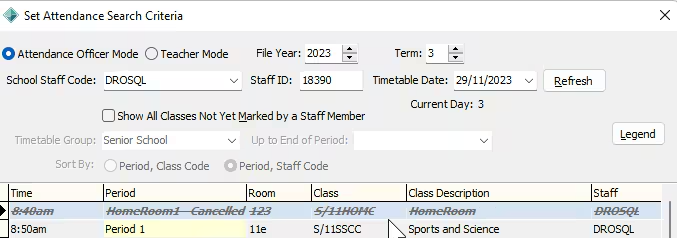
The most common reason is the attendance has been marked or cancelled in a previous Term for that attendance date.
ie. If the current FileYear semester is 2024/Term4 switch to 2024/Term3, Term 2 or Term 1
Confirm there have been no attendances classes marked/cancelled in an incorrect Term
2.ISSUE - Attendances not saving for some staff
Staff is marking attendances however they are not saving when refreshing attendance maintenance
This often happens at the beginning of a new term after term rollover
The cause is the logged in user has not rolled over their term settings to the new term
ie - Current Term/Semester is 2024 Term4, The user is still set to 2024 Term3 and marking attendances in that term . They attempt to mark attendances they will be saved in the previous term
Possible solution
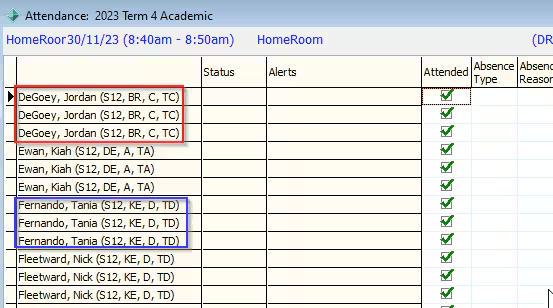
The fix is to switch to the previous term and you will see multiple attempts
- Unsubmit attendances from the previous Term
- Submit attendances from the current Term
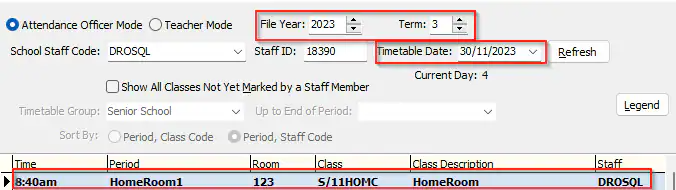
multiple attendance attempts showing.
Was this article helpful?
That’s Great!
Thank you for your feedback
Sorry! We couldn't be helpful
Thank you for your feedback
Feedback sent
We appreciate your effort and will try to fix the article