TABLE OF CONTENTS
Summary
This article summarises how to reflect a bounced Debtor Direct Debit Receipt into Synergetic
End Result
The amount of Direct Debit Receipt will be charged back in to the Debtor's accountMethod
Once Direct Debit is processed the Posting will automatically be created and closed off , Follow below steps to reverse a specific receipt:
- Go to Debtors> Cash Receipt Entry
- Select the Past Postings radio button, choose the Direct debit posting with a bounced receipt and open the posting.

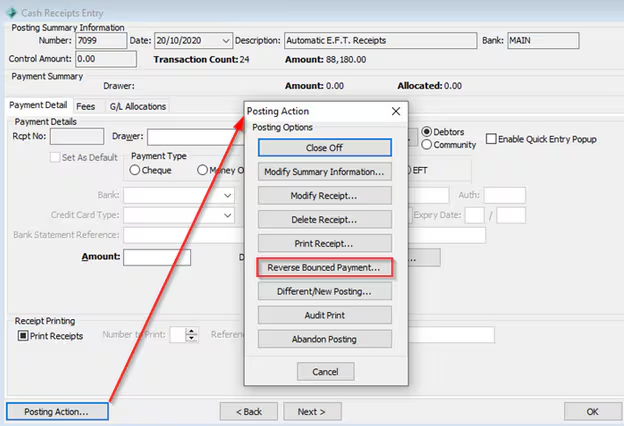
- Click on Posting Posting Action and select Reverse Bounced Payment.
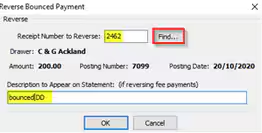
- In Reverse Bounced payment screen enter the receipt number or find the Debtor ID via Find button and enter a description to reflect the action.
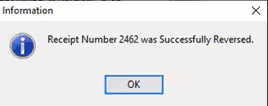
- System will prompt you with a message that the receipts has been reversed. Click OK.
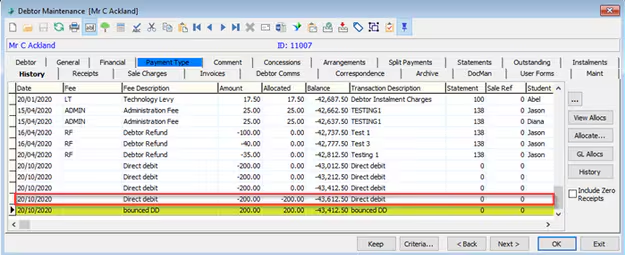
- The receipt will be charged back to the Debtor account in History Tab.
- Close the posting off again
The source of the reversed payment will also be the RECDEB within the same Posting number.
Was this article helpful?
That’s Great!
Thank you for your feedback
Sorry! We couldn't be helpful
Thank you for your feedback
Feedback sent
We appreciate your effort and will try to fix the article