TABLE OF CONTENTS
Summary
This article explains how to create and Sundry debtor and link them to a specific sub ledger.
End Result
You will have a debtor that you can invoice without having them linked to a student.
Method
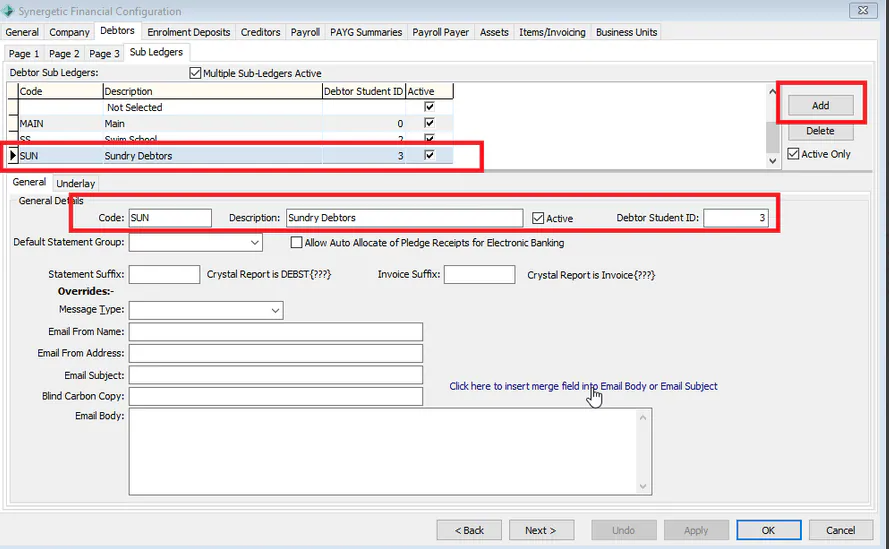
- Go to System> Finance Configuration > Debtors Tab > Sub Ledgers (Tab)
- Create a Sub ledger and Student ID number for the Sundry Debtors
If they don't already exist create a Community Record for the Sundry Debtor.
- Go to Debtor Maintenance
- On the Criteria screen, click 'New'
- Create a new Debtor record using an existing Community ID
- In the create Debtors screen use the Sub ledger created for Sundry Debtors
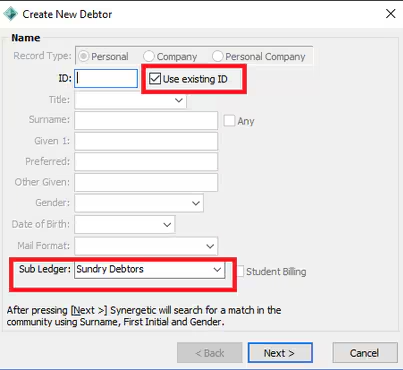
The Results will be a debtor with a Sundry debtor and will display as 12345/3 - where the /3 is referencing the Sub Ledger selected.
Considerations
You will need to consider if this debtor also needs to exist for the purpose of being linked to a student account as well.
Was this article helpful?
That’s Great!
Thank you for your feedback
Sorry! We couldn't be helpful
Thank you for your feedback
Feedback sent
We appreciate your effort and will try to fix the article