TABLE OF CONTENTS
Summary
How to add a generic .pdf to Debtor Statements when these are emailed out to debtors
End Result
A generic PDF will be sent to all debtors with their statements
Method
You can use the Underlay process to attach a .pdf to your emailed statements. The .pdf can be added as a header (ie added before the statement) or a footer (ie added after the statement).
Underlays are set up under SYS -> Finance Configuration -> Debtors -> Sub Ledgers -> Underlay
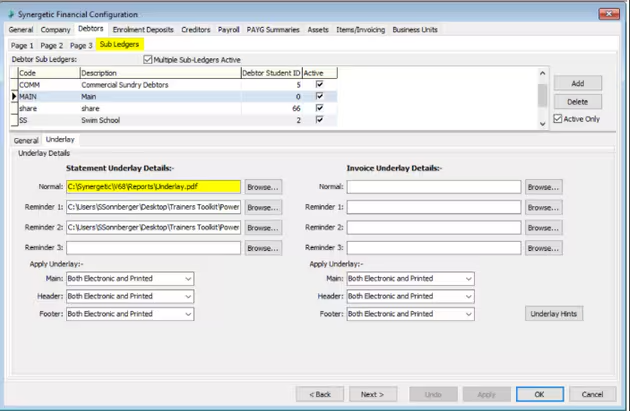
In this section there is an Underlay Hints button which will bring up the following information
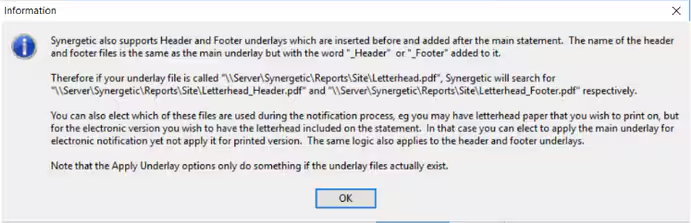
You can have more than one grouping of underlay documents eg: Underlay, Underlay_Header, Underlay_Footer and Letterhead, Letterhead_Header, Letterhead_Footer which can be applied as required.
If for example you are wanting just a Underlay_Footer which contains your schools terms and conditions you will need the following PDF files
- statementunderlay.pdf
- statementunderlay_Footer.pdf
The statementunderlay.pdf can be blank if you wish the main statement to have a blank underlay but the file itself must be there for the Footer to work.
Considerations
The information you provide on this PDF will be automatically sent to all debtors with their statements
Was this article helpful?
That’s Great!
Thank you for your feedback
Sorry! We couldn't be helpful
Thank you for your feedback
Feedback sent
We appreciate your effort and will try to fix the article