TABLE OF CONTENTS
Summary
When a community Member has two ID's and needs to be merged into one first the debtor records need to be merged within the Debtor Module.
End Result
There will be one Debtor ID for the Community Member
Method
Before completing the merge you should consider if you need to keep all transaction history separate or if the history can also be combined.
Option 1 - Keeping Debtor history separate
If you wish to keep the history of all of the activity that occurred against the debtor separately then the process would be:
1. Create a charge against the new debtor
2. Create a negative charge against the debtor you wish to remove.
Most schools will have some sort of 'Transfers' type Fee Code setup for this purpose where the linked GL code is a clearing account as the net result will be 0.
You can then complete the merge
Option 2 - Merge history
The alternate option if maintaining a separate history of transactions is not needed would be to merge the debtor (which includes all transactions) into the new debtor. This is done using the steps below to complete the merge.
Then complete the merge by following the steps below:
1. Access DEBTORS > DEBTOR MAINTENANCE
2. Search for the relevant debtor
*The Debtor you select from the Grid is the one that gets removed and the process will merge all transactions into the one debtor.
3. Right click on their name within the grid and select the option 'Rename/Merge...'
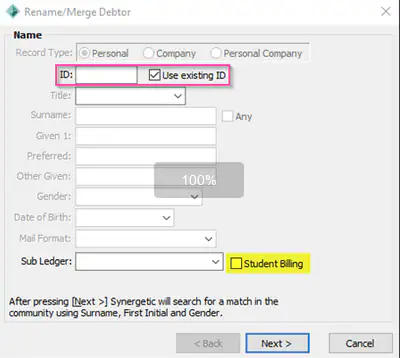
4. Either enter the details of the debtor which you wish to merge this debtor record into or tick the 'Use existing ID' if you already know their Synergetic ID
Note! Make sure to un_tick the Student Billing check box in the Rename/Merge Debtor screen
Considerations
-If you are conducting the merge because the original debtor has passed away you will need to make additional considerations such as who is taking over the responsibility for remaining charges
IMPORTANT - Once you merge records, you cannot unmerge them. Please verify carefully before merging.
Was this article helpful?
That’s Great!
Thank you for your feedback
Sorry! We couldn't be helpful
Thank you for your feedback
Feedback sent
We appreciate your effort and will try to fix the article