This is only valid if your luSchool lookup table is using the ACARA ID as the code. If this is not the case, please speak to the Synergetic consulting team for further information. |
Download the Excel version of the list with the required parameters (ie. State) from https://asl.acara.edu.au/School-Search
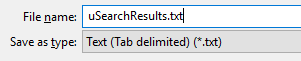
Prefix the name with a 'u' and save this as Text (Tab delimited)
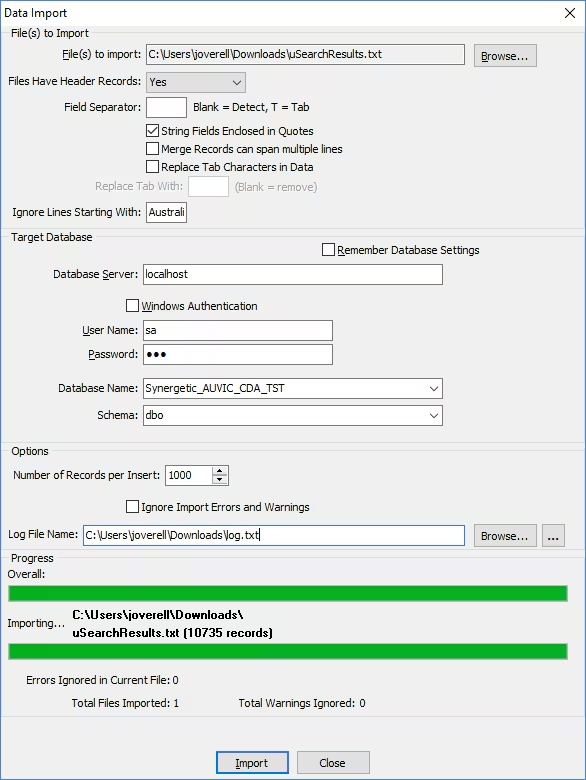
Use the Data Import Tool to import this into your database using the following configuration as an example.
Once the data has successfully imported, you can make the necessary updates or additions as required.
These are example scripts only. |
-- UPDATE OPEN/CLOSED SCHOOLS
-- ==========================
SELECT sr.*
-- UPDATE dbo.luSchool SET ActiveFlag = CASE WHEN sr.Status = 'Open' Then 1 ELSE 0 END
FROM dbo.uSearchResults sr
INNER JOIN dbo.luSchool sc
  ON sr.[ACARA ID] = sc.Code
WHERE sc.ActiveFlag <> CASE WHEN sr.Status = 'Open' Then 1 ELSE 0 END

-- INSERT ADDITIONAL SCHOOLS
-- ========================
SELECT
-- INSERT dbo.luSchools (Code, Description, Suburb, State, PostCode, ActiveFlag) SELECT
  sr.[ACARA ID],
  sr.[School Name],
  sr.Suburb,
  sr.State,
  sr.PostCode,
  ActiveFlag = CASE WHEN sr.Status = 'Open' Then 1 ELSE 0 END
FROM dbo.uSearchResults sr
WHERE sr.[ACARA ID] NOT IN (SELECT Code from dbo.luSchool)

-- DROP THE TEMP USER TABLE
-- ========================
DROP TABLE dbo.uSearchResults
Was this article helpful?
That’s Great!
Thank you for your feedback
Sorry! We couldn't be helpful
Thank you for your feedback
Feedback sent
We appreciate your effort and will try to fix the article