TABLE OF CONTENTS
TL;DR
Reports with photos and those that run from stored procedures historically have had issues when using TLS1.2 and required schools to use the vulnerable TLS1.0 protocol.
Changes introduced with 71.05 have aloowed us to have a more secure platform, but may need the latest Microsoft SQL Server Native Client installed. Please raise a ticket with our support desk if you have any concerns.
Current Behaviour
Before the changes introduced by this change, Synergetic worked as follows:
SynMain
The SQL Server Driver that is shipped with Windows was upgraded in October 2022 to support TLS1.2. If a school has System|ODBC|AllowTLS1.2Support set to False and the newer Windows SQL Server driver is present then the reports with TLS1.2 will actually work whereas they will not work properly with AllowTLS1.2Support set to True, as in this case SynMain will use the ODBC Driver which will have the photo and stored proc issue.
SynWeb
If the config key SynWeb|Reports|Driver|SupportTLS1.0Flag is set to True then the available SQL OLEDB Driver (SQLOLEDB) is used to connect to SQL Server to retrieve the data for Crystal Reports. Note that this driver will not work with anything but TLS1.0. If this key is set to False then SQL Server Native Client Driver (SQLNCLI11) is used. SynWeb does not use any ODBC entries as SynMain does.
Synergetic Service Suite
It does the same as above but uses the setting of SynServiceCrystalEnabledTLS10 from \SynergeticServices\Site\Default\Config\SynergeticServiceSuite.xml
New Behaviour
SynMain
Microsoft updated the SQL Server driver that comes with Windows 10 to support TLS1.2 in October 2020. See https://support.microsoft.com/en-us/topic/october-20-2020-kb4580390-os-build-17763-1554-preview-ac4799c9-838f-8665-a968-0f19b6cb1049
This driver works successfully with Crystal Reports that contain photos and reports that inject SQL where clauses.
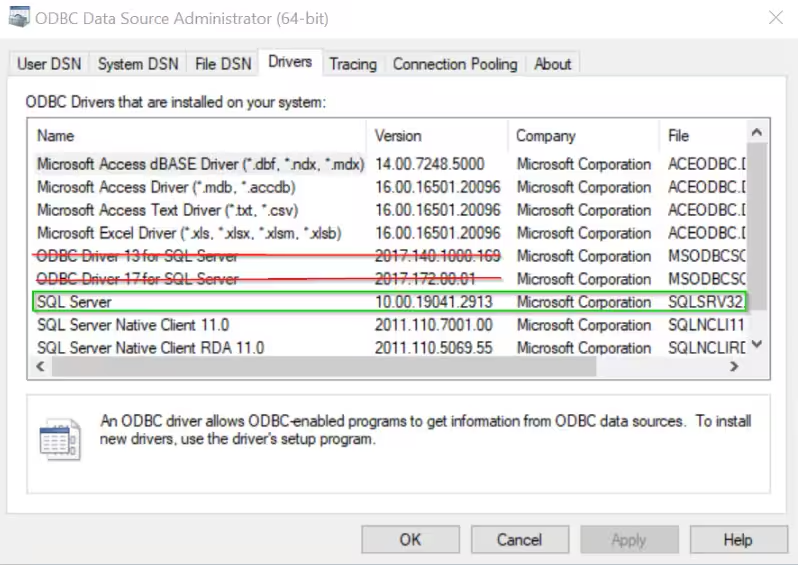
SynMain will not check any TLS-related config keys. For TLS1.2 to work, Synergetic and SynergeticReserved ODBC Data Sources MUST use the SQL Server driver that comes with Windows 10/11 (SQLSRV32.DLL). They must not use the ODBC Drivers (MSODBCSQLnn.DLL)
SynWeb
Config keys relating to TLS1.0 or TLS1.2 will no longer be checked. There is a new config key that can be used to indicate that the Web server supports TLS1.3 (SynWeb|CrystalReports|Driver|UseTLS1.3Flag), if this flag is set then SynWeb will attempt to use Microsoft OLE DB Driver for SQL Server Version 19 (MSOLEDBSQL19) which supports TLS1.3. Otherwise SynWeb will use SQL Server Native Client 11.0 (SQLNCLI11) which supports TLS1.2.
Here's a compatibility table taken from this article: https://stackoverflow.com/questions/67943468/is-sqloledb-actually-using-msoledbsql-on-windows-server-2019
| OLE DB Provider | Description | Available with | Minimum SQL Server | Max TLS | Installed with | Status (As of Q3 2022) |
|---|---|---|---|---|---|---|
SQLOLEDB | "Microsoft OLE DB Provider for SQL Server" | Windows 2000 | SQL Server 7.0 (70) | TLS 1.0 | Windows (MDAC) | Deprecated |
SQLOLEDB(2021 update) | "Microsoft OLE DB Provider for SQL Server" | Windows 10 1809+ | SQL Server 7.0 (70) (SQL Server 2008+ needed for TLS 1.2) | TLS 1.2 | Windows (MDAC) | Deprecated |
SQLNCLI | "SQL Server Native Client" ("SNAC") | SQL Server 2005 | SQL Server 7.0 (70) | TLS 1.1Note 1 | Manually | Deprecated |
SQLNCLI10 | "SQL Server Native Client 10.0" | SQL Server 2008 | SQL Server 2000 (80) | TLS 1.2 | Manually | Deprecated |
SQLNCLI10(2020 update) | "SQL Server Native Client 10.0" | SQL Server 2000 (80) (SQL Server 2008+ needed for TLS 1.2) | TLS 1.2 | Manually | Deprecated | |
SQLNCLI11 | "SQL Server Native Client 11.0" | SQL Server 2012 | SQL Server 2005 (90) | TLS 1.2 | Manually | Deprecated |
SQLNCLI11(2018 update) | "SQL Server Native Client 11.0" | SQL Server 2005 (90) (SQL Server 2008+ needed for TLS 1.2) | TLS 1.2 | Manually | Deprecated | |
MSOLEDBSQL | "Microsoft OLE DB Driver for SQL Server" | 2017 Announcement | SQL Server 2012 (110) (SQL Server 2016+ needed for TLS 1.3) | TLS 1.3 | Manually | Current |
MSOLEDBSQL19 | "Microsoft OLE DB Driver 19 for SQL Server" | SQL Server 2019 | SQL Server 2012 (110) (SQL Server 2016+ needed for TLS 1.3) | TLS 1.3 | Manually | Current |
Synergetic Service Suite
It now follows the same logic as SynWeb. There is a new config setting in ServiceSuite.xml called SynServiceCrystalEnabledTLS13 which drives the same logic behaviour as SynWeb (mentioned above).
Was this article helpful?
That’s Great!
Thank you for your feedback
Sorry! We couldn't be helpful
Thank you for your feedback
Feedback sent
We appreciate your effort and will try to fix the article