Presented by Kylie Beutel, Tuesday 12/08/25
Synergetic Online Payments
Presented by Sunny Chan, Wednesday 25/08/25
Frequently Asked Questions - Online Payments
How are cards stored?
Debtors may store their payment methods on Synergetic’s Community Portal. These records are validated directly by the payment gateway provider when they are entered. In Synergetic the records are not stored in the database and only certain components of the card details or bank account details will be displayed.
Can you hide a sub-ledger if you do not want the parents to see it in the community portal?
No once the school has created a sub ledger for a debtor, they will be able to view this in the community portal.
Is the debtor ID common for main & sub ledger (do both come under one debtor ID?)
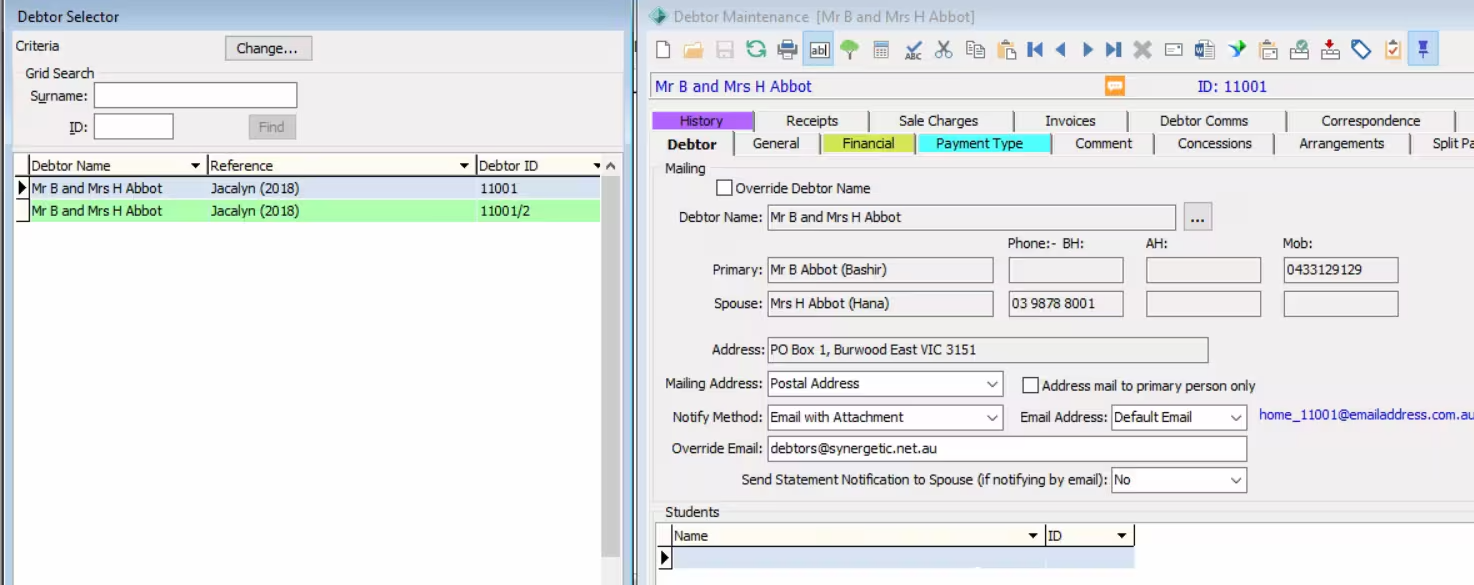
The sub ledger ID will use the same code as the main ledger, but with an extra number. In the example below, the debtor Mr & Mrs Abbot debtor ID is 11001 while their swimming fees sub ledger is 11001/2.
Can payments only be made via cards rather than eft or direct debit?
Payments can be made via a card (credit or debit) or bank account (BSB and account number).
Does the community portal generate the CC surcharge when a parent processing CC payment?
Yes, this can be managed within Synergetic through the luCreditCard lookup table. When a payment is made on the portal the surcharge will be calculated and added to the payment total.
Recently a parent made a payment through the online portal, but it was not credited to the school account. Why would this happen and how can we locate it in the online portal?
Our support team are in the best position to handle situations of this nature. Please have your school’s Synergetic admin user log a case and we will be able to troubleshoot the issue.
Can payment plans be rolled over each year, or do we have to manually enter them every year?
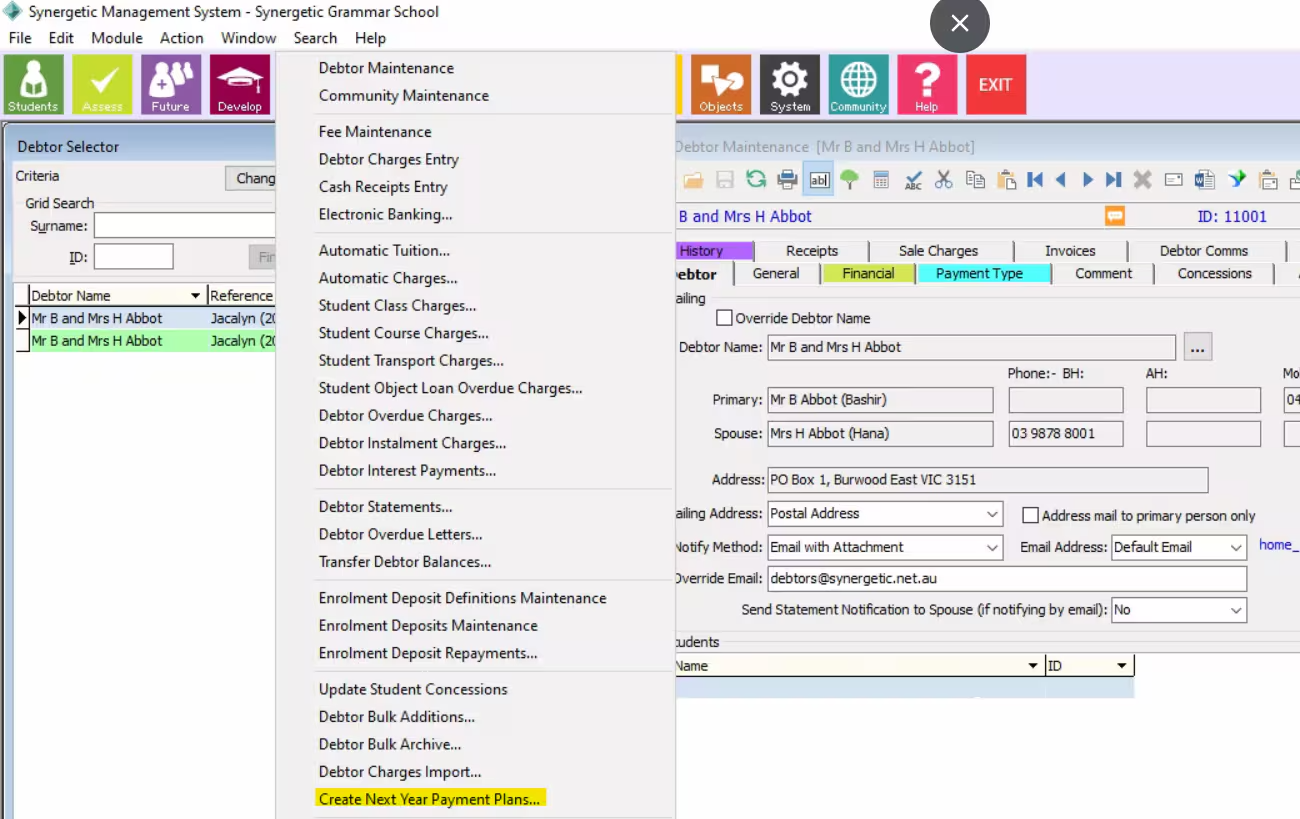
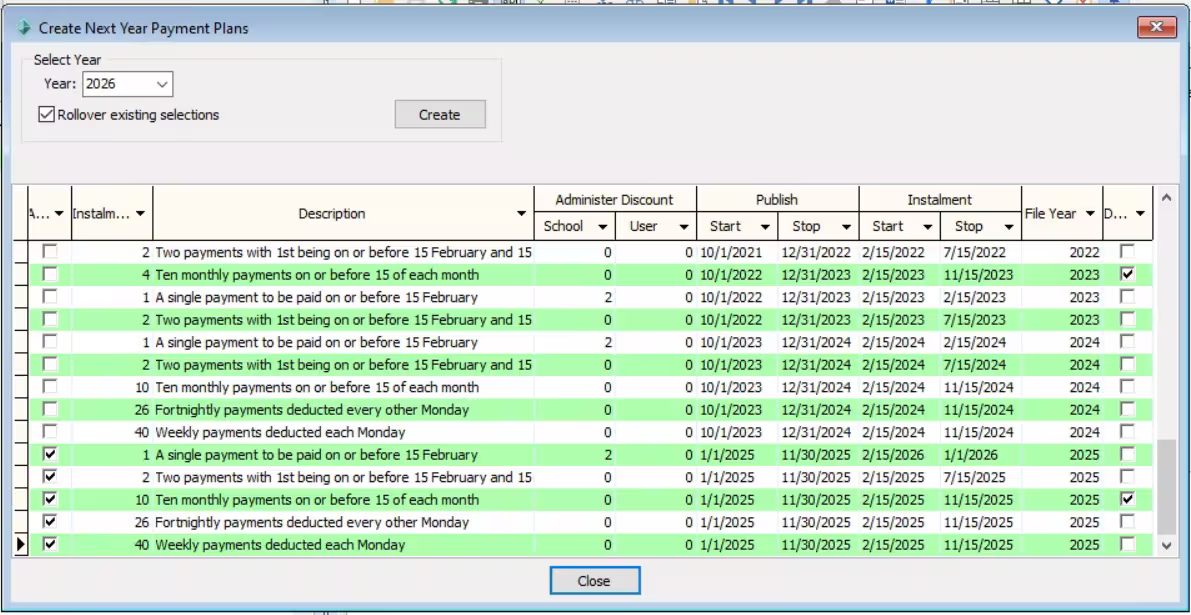
Yes payment plans can be rolled over each year, via Debtors > Create Next Year Payment Plans
What version of Synergetic do you need to be running for the community portal to work?
Although there is no minimum version requirement to able to run community portal, for payments it is always best practice to be on the latest version.
How do you set up the payment plan, if you are charging fee accounts by term? Do we manually give them the options, and can they be changed or turned off during the year, as the amounts will change depending when they commence?
Synergetic allows schools to create the payment plan options, when it is available for parents to choose in the community portal, when they commence and how each payment plan option calculates (e.g. monthly option over 10 or 12 months). Schools wanting to continue with charging their fees termly may consider using Debtor Instalment Charges. For more detailed information, please book a free scoping session for a quick demonstration from one of our experienced finance consultants.
Can payment plans be varied eg. if extended payment terms are granted which wouldn't necessarily have the fees paid off in the time frames allocated?
Yes, this can be managed via the Automatic Payments tab the Stop date can either be set for a different timeframe (e.g. 2 years) or deleted (for a payment amount to continue indefinitely or a new stop date is added). Another suggestion to manage these debtors would be to create a statement group that is appropriate to be able to identify their special arrangement plan. Please click here and here for more information.
Please note that if you decide to change their amount in Debtor Maintenance>Payment Type>Automatic payments, this new amount will not be reflected in the debtor’s community portal payment plans page.
How do you manage declined payments?
Depending on your gateway payment provider, if you are using NAB then the declined payment will show in the debtor’s history tab and then you will need to process a bounce back via cash receipts. For Stripe, the payment can be set to re-try at a future date.
We have confirmation of return money we hold each year and give back to the parents when they reach year 12. How would this sit in the portal. It would be a credit of roughly $3000.
Our Enrolment Deposits program may assist you in managing this area. Please book in a free scoping session to discuss the possibilities available to help meet your school’s needs.
In general receipts will show on the portal for up to two years. Depending on your payment gateway the platform can be set to automatically send a receipt to the payer’s email address. As an enrolment deposit the payment would not be allocated against the debtor account.
If we added in an extra curriculum fee will this update the payment plan to include the extra fee?
Payment Plans look at the account balance when the plan selection is made. If additional charges are added to an account after this point the debtor would need to re-visit the payment plan page to trigger a re-calculation of the payment instalment amounts.
The payment instalment amount can be updated on the Automatic Payments tab, but this change would not be reflected on the portal.
Will there be a notification generated if a payment plan is default or failed to maintain?
Synergetic’s Online Receipts List report captures all payments including any that have failed. The Action Centre message Debtor Payment Method Changed will alert subscribers that a debtor has changed their payment plan payment method on the portal.
Can you change payments to on hold? And can you amend their final payment amount to bring their account back to zero.
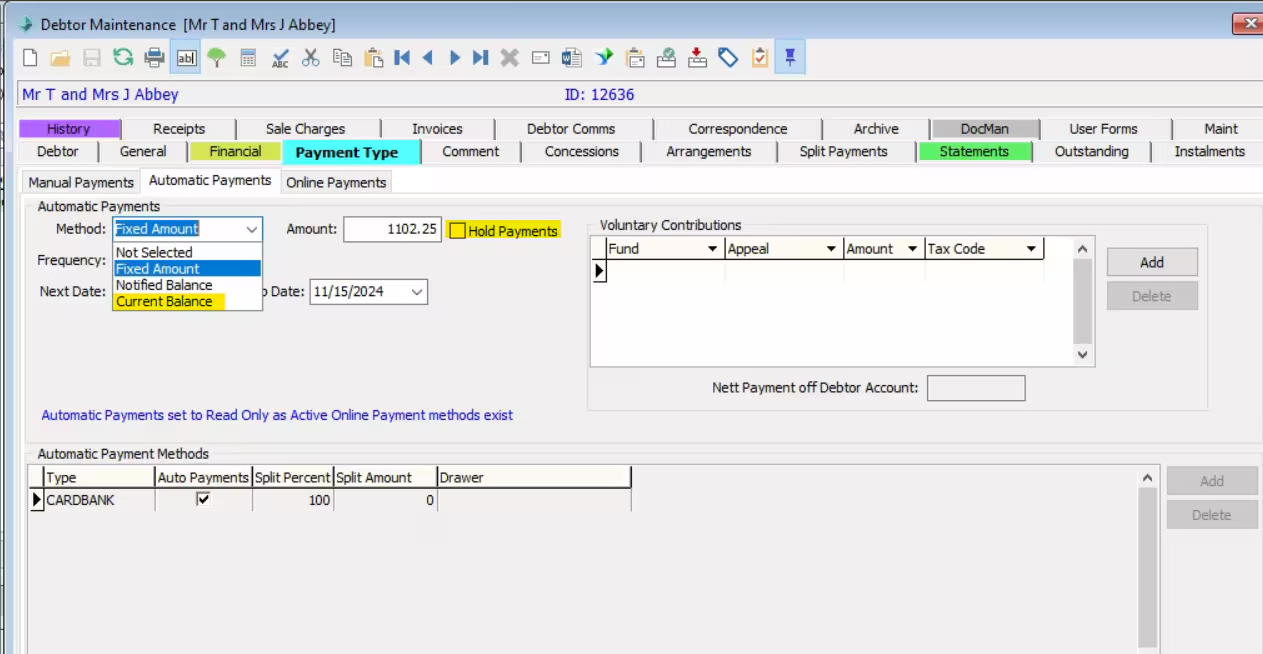
A debtor who is on a payment plan can be put on hold in Synergetic (Payment Type > Automatic Payments > Hold Payments). If you are nearing the end of year and wish to amend their final payment amount to bring their account back to zero, it is possible to do this by changing their “Method” in Automatic Payments subtab to Current Balance. The Notified Balance option is the closing balance on the latest statement.
If they change the plan during the year does it recalculate the amount?
Yes Synergetic will recalculate the debtor’s new amount if the parent re-visits the payment plan page on the portal the payment instalment amounts will recalculate. The debtor can then select the same payment plan or change to another plan they can also change their payment method. As long as School Administered Payments Plan only is selected on their Debtor record they will not be able to opt out of a payment plan.
If there are additional items billed along the way, can the payment plan be amended or who controls that?
The school has full control. In Synergetic you can have additional items be included as part of the debtor’s payment plan or not. For an updated payment plan to show on the portal the payment plan page needs to be re-visited, plan selected, payment method confirmed and finalised. This data will sync with Synergetic > Automatic Payments tab. If a user updates the Automatic Payments tab directly into Synergetic these changes will not show on the portal.
Can you disable the self managed options? And only have school managed?
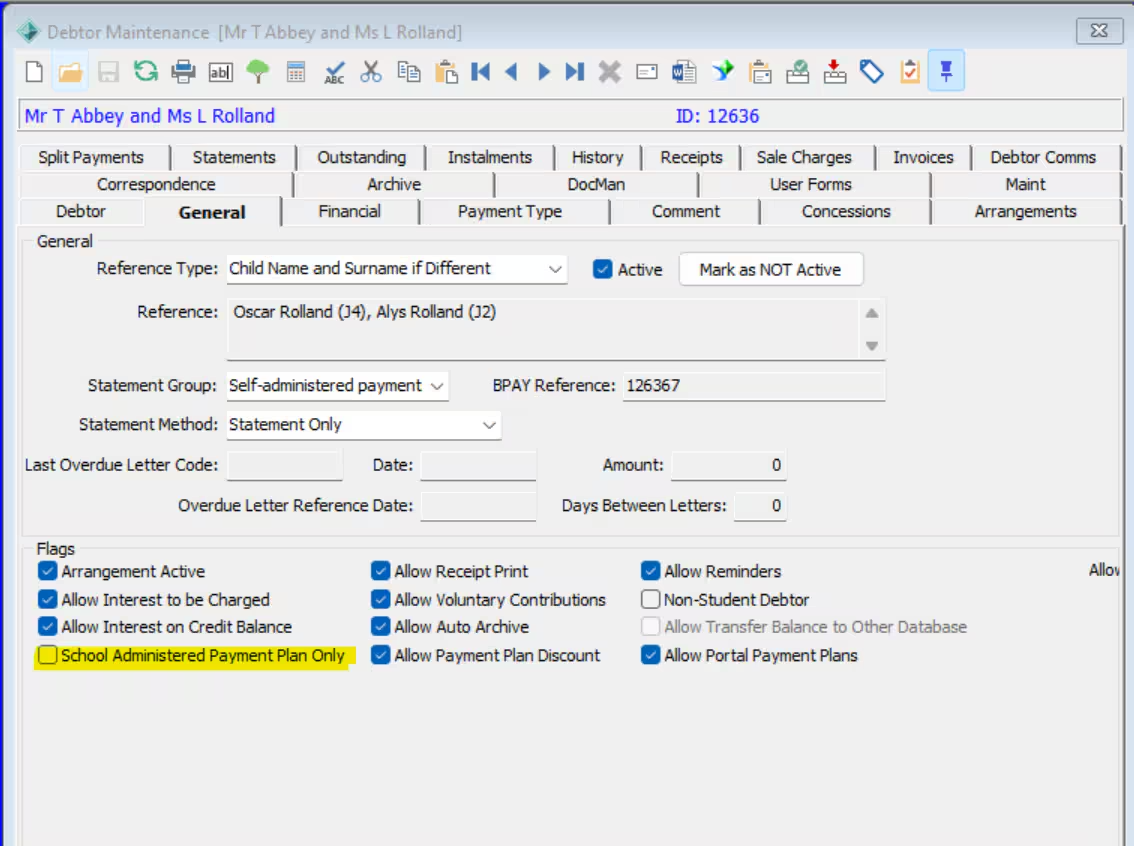
Yes under Debtor Maintenance > General tab > select the School Administered Payment Plan only flag the debtor will not be able to select a Self-Administered Payment Plan.
Is there any way we can apply custom styling to modernise the look of the parent-facing interfaces, particularly the transactional screens?
Yes, the community portal can be customised to incorporate the school’s branding, colours and what tabs the parents can see. Please book in a free scoping sessionfor more information.
When setting up an excursion, where/who would assign the GL code and other Finance related variables? Is it a one-person process or flows through various roles?
The financial component of events and excursions is set up in Online Payments Maintenance. The staff member setting up the event or excursion would select the online payment option at the time of creation.
Do the number of payments and payment amounts get adjusted if a parent signs up after the first payment date?
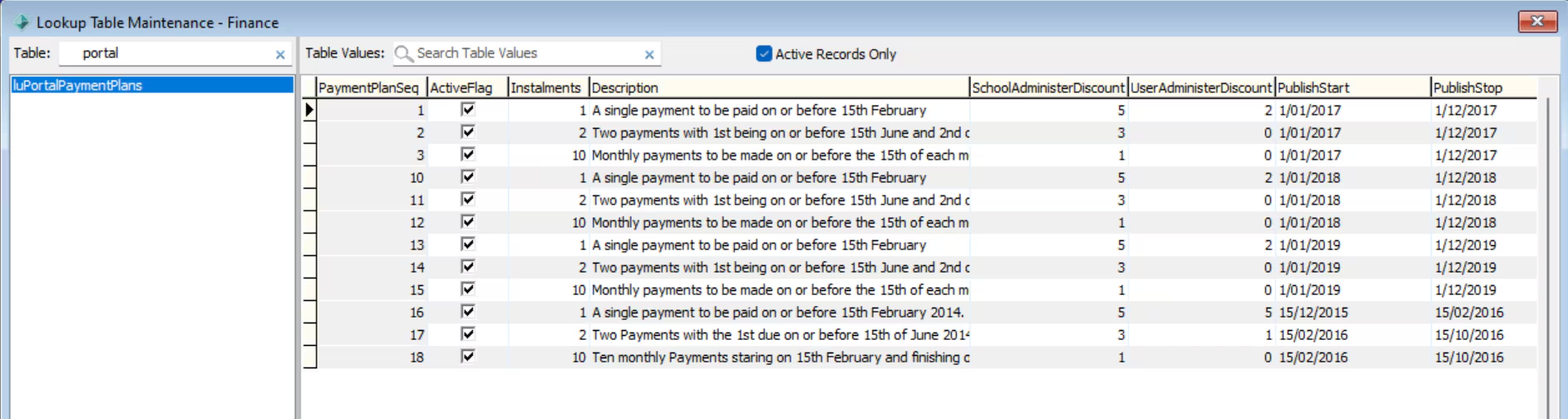
Yes, if the Payment Plans page continues to be published throughout the year Synergetic will automatically adjust the number of instalments and payment amount based on when the page is visited, when the next payment is due and the Instalment Stop Date a configured on the luPortalPaymentPlans look up table.
For a free scoping session dedicated to Online Payments, pleas book a time with one of our experienced Finance Consultants.
Was this article helpful?
That’s Great!
Thank you for your feedback
Sorry! We couldn't be helpful
Thank you for your feedback
Feedback sent
We appreciate your effort and will try to fix the article