Previewing a summary BAS
To preview the summary BAS without updating the general ledger:
- Select Module > General Ledger > Business Activity Statement
The Process Business Activity Statement window is displayed
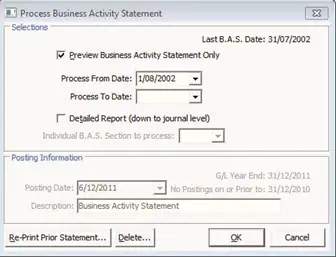
- Select Preview Business Activity Statement Only
- Enter a date range
- Click OK
Note: The date range is generally one month only - the Process From Date automatically sets to the start of the month that you are up to.
Was this article helpful?
That’s Great!
Thank you for your feedback
Sorry! We couldn't be helpful
Thank you for your feedback
Feedback sent
We appreciate your effort and will try to fix the article