TABLE OF CONTENTS
Summary
How to transfer Enrolment Deposit from one student to another studentEnd Result
Deposit Tab of Future Student maintenance for student 1 will no longer show the deposit SeqMethod
- Go to Future student 1> Deposit Tab, Click on Eclipse... to open the Enrolment Deposit Maintenance screen.
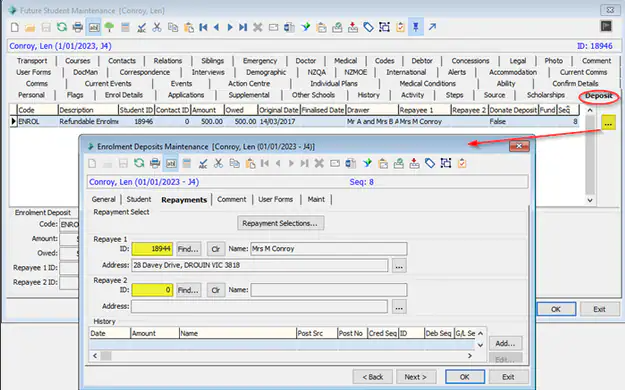
- Go to Repayments tab and click on Clear button (Clr) and remove both Repayee1 and Repayee 2 (if different to student 2 repayees)
- Go to Student Tab and click on the "Find" button to change the student to Student 2
- Save
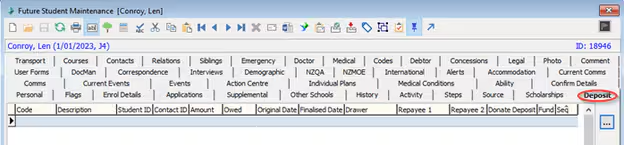
- The deposit will transfer to student 2 Deposit Tab and Deposit Tab of student 1 will no longer show that deposit seq
Considerations
- check the Repayee 1 and 2 and make sure they are set correctly for the student.
- you can also change the name of the Drawer in General Tab of Enrolment Deposit Maintenance if need be.
Was this article helpful?
That’s Great!
Thank you for your feedback
Sorry! We couldn't be helpful
Thank you for your feedback
Feedback sent
We appreciate your effort and will try to fix the article