TABLE OF CONTENTS
Summary
This article explains how to configure Synergetic to calculate a Fixed amount on overdue charges.
End Result
Each debtor with an Overdue Balance for a statement, will be charged a fixed amount.
Method
First you will need to configure your system to know hoe much to charge and who is eligible.
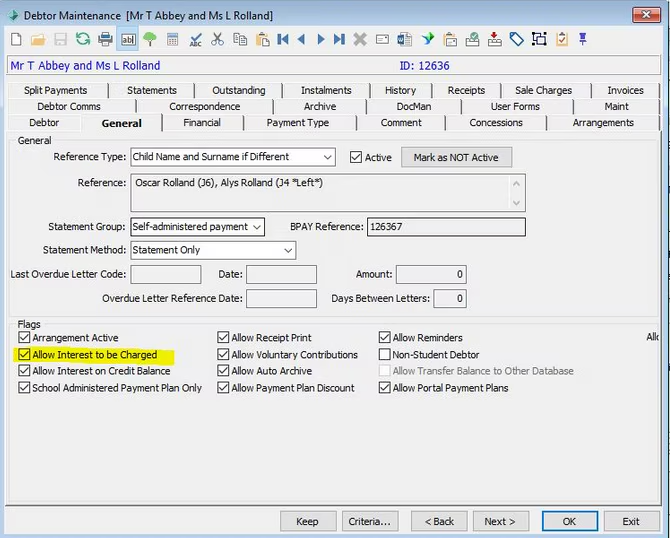
- In Debtors > Debtor Maintenance > General Tab each debtor who is eligible to have interest charged needs to have the 'Allow Interest to be charged' Flag ticked
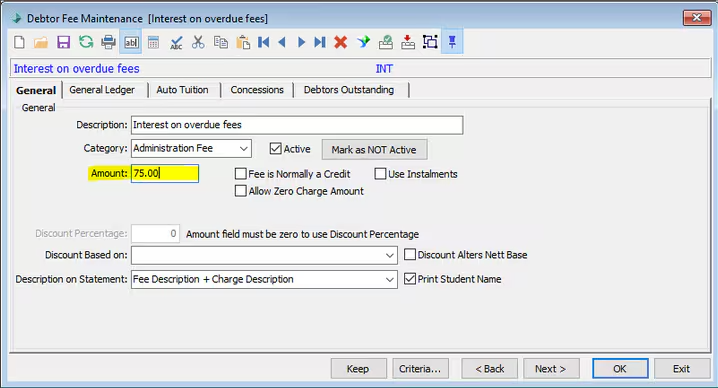
2. In Debtors > Debtor Fee Code Maintenance you need to specify the fixed amount you intend to charge on the Fee Code
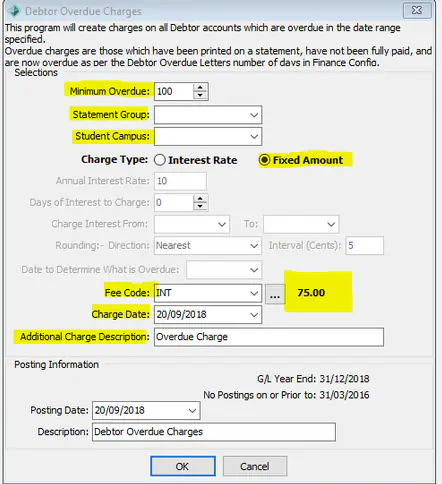
3. Then in Debtors > Debtor Overdue Charges
You need to complete the following fields
- Minimum balance
- Statement group
- Student Campus (you can leave this blank if you wish to include all)
- Charge Type - Fixed Amount
- Fee Code - You will see next to the Fee Code the Amount that was set on the Fee Code
- Charge Date
- Description
Considerations.
This process will not take into account part payments on overdue balances and will still the whole amount to the account. If you wish to take into account payments made you may wish use interest rate calculations.
See https://help.synergetic.net.au/s/article/Debtor-Overdue-Charges-Interest-Calculated-Daily
Once a Debtor has been Deleted or Archived you can not use this method to calculate interest on the balance outstanding prior to being archived
Was this article helpful?
That’s Great!
Thank you for your feedback
Sorry! We couldn't be helpful
Thank you for your feedback
Feedback sent
We appreciate your effort and will try to fix the article