TABLE OF CONTENTS
Affects
This can affect all clients using the MANUAL Timetable Import ONLY - please see below instructions for the AUTOMATED import
Error
The Class Code is showing the description field for classes.
Resolution
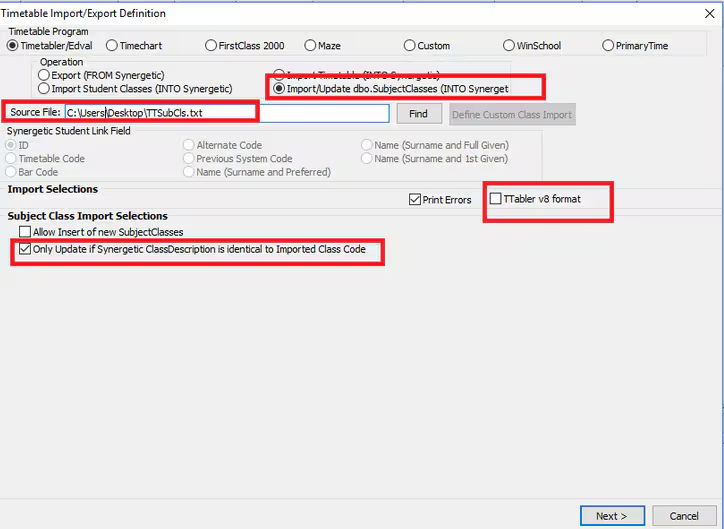
Follow the below steps to re-import the class descriptions
- Go to Students > Timetable Import
- Use the TTSubCls.txt file from timetable
- Select Import/Update dbo.SubjectClasses (INOT Synergetic)
- Select 'Only Update if Synergetic ClassDescription is identical to Imported Class Code'
- IF you are using Timetabler V8 you will also need to select the box 'TTabler v8 format'
- Select Next and import the Timetable.
Considerations
If you are using Automatic Timetable Import then in the lookup table luTimetableOperationMode tick the UpdateClassDescriptionFlag before following the above instructions
Was this article helpful?
That’s Great!
Thank you for your feedback
Sorry! We couldn't be helpful
Thank you for your feedback
Feedback sent
We appreciate your effort and will try to fix the article